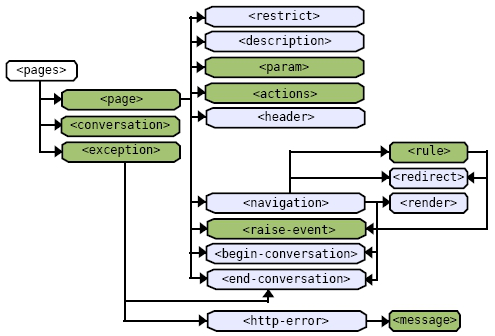
An extended JSF tag library is defined by Seam to provide control over conversational navigation, simplified dropdowns, bean validation, and component formatting.
Integrating the Seam Taglib
Taglib URI
Taglib Declaration
| Facelets |
<html xmlns=”http://www.w3.org/1999/xhtml” xmlns:s=”http://jboss.com/products/seam/taglib”> |
| JSP |
<%@ taglib uri=”http://jboss.com/products/seam/taglib” prefix=”s” %> |
Controlling Navigation
Seam provides a set of JSF components for controlling conversation propagation across both GET and POST requests. These components also extend the capabilities of JSF to allow GET requests to trigger actions and make it simple to define default page actions.
Navigation Tags
| Tag |
Description |
| <s:link> |
Link that performs a GET request to invoke an action and allows conversation propagation to be controlled. |
| <s:button> |
Button that performs a GET request to invoke an action and allows conversation propagation to be controlled. |
| <s:conversationId> |
Adds the conversation ID to a JSF link or button, especially useful with the <h:outputLink>. |
| <s:conversation Propagation> |
Allows the conversation propagation to be controlled for a JSF command link or command button. |
| <s:defaultAction> |
Configures a button (e.g.<h:commandButton>) as the default action when the form is submitted using the enter key |
Navigation Examples
The conversation propagation can be controlled from a link through use of the <s:link> component. For instance, if you click on the following link, Seam leaves the current conversation when the main.xhtml page is loaded, just as a regular HTTP GET request would do.
| Navigation Examples |
| <s:link view-id=”/main.xhtml” propagation=”none” value=”Back to Main” /> |
We can also trigger an action during an HTTP GET request:
The <s:link> component has richer conversation-management capabilities than the plain JSF <commandbutton>, which simply propagates the conversation context between pages.

Ports change, so make it easy to change them.The http-port and https-port can be defined in components.xml rather than in pages.xml to allow use of wild-cards. Wild-cards are defined as @propertyValue@ and are replaced with values from a components.properties file. These ports can (and generally do) change based on environment which makes it useful to break these values out into a properties file for simple substitution.
JSF Component Tags, Continued
What if you want to exit, begin, or end a conversation context from a button click? The following example shows a button that exits the current conversation context.
In addition, by specifying the button is the <s:defaultAction/> the user is returned to /main.xhtml through a navigation rule should the user submit the form by pressing the enter key.

Use of Conversation Propagation in Links and Buttons. It is recommended that you limit the use of conversation propagation for links and buttons to simply choosing whether or not to propagate the current conversation. Propagating the conversation is as simple as ensuring the conversationId is sent with the request. Propagation of none leaves the current conversation by not passing the conversationId. Potential maintenance difficulties can arise when beginning or ending a conversation in a link or button as this does not provide a clear delineation of conversational boundaries.
Dropdown Selection
When developing JSF pages it is commonly required to associate the possible selections of a dropdown component with a list of objects or an enumeration of values. Unfortunately with standard JSF this requires quite a bit of glue code to achieve. Seam makes this simple through the <s:selectItems> and <s:enumItem> tags. Even further when the<s:convertEntity> and the <s:selectItems> tags are combined, you can directly associate JPA or Hibernate managed entities by simply binding a dropdown component to an entity association attribute.
Dropdown Tags
| Tag |
Description |
| <s:convertEntity> |
Converts a managed entity to and from its unique identifier. Used for selecting entities in a dropdown component. |
| <s:convertEnum> |
Converts an enum to and from its constant representation. Generally used for selecting enums in a dropdown component. |
| <s:enumItem> |
Creates a SelectItem from an enum value allowing the label to be specified. |
| <s:selectItems> |
Creates a List<SelectItem> from a List, Set, DataModel or Array. Iterates over the Collection with a var allowing the itemLabel and itemValue to be defined through EL. |
Dropdown Examples
The following example demonstrates directly associating a managed entity from a List of entities. The CreditCard class represents types of credit cards and the @NamedQuery allows us to load all CreditCard types from the data store.
JSF Component Tags, continued
The Booking class is then be defined with a @ManyToOne reference to the CreditCard entity.
In order to load the list of credit card types, the Booking Action can define an @Factory method which initializes the list of CreditCard entities in the conversation context.
The method simply uses the named query we defined previously to load the entities from the current Entity- Manager instance. Note that our Seam-managed Persistence Context (SMPC) is named entityManager. If your SMPC is named something other than entityManager, you will have to configure the EntityConverter in components.xml (see the UI Namespace).
Finally, we can define a JSF<h:selectOneMenu> component which simply binds directly to the creditCard attribute of the current booking instance.
The #{creditCardTypes} are loaded into the conversation context from the @Factory method we defined previously. The <s:selectItems> component allows us to iterate over the list of CreditCard entities and display the description by referencing the type variable. The <s:convertEntity> tag ensures that the user selection is converted to an entity for association with the booking instance.
Simplifying Validation
When using Seam you can define validations directly on your entity beans that behave like JSF validators. These bean validators are provided by the Hibernate Validator framework
JSF Component Tags, Continued
(http://validatior.hibernate.org), but with Seam can be triggered as JSF validations.
Validation Tags
| Tag |
Description |
| <s:validate> |
Triggers entity bean validations for the tagged component on a form submission. |
| <s:validateAll> |
Triggers entity bean validations for all components embedded within this tag on a form submission. |
Validation Examples
The Seam Booking example allows a user to enter her credit card number while booking a hotel. Credit card numbers have a common pattern and should be validated on input. The following example demonstrates how we can apply these restrictions using Hibernate Validator annotations:
The @Length annotation restricts the String length to 16 characters while the @Pattern annotation specifies a regular expression restricting the String to digits only. Once these annotations are added to the entity, we can trigger them as validations during the JSF validations phase. Simply embedding the <s:validate> tag within the <h:inputText> component ensures the validation is triggered. If an invalid credit card number is input, the user will be presented with the message defined in the annotation.

Keep validations DRY by defining them only once. The Hibernate Validator framework allows you to keep your validations DRY (Don't Repeat Yourself) by only defining them once in the entity. Through hooks with Hibernate these validations are enforced at persisttime and with the JSF integration provided by Seam are also enforced in the UI. When placed in entities, validations can be reused by other JSFpages, services, or even other applications avoiding repetitive logic.
Formatting
While validation becomes simple with Seam, standard JSF validation messages are not very flexible. Although you can
JSF Component Tags, Continued
assign CSS classes to customize the look of the error message itself, you cannot alter the appearance of the input field that contains the invalid input. The following formatting tags allow you to decorate invalid fields with styles and messages. In addition to validation message formatting Seam provides formatting components for applying labels directly to JSF input fields, optionally rendering HTML <div> and <span> tags, and optionally rendering page fragments.
| Tag |
Description |
| <s:decorate> |
"Decorate” a JSF input field when validation fails or when required=”true” is set using a Facelets template. |
| <s:label> |
"Decorate” a JSF input field with the label. The label is placed inside the HTML <label> tag, and is associated with the nearest JSF input component. |
| <s:message> |
"Decorate” a JSF input field with the validation error message associated with that field. |
| <s:div> |
Render an HTML <div>. Allows the <div> to be optionally rendered through the rendered attribute. |
| <s:span> |
Render an HTML <span>. Allows the <span> to be optionally rendered through the rendered attribute. |
| <s:fragment> |
A non-rendering component useful for optionally rendering its children through the rendered attribute. |
Formatting Examples
To use a Seam decorator, you first define how the decorator behaves using special named JSF facets. The beforeInvalidField facet defines what to display in front of the invalid field; the afterInvalidField facet defines what to display after the invalid field, and the <s:message> tag shows the error message for the input field; and the aroundInvalidField facet defines a span or div element that encloses the invalid field and the error message. You also can use the aroundField facet to decorate the appearance of valid (or initial) input fields.
Formatting Examples
To use a Seam decorator, you first define how the decorator behaves using special named JSF facets. The beforeInvalidField facet defines what to display in front of the invalid field; the afterInvalidField facet defines what to display after the invalid field, and the <s:message> tag shows the error message for the input field; and the aroundInvalidField facet defines a span or div element that encloses the invalid field and the error message. You also can use the aroundField facet to decorate the appearance of valid (or initial) input fields.
<table cellpadding="0" cellspacing="0"> <tr> <td class="light_blue">Formatting Examples</td> </tr>
</td> </tr>
Now you can simply enclose each input field in a pair of <s:decorate> tags as shown below:
The UI Namespace
Schema URI
Schema XSD
As you have seen, the <s:convertEntity/> tag provides the ability to convert entities to and from dropdown selections. In most cases this is as simple as defining <s:convertEntity> within the dropdown, but there are cases where this needs to be customized. The UI namespace allows you to configure
JSF Component Tags, Continued
the EntityConverter component in the following cases:
JPA is the persistence provider and your Seam-Managed Persistence Context (SMPC) is named something other than EntityManager Hibernate is being used directly as the persistence provider You would like to use more than one EntityManager with the EntityConverter
In each of these cases, it is necessary to configure the Entity-Converter component using the UI namespace.
UI Namespace Diagram
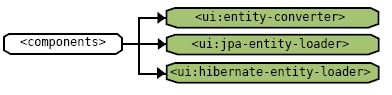
UI Namespace Elements
| Tag |
Description |
| <ui:entityconverter> |
Allows a custom EntityConverter to be defined which is useful if more than one EntityManager is being used. |
| <ui:jpa-entityloader> |
Configures a Seam-Managed Persistence Context (SMPC) named something other than entityManager. |
| <ui:hibernateentity-loader> |
Allows a Managed Hibernate Session to be configured for use
with the EntityConverter. By default assumes the component name session. |
JSF Component Tags, Continued
UI Namespace Examples
The following example configures the EntityConverter with a custom EntityManager name:
As you can see, the Seam-managed Persistence Context is given the name em. This is simply referenced through an EL expression in the jpa-entity-loader configuration.