Understanding Lucene: Powering Better Search Results
Understanding Lucene
Powering Better Search Results
By Erik Hatcher
15,249 Downloads · Refcard 137 of 186 (see them all)
Download
FREE PDF
The Essential Apache Lucene Cheat Sheet
Understanding LucenePowering Better Search Results
WHAT IS LUCENE?
The Lucene Ecosystem
“Lucene” is a broadly used term. It’s the original Java indexing and search library created by Doug Cutting. Lucene was then chosen as a top-level Apache Software Foundation project name — http://lucene.apache.org. The name is also used for various ports of the Java library to other languages (Lucene.Net, PyLucene, etc). The following table shows the key projects at http://lucene.apache.org.
| Project | Description |
| Lucene - Java | Java-based indexing and search library. Also comes with extras such as highlighting, spellchecking, etc. |
| Solr | High-performance enterprise search server. HTTP interface. Built upon Lucene Java. Adds faceting, replication, sharding, and more. |
| Droids | Intelligent robot crawling framework. |
| Open Relevance | Aims to collect and distribute free materials for relevance testing and performance. |
| PyLucene | Python port of the Lucene Java project. |
There are many projects and products that use, expose, port, or in some way wrap various pieces of the Apache Lucene ecosystem.
WHICH LUCENE DISTRIBUTION?
There are many ways to obtain and leverage Lucene technology. How you choose to go about it will depend on your specific needs and integration points, your technical expertise and resources, and budget/time constraints.
When Lucene in Action was published in 2004, before the advent of many of the projects mentioned above, we just had Lucene Java and some other open-source building blocks. It served its purpose and did so extremely well. Lucene has only gotten better since then: faster, more efficient, newer features, and more. If you’ve got Java skills you can easily grab lucene.jar and go for it.
However, some better and easier ways to build Lucene-based search applications are now available. Apache Solr, specifically, is a top notch server architecture, built from the ground up with Lucene. Solr factors in Lucene best practices and simplifies many aspects of indexing content and integrating search into your application as well as addressing scalability needs that exceed the capacity of single machines.
This Refcard is about the concepts of Lucene more than the specifics of the Lucene API. We’ll be shining the light on Lucene internals and concepts with Solr. Solr provides some very direct ways to interact with Lucene.
We recommend you start with one of the following distributions:
- LucidWorks for Solr – certified distributions of the official Apache Solr distributions, including any critical bug fixes and key performance enhancements.
- Apache Solr – a great starting point for developers; grab a distro, write a script, integrate into UI.

If you’re getting started on building a search application, your quickest, easiest bet is to use LucidWorks Enterprise. LucidWorks Enterprise is Lucene and Solr, plus more. Easy to install, easy to configure and monitor. LucidWorks Enterprise is free for development, with support subscriptions available for production deployments.
Lucid Imagination offers professional services, training, and the new LucidWorks Enterprise platform. Visit http://www.lucidimagination.com.
Definitions/Glossary
There are many common terms used when elaborating on Lucene’s design and usage.
| Term | Definition/context/usage |
| Document | Returnable search result item. A document typically represents a crawled web page, a file system file, or a row from a database query. |
| Field | Property, metadata item, or attribute of a document. Documents typically have a unique key field, often called “id”. Other common fields are “title”, “body”, “last_modified_date”, and “categories”. |
| Term | Searchable text, extracted from each indexed field by analysis (a process of tokenization and filtering). |
| tf/idf | Term frequency / inverse document frequency. This is a commonly used factor, computing the relationship between term frequency (how many uses of the query term exists in the entire index) to the inverse document frequency (how many documents in the entire collection that contain that query term, inverted). |
Lucene Java and Core Lucene Concepts Explained
The design of Lucene is, at a high level, quite straightforward. Documents are “indexed”.
Documents are a representation of whatever types of “objects” and granularities your application needs to work with on the search/discovery side of the equation. In other words, when thinking Lucene, it is important to consider the use cases / demands of the encompassing application in order to effectively tune the indexing process with the end goal in mind.
Lucene provides APIs to open, read, write, and search an index. Documents contain “fields”. Fields are the useful individually named attributes of a document used by your search application. For example, when indexing traditional files such as Word, HTML, and PDF documents, commonly used fields are “title”, “body”, “keywords”, “author”, and “last_modified_date”.
DOCUMENTS
Documents, to Lucene, are the findable items. Here’s where domain-specific abstractions really matter. A Lucene Document can represent a file on a file system, a row in a database, a news article, a book, a poem, an historical artifact (see collections. si.edu), and so on. Documents contain “fields”. Fields represent attributes of the containing document, such as title, author, keywords, filename, file_type, lastModified, and fileSize.
Fields have a name and one or more values. A field name, to Lucene, is arbitrary, whatever you want.
When indexing documents, the developer has the choice of what fields to add to the Document instance, their names, and how they are each handled. Field values can be stored and/or indexed. A large part of the magic of Lucene is in how field values are analyzed and how a field’s terms are represented and structured.
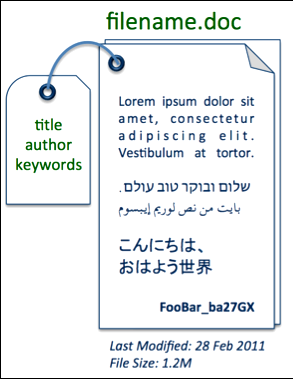
“document” example

The heart of Lucene’s search capabilities is in the elegance of the index structure, a form of an “inverted index”. An inverted index is a data structure mapping “terms” to the documents. Indexed fields can be “analyzed”, a process of tokenizing and filtering text into individual searchable terms. Often these terms from the analysis process are simply the individual words from the text. The analysis process of general text typically also includes normalization processes (lowercasing, stemming, other cleansing). There are many interesting and sophisticated ways indexing analysis tuning techniques can facilitate typical search application needs for sorting, faceting, spell checking, autosuggest, highlighting, and more.
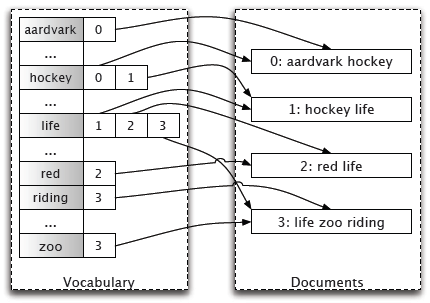
Inverted Index
Again we need to look back at the search application needs. Almost every search application ends up with a human user interface with the infamous and ubiquitous “search box”.

The trick is going from a human entered “query” to returning matching documents blazingly fast. This is where the inverted index structure comes into play. For example, a user searching for “mountain” can be readily accommodated by looking up the term in the inverted index and matching associated documents.
Not only are documents matched to a query, but they are also scored. For a given search request, a subset of the matching documents are returned to the user. We can easily provide sorting options for the results, though presenting results in “relevancy” order is more often the desired sort criteria. Relevancy refers to a numeric “score” based on the relationship between the query and the matching document. (“Show me the documents best matching my query first, please”).
The following formula (straight from Lucene’s Similarity class javadoc) illustrates the basic factors used to score a document.

Lucene practical scoring formula
Each of the factors in this equation are explained further in the following table:
| Factor | Explanation |
| score(q,d) | The final computed value of numerous factors and weights, numerically representing the relationship between the query and a given document. |
| coord(q,d) | A search-time score factor based on how many of the query terms are found in the specified document. Typically, a document that contains more of the query’s terms will receive a higher score than another document with fewer query terms. |
| queryNorm(q) | A normalizing factor used to make scores between queries comparable. This factor does not affect document ranking (since all ranked documents are multiplied by the same factor), but rather just attempts to make scores from different queries (or even different indexes) comparable. |
| tf(t in d) | Correlates to the term’s frequency, defined as the number of times term t appears in the currently scored document d. Documents that have more occurrences of a given term receive a higher score. Note that tf(t in q) is assumed to be 1 and, therefore, does not appear in this equation. However, if a query contains twice the same term, there will be two term-queries with that same term. Hence, the computation would still be correct (although not very efficient). |
| idf(t) | Stands for Inverse Document Frequency. This value correlates to the inverse of docFreq (the number of documents in which the term t appears). This means rarer terms give higher contribution to the total score. idf(t) appears for t in both the query and the document, hence it is squared in the equation. |
| t.getBoost() | A search-time boost of term t in the query q as specified in the query text (see query syntax), or as set by application calls to setBoost(). |
| norm(t,d) | Encapsulates a few (indexing time) boost and length factors. |
Understanding how these factors work can help you control exactly how to get the most effective search results from your search application. It's worth noting that in many applications these days, there are numerous other factors involved in scoring a document. Consider boosting documents by recency (latest news articles bubble up), popularity/ratings (or even like/dislike factors), inbound link count, user search/click activity feedback, profit margin, geographic distance, editorial decisions, or many other factors. But let's not get carried away just yet, and focus on Lucene's basic tf/idf.
So now we've briefly covered the gory details of how Lucene works for matching and scoring documents during a search. There's one missing bit of magic, going from the human input of a search box and translating that into a representative data structure, the Lucene Query object. This string, Query process is called "queryparsing". Lucene itself includes a basic QueryParser that can parse sophisticated expressions including AND, OR, +/-, parenthetical grouped expressions, range, fuzzy, wildcarded, and phrase query clauses. For example, the following expression will match documents with a title field with the terms "Understanding" and Lucene collocated successively (provided positional information was enabled!) where the mimeType (MIME type is the document type) value is "application/pdf":
title:”Understanding Lucene” AND mimeType:application/PDF
For more information on Lucene QueryParser syntax, see http://lucene.apache.org/java/3_0_3/queryparsersyntax.html (or the docs for the version of Lucene you are using).
It is important to note that query parsing and allowable user syntax is often an area of customization consideration. Lucene’s API richly exposes many Query subclasses, making it very straightforward to construct sophisticated Query objects using building blocks such as TermQuery, BooleanQuery, PhraseQuery, WildcardQuery, and so on.
Shining the Light on Lucene: Solr
Apache Solr embeds Java Lucene, exposing its capabilities through an easy-to-use HTTP interface. Solr has Lucene best practices built in, and provides distributed and replicated search for large scale power.
For the examples that follow, we’ll be using Solr as the front-end to Lucene. This allows us to demonstrate the capabilities with simple HTTP commands and scripts, rather than coding in Java directly. Additionally, Solr adds easy-to-use faceting, clustering, spell checking, autosuggest, rich document indexing, and much more. We’ll introduce some of Solr’s value-added pieces along the way.
Lucene has a lot of flexibility, likely much more than you will need or use. Solr layers some general common-sense best practices on top of Lucene with a schema. A Solr schema is conceptually the same as a relational database schema. It is a way to map fields/ columns to data types, constraints, and representations. Let’s take a preview look at fields defined in the Solr schema (conf/schema. xml) for our running example:
<fields>
<field name=”id”
type=”string” indexed=”true” stored=”true”/>
<field name=”title”
type=”text_en” indexed=”true” stored=”true” />
<field name=”mimeType”
type=”string” indexed=”true” stored=”true” />
<field name=”lastModified”
type=”date” indexed=”true” stored=”true” />
</fields>
The schema constrains all fields of a particular name (there is dynamic wildcard matching capability too) to a “field type”. A field type controls how the Lucene Field instances are constructed during indexing, in a consistent manner. We saw above that Lucene fields have a number of additional attributes and controls, including whether the field value is stored, indexed, if indexed, how so, which analysis chain, and whether positions, offsets, and/or term vectors are stored.
Our Running Example, Quick Proof-of-Concepts
The (Solr) documents we index will have a unique “id” field, a “title” field, a “mimeType” field to represent the file type for filtering/faceting purposes, and a “lastModified” date field to represent a file’s last modified timestamp. Here’s an example document (in Solr XML format, suitable for direct POSTing):
<add>
<doc>
<field name=”id”>doc01</field>
<field name=”title”>Our first document</field>
<field name=”mimeType”>application/pdf</field>
<field name=”lastModified”>NOW</field>
</doc>
</add>
That example shows indexing the metadata regarding an actual file. Ultimately, we also want the contents of the file to be searchable. Solr natively supports extracting and indexing content from rich documents. And LucidWorks Enterprise has built-in file and web crawling and scheduling along with content extraction.
Launching Solr, using its example configuration, is as straightforward as this, from a Solr installation directory:
cd example
java –jar start.jar
And from another command-shell, documents can be easily indexed. Our example document shown previously (saved as docs.xml for us) can be indexed like this:
cd example/exampledocs
java –jar post.jar docs.xml
First of all, this isn’t going to work out of the box, as we have a custom schema and applications needs not supported by Solr’s example configuration. Get used to it, it’s the real world! The example schema is there as an example, and likely inappropriate for your application as-is. Borrow what makes sense for your own applications needs, but don’t leave cruft behind.
At this point, we have a fully functional search engine, with a single document, and will use this for all further examples. Solr will be running at http://localhost:8983/solr.

INDEXING
The process of adding documents to Lucene or Solr is called indexing. With Lucene Java, you create a new Document instance and call the addDocument method of an IndexWriter. This is straightforward and simple enough, leaving the burden on you to come up with the textual strings that'll comprise the document.
Contrast with Solr, which provides numerous ways out of the box to index. We've seen an example of Solr XML, one basic way to bring in documents. Here are detailed examples of various ways to index content into Solr. Solr’s schema centralizes the decisions made about how fields are indexed, freeing the indexer from any internal knowledge about how fields should be handled.
Solr XML/JSON
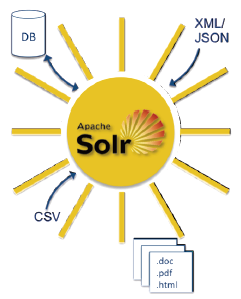
Solr’s basic XML format can be a convenient way to map your applications “documents” into Solr. A simple HTTP post to /update is all it takes.
Posting XML to Solr can be done using the post.jar tool that comes with Solr’s example data, curl (see Solr’s post.sh), or any other HTTP library or tool capable of POST. In fact, most of the popular Solr client API libraries out there simply wrap an HTTP library with some convenience methods for indexing documents, packaging up documents and field values into this XML structure and POSTing it to Solr’s /update handler. Documents indexed in this fashion will be updated if they share the same unique key field value (configured in schema.xml) as existing documents.
Recently, JSON support has been added so it can be even cleaner to post documents into Solr and easier to adapt to a wider variety of clients. It looks like this:
{“add”: {
“doc”: {
“id”: “doc02”,
“title”: “Solr JSON”,
“mimeType”: “application/pdf”}
}
}
Simply post this type of JSON to /update/json. All other Solr commands can be posted as JSON as well (delete, commit, optimize).
Comma, or Tab, Separated Values
Another extremely convenient and handy way to bring documents into Solr is through CSV (comma-separated variables; or, more generally, column-separated variables as the separator character is configurable). An example CSV file is shown here:
id,title,mimeType,lastModified
doc03,CSV ftw,application/pdf,2011-02-28T23:59:59Z
This CSV can be POSTed to the /update/csv handler, mapping rows to documents and columns to fields in a flexible, mappable manner. Using curl, this file (we named docs.csv) can be posted like this:
curl “http://localhost:8983/solr /update/csv?commit=true” --databinary
@docs.csv -H ‘Content-type:text/plain; charset=utf-8’
Note that this Content-type header is a necessary HTTP header to use for the CSV update handler.
Indexing Rich Document Types
Thus far, our indexing examples have omitted extracting and indexing file content. Numerous rich document types, such as Word, PDF, and HTML, can be processed using Solr’s built-in Apache Tika integration. To index the contents and metadata of a Word document, using the HTTP command-line tool curl, this is basically all that is needed:
curl “http://localhost:8983/solr/update/extract?literal.id=doc04” -F
“myfile=@technical_manual.doc”
To index rich documents with Lucene’s API, you would need to interface with one or more extractor libraries, such as Tika, extract the text, and map full text and document metadata as appropriate to Lucene fields. It’s much more straightforward, with no coding, to accomplish this task with Solr.

DataImportHandler
And finally, Solr includes a general-purpose “data import handler” framework that has built-in capabilities for indexing relational databases (anything with a JDBC driver), arbitrary XML, and e-mail folders. The neat thing about the DataImportHandler is that it allows aggregating data from various sources into whole Solr documents.
For more information on Solr’s DataImportHandler, see http://wiki.apache.org/solr/DataImportHandler.
Deleting Documents
Documents can be deleted from a Lucene index, either by precise term matching (a unique identifier field, generally) or in bulk for all documents matching a Query.
When using Solr, deletes are accomplished by POSTing <delete><id>refcard01</id></delete> or <delete><query>mi meType:application/PDF</query></delete> XML messages to the /update handler. Or “delete”: { “id”:”ID”} or “delete”: { “query”:”mimeType:application/pdf” } messages to /update/json.

Committing
Lucene is designed such that documents can continuously be indexed, though the view of what is searchable is fixed to a certain snapshot of an index (for performance, caching, and versioning reasons). This architecture allows batches of documents to be indexed and only made searchable after the entire batch has been ingested. Pending changes to an index, including added and deleted documents, are made visible using a commit command. With Solr, a <commit/> message can be posted to the /update handler, “commit”: {} to /update/json, or even simpler as a bodyless /update GET (or POST) with commit=true set: http://localhost:8983/solr/update?commit=true
FIELDS
As mentioned, fields have a lot of configuration flexibility. The following table details the various decisions you must make regarding each fields configuration.
| Field Attribute | Effect and Uses |
| stored | Stores the original incoming field value in the index. Stored field values are available when documents are retrieved for search results. |
| term positions | Location information of terms within a field. Positional information is necessary for proximity-related queries, such as phrase queries. |
| term offsets | Character begin and end offset values of a term within a fields textual value. Offsets can be handy for increasing performance of generating query term highlighted field fragments. This one typically is a trade-off between highlighting performance and index size. If offsets aren’t stored, they can be computed at highlighting time. |
| term vectors | An “inverted index” structure within a document, containing term/frequency pairs. Term vectors can be useful for more advanced search techniques, such as “more like this” where terms and their frequencies within a single document can be leveraged for finding similar documents. |
In Solr’s schema.xml, a field can be configured to have all of these bells and whistles enabled like this:
<field name=”kitchen_sink” type=”text” indexed=”true” stored=”true”
termVectors=”true” termPositions=”true” termOffsets=”true” />
Only indexed fields have “terms”. These additional term-based structures are only available on indexed fields and really only make sense when used with analyzed full-text fields.
When indexing non-textual information, such as dates or numbers, the representation and ordering of the terms in the index drastically impact the types of operations available. Especially for numeric and date types, which typically are used for range queries and sorting, Lucene (and Solr) offer special ways to handle them. When indexing dates and numerics, use the Trie*Field types in Solr, and the NumericField/NumericTokenStream API’s with Lucene. This is a crucial reminder that what you want your end application to do with the search server greatly impacts how you index your documents. Sorting and range queries, specifically, require up-front planning to index properly to support those operations.
ANALYSIS
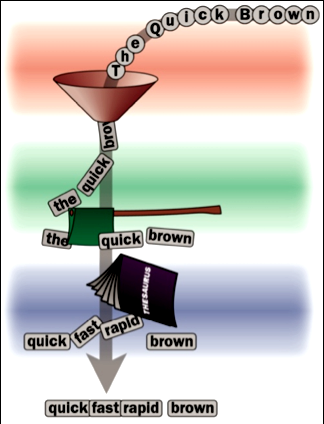
The Lucene analysis process consists of several stages. The text is sent initially through an optional CharFilter, then through a Tokenizer, and finally through any number of TokenFilters. CharFilters are useful for mapping diacritical characters to their ASCII equivalent, or mapping Traditional to Simplified Chinese. A Tokenizer is the first step in breaking a string into “tokens” (what they are called before being written to the index as “terms”). TokenFilters can subsequently add, remove, or modify/augment tokens in a sequential pipeline fashion.

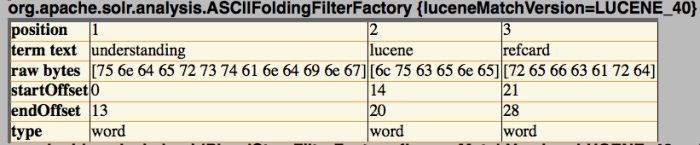
Using the Solr admin analysis introspection tool, using the field type “text_en” with the value “Understanding Lucene Refcard”, the following terms result:
The analysis tool shows the term text that would be indexed ([understanding], [lucene]…), and the position and offset attributes we previously discussed. The analysis tool will handily show you the term output of each of the analysis stages, from tokenization through each of the filters.
SEARCHING
Now that we’ve got content indexed, searching it is easy! Ultimately, a Lucene Query object is handed to a Lucene IndexSearcher.search() method and results are processed. How to construct a query is the next step.
With Lucene Java, TermQuery is the most primitive Query. Then there’s BooleanQuery, PhraseQuery, and many other Query subclasses to choose from. Programmatically, the sky’s the limit in terms of query complexity. Lucene also includes a QueryParser, which parses a string into a Query object, supporting fielded, grouped, fuzzy, phrase, range, AND/OR/NOT/+/- and other sophisticated syntax.
Solr makes this all possible without coding and accepts a simple string query (q) parameter (and other parameters that can affect query parsing/generation). Solr includes a couple of general purpose query parsers, most notably a schema-aware subclass of Lucene’s QueryParser. This Lucene query parser is the default.

Searching Solr is a straightforward HTTP request to / select?q=<your query>. Displaying search results in JSON (adding &wt=json) format, we get something like this:
{“responseHeader”:{
“status”:0,
“QTime”:2,
“params”:{
“indent”:”true”, “wt”:”json”, “q”:”*:*”}},
“response”:{“numFound”:3,”start”:0,
“docs”:[
{“id”:”refcard01”,
“timestamp”:”2011-02-17T20:44:49.064Z”,
“title”:[ “Understanding Lucene”]}, {
“id”:”refcard02”, “timestamp”:”2011-02-17T20:48:16.862Z”,
“title”:[ “Refcard 2”]}, { “id”:”doc03” ,
“mimeType”:”application/pdf”, “lastModified”:”2011-02-
28T23:59:59Z”, “timestamp”:”2011-02-17T21:42:31.423Z”,
“title”:[ “CSV ftw”]}] }}
Note that Solr can return search results in a number of formats (XML, JSON, Ruby, PHP, Python, CSV, etc), choose the one that is most convenient for your environment.
Debugging Query Parsing
Query parsing is complex business. It can be very helpful in seeing a representation of the underlying Query object generated. By adding a debug=query parameter to the request, you can see how a query is parsed. For example, using the query “title:lucene AND timestamp:[NOW-1YEAR TO NOW]“, the debug output returns a parsedquery value of:
parsedquery:+title:lucene +timestamp:[1266446158657 TO
1297982158657]”
Note that AND translated to both clauses as mandatory (leading +) and the date range values were parsed by Solr’s useful date math feature and then converted to the Lucene “date” type index representation.
Explaining Result Scoring
Now that we have real documents indexed, we can take a look at Lucene’s scoring first-hand. Solr provides an easy way to look at Lucene’s “explain” output, which details how/why a document scored the way it did. In our Refcard lab, doing a title:lucene search matches a document and scores it like this:
0.8784157 = (MATCH) fieldWeight(title:lucene in 0), product of:
1.0 = tf(termFreq(title:lucene)=1)
1.4054651 = idf(docFreq=1, maxDocs=3)
0.625 = fieldNorm(field=title, doc=0)
Add the debug=results parameter to the Solr search request to have explanation output added to the response.
BELLS AND WHISTLES
Solr includes a number of other features; some of them wrap Lucene Java add-on libraries and some of them (like faceting and rich function query/sort capability) are currently only at the Solr layer. We aren’t going into any detail of these particular features here, but now that you understand Lucene, you have the foundation to understand basically how they work from the inverted index structure on up. These features include:
- Faceting: providing counts for various document attributes across the entire result set.
- Highlighting: generating relevant snippets of document text, highlighting query terms. Useful in result display to show users the context in which their queries matched.
- Spell checking: “Did you mean…?”. Looks up terms textually close to the query terms and suggests possible intended queries.
- More-like-this: Given a particular document, or some arbitrary text, what other documents are similar?
Version Information
These Refcard demos use the current development branch of Lucene/Solr. This is likely to be what is eventually released from Apache as Lucene and Solr 4.0. LucidWorks Enterprise is also based on this same version. The concepts apply to all versions of Lucene and Solr, and the bulk of these examples should also work with earlier versions of Solr.
For Further Information
For all things Apache Lucene, start here: http://lucene.apache.org
Solr sports relatively decent developer-centric documentation: http://wiki.apache.org/solr
Lucene in Action (Manning): http://www.manning.com/lucene
To answer your Lucene questions, try LucidFind — http://search.lucidimagination.com — where the Lucene ecosystems e-mail lists, wikis, issue tracker, etc are made searchable for the entire Lucene community’s benefit.
See Apache Solr: Getting Optimal Search Results, http://refcardz.dzone.com/refcardz/solr-essentials, for more information on Apache Solr.