JUnit and EasyMock
JUnit and EasyMock
By Michael Minella
43,447 Downloads · Refcard 28 of 185 (see them all)
Download
FREE PDF
The Essential JUnit and EasyMock Cheat Sheet
JUnit andEasyMock
ABOUT JUNIT AND EASYMOCK
Unit testing and test driven development are proven ways to improve both the productivity of a developer and the quality of their software. JUnit and EasyMock are the predominant choices for testing tools in the Java space. This reference card will guide you through the creation of unit tests with JUnit and EasyMock. It contains detailed definitions for unit testing and mock objects as well as a description of the lifecycle of each. The APIs for both JUnit and EasyMock are covered thoroughly so you can utilize these tools to their fullest extent.
UNIT TESTING
A unit test is a test of a single isolated component in a
repeatable way. A test consists of four phases:
| Prepare | Sets up a baseline for testing and defines the expected results. |
| Execute | Running the test. |
| Validate | Validates the results of the test against previously defined expectations. |
| Reset | Resets the system to the way it was before Prepare. |
JUnit is a popular framework for creating unit tests for Java. It provides a simple yet effective API for the execution of all four phases of a unit test.
TEST CASE
A test case is the basic unit of testing in JUnit and is defined by extending junit.framework.TestCase. The TestCase class
provides a series of methods that are used over the lifecycle of a test. When creating a test case, it is required to have one or more test methods. A test method is defined by any method that fits
the following criteria:
- It must be public.
- It must return void.
- The name must begin with “test”.
Optional lifecycle methods include public void setUp() and public void tearDown(). setUp()is executed before each test method, tearDown()is executed after each test method and the execution of both setUp() and tearDown() are guaranteed.
Figure 1
import junit.framework.TestCase;
public class FooTest extends TestCase {
private Foo fooInstance;
@Override
public void setUp() {
fooInstance = new Foo();
}
public void testBar() {
assertNotNull(“fooInstance was null”, fooInstance);
String results = fooInstance.bar();
assertNotNull(“Results was null”, results);
assertEquals(“results was not ‘success’”,
“success”, results);
}
@Override
public void tearDown(){
fooInstance.close();
}
}
Place test classes in the same package but different source folder as the class they are testing. That allows the test to have access to protected methods and attributes.
JUNIT LIFECYCLE
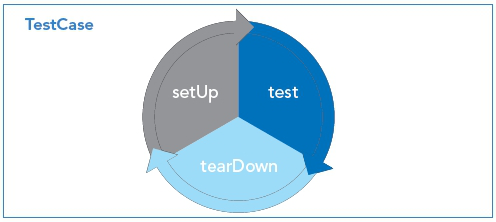
A JUnit test case can contain many test methods. Each method identified as a test will be executed within the JUnit test lifecycle. The lifecycle consists of three pieces: setup, test and teardown, all executed in sequence.
JUnit Lifecycle, continued
| Lifecycle stage | Method called | Method description |
| Setup |
|
Called to do any required preprocessing before a test. Examples include instantiating | Test |
|
Each test method is called once within the test lifecycle. It performs all required testing. Test results are recorded by JUnit for reporting to the test runner upon completion. | Teardown |
|
Called to do any required post processing after a test. Examples include cleaning up of database tables and closing database connections. |
Table 1. Lifecycle stage
All of the test methods are guaranteed to be executed. In JUnit 4 two more phases of the lifecycle were added, beforeClass() and afterClass(). These methods are executed once per test class (instead of once per test method as setUp and tearDown are), before and after respectively.
ASSERTIONS
| Assertion | What it does |
| assertNull(Object x) | Validates that the parameter is null |
| assertNotNull(Object x) | Validates that the parameter is not null |
| assertTrue(boolean x) | Validates that the parameter is true |
| assertFalse(boolean x) | Validates that the parameter is false |
| assertEquals(Object x, Object y) |
Validates that the two objects passed are equal based on the .equals(Object obj1, Object obj2) method |
| assertSame(Object x, Object y) |
Validates that the two objects passed are equal based on the == operator |
| assertNotSame(Object x, Object y) |
Validates that the two objects passed are not equal based on the == operator |
| fail() | Programmatically fail the test. |
Table 2. Assertions
TESTS
Testing is about running code with a predictable set of inputs and verifying that the set of outputs you receive are as expected. JUnit is used to execute the code to be tested in an isolated manor so that those validations can be made.
Figure 2
public void testGoodResultsBar() {
String param1 = “parameter1”;
String results = foo.bar(param1);
assertNotNull(“results was null”, results);
assertEquals(“results was not ‘good’”, “good”,
results);
}
public void testBadResultsBar() {
try {
String results = foo.bar(null);
} catch (NullPointerException npe) {
return;
}
fail();
}
testGoodResultsBar() tests a positive scenario. It passes in an expected value (“parameter1”) into the method to be tested (foo.bar()) and validates that the results are as expected (the String “good”).
The second test is an example of a negative test. It tests that an error condition is handled correctly. In testBadResultsBar(), foo.bar() is passed null expecting that a NullPointerException will be thrown. If it is not thrown, the test is considered a failure (indicated by the fail() call).

JUNIT 4 ANNOTATIONS
JUnit 4 added annotations to the framework and eliminated the need to extend TestCase. You can direct both the lifecycle events and other aspects of the test execution with the provided annotations.
| Annotation | Parameters | Use |
| @After | None | Method will be executed after each test method (similar to the tearDown() method in JUnit 3.x). Multiple methods may be tagged with the @After annotation, however no order is guaranteed. |
| @AfterClass | None | Method will be executed after all of the test methods and teardown methods have been executed within the class. Multiple methods may be tagged with the @AfterClass annotation, however no order is guaranteed. |
| @Before | None | Method will be executed before each test method (similar to the setUp() method in JUnit 3.x). Multiple methods may be tagged with the @Before annotation, however no order is guaranteed. |
| @BeforeClass | None | Executed before any other methods are executed within the class. Multiple methods may be tagged with the @BeforeClass annotation, however no order is guaranteed. |
| @Ignore | String (optional) | Used to temporarily exclude a test method from test execution. Accepts an optional String reason parameter. |
| @Parameters | None | Indicates a method that will return a Collection of objects that match the parameters for an available constructor in your test. This is used for parameter driven tests. |
| @RunWith | Class | Used to tell JUnit the class to use as the test runner. The parameter must implement the interface junit.runner.Runner. |
| @SuiteClasses | Class [] | Tells JUnit a collection of classes to run. Used with the @RunWith(Suite.class) annotation is used. |
| @Test |
|
Used to indicate a test method. Same functionality as naming a method public void testXYZ() in JUnit 3.x. The class parameter is used to indicate an exception is expected to be thrown and what the exception is. The timeout parameter specifies in milliseconds how long to allow a single test to run. If the test takes longer than the timeout, it will be considered a failure. |
Table 3. Annotations
Figure 3 shows two test cases, one using JUnit 3.x method names and one using JUnit 4 annotations.
Figure 3
JUnit 3.x
import junit.framework.TestCase;
public class FooTestCase extends TestCase {
private Foo foo;
@Override
public void setUp() {
foo = new Foo();
}
public void testGoodResultsBar() {
String param1 = “parameter1”;
String results = foo.bar(param1);
assertNotNull(“results was null”, results);
assertEquals(“results was not ‘good’”, “good”,
results);
}
public void testBadResultsBar() {
try {
String results = foo.bar(null);
} catch (NullPointerException npe) {
return;
}
fail();
}
@Override
public void tearDown() {
foo.close();
}
}
JUnit 4
public class FooTestCase {
private Foo foo;
@Before
public void buildFoo() {
foo = new Foo();
}
@Test
public void testGoodResultsBar() {
String param1 = “parameter1”;
String results = foo.bar(param1);
assertNotNull(“results was null”, results);
assertEquals(“results was not ‘good’”, “good”,
results);
}
@Test
public void testBadResultsBar() {
try {
String results = foo.bar(null);
} catch (NullPointerException npe) {
return;
}
fail();
}
@After
public void closeFoo() {
foo.close();
}
}

Test Suites
A test suite is a collection of tests cases. It is used to run a collection of tests and aggregate the results. In JUnit 3.x., test suites can be used to parameterize test cases (parameterized tests are handled with annotations in JUnit 4) as well as group test cases together (in functional groups for example). There are two ways to create a test suite, programmatically and with annotations.
Test Suites, continued
Programmatically:
TestSuite suite = new TestSuite();
suite.addTest(new MyFirstTest());
suite.addTest(new MySecondTest());
suite.addTest(new MyThirdTest());
suite.run();
Annotations:
@RunWith(Suite.class)
@SuiteClasses({FooTest.class, BarTest.class})
public class AllTests{
public static Test suite() {
return new JUnit4TestAdapter(AllTests.class);
}
}
Fixtures
A test fixture is a baseline environment used for testing. For example, if the method bar is to be tested on the object foo, the test should create a new instance of foo for each test. This will prevent any state related issues from interfering with future tests (variables left initialized from previous tests, objects left with invalid data, etc). Figure 1 is an example of a fixture. It creates a new instance of foo for each test and closes it after the execution of each test. This prevents any carryover issues from affecting the current test.
MOCK OBJECTS
Unit testing is the testing of a component in isolation. However,in most systems objects have many dependencies. In order to be able to test code in isolation, those dependencies need to be removed to prevent any impact on test code by the dependant code. To create this isolation, mock objects are used to replace the real objects.
EASYMOCK
EasyMock is a framework for creating mock objects using the java.lang.reflect.Proxy object. When a mock object is created, a proxy object takes the place of the real object. The proxy object gets its definition from the interface or class you pass when creating the mock.
EasyMock has two sets of APIs. One is intended for creation and manipulation of mock objects that are based on interfaces, the other on classes (org.easymock.EasyMock and org.easymock. classextensions.EasyMock respectively). Both provide the same basic functionality; however classextensions does not have quite as extensive as an API as the regular EasyMock does.
EASYMOCK MOCK OBJECT LIFECYCLE
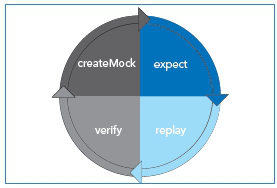
EasyMock has a lifecycle similar to JUnit. It contains four stages.
EasyMock mock object lifecycle, continued
| Stage | Description |
| Create Mock | This phase creates the mock object. |
| Expect | This phase records the expected behaviors of the mock object. These will be verified at the end. |
| Replay | Replays the previously recorded expectations. |
| Verify | In order for a test to pass, the expected behaviors must have been executed. The verify phase confirms the execution of the expected calls. |
Table 4. EasyMock stages
OBJECTS IN EASYMOCK
| Type | Description |
| Regular/td> | A test fails if a method is called that is not expected or if a method that is expected is not called. Order of method calls does not matter. |
| Nice | A test fails if a method is expected but not called. Methods that are called but are not expected are returned with a type appropriate default value (0, null or false). Order of method calls does not matter. |
| Strict | A test fails if a method is called that is not expected or if a method that is expected is not called. Order of method calls does matter. |
Table 5. Types of mock objects in EasyMock

Creating objects with EasyMock
There are two main ways to create a mock object using EasyMock, directly and thru a mock control. When created directly, mock objects have no relationship to each other and the validation of calls is independent. When created from a control,all of the mock objects are related to each other. This allows for validation of method calls across mock objects (when created with the EasyMock.createStrictControl() method).
Direct creation of mock objects
…
@Override
public void setUp() {
UserDAO userDAO = EasyMock.createMock(UserDAO.class);
CustomerDAO customerDAO =
EasyMock.createMock(CustomerDAO.class);
}
…
Creation of a mock object thru a control
…
@Override
public void setUp() {
IMocksControl mockCreator = EasyMock.createControl();
UserDAO userDAO = mockCreator.createMock(UserDAO.
class);
CustomerDAO customerDAO =
mockCreator.createMock(CustomerDAO.class);
}
…
Table 6 describes the API available for creating mock objects. These are static methods that are available on both versions of EasyMock (regular and classextension). createMock(MyInterface.class) is also available from a mock control.
Creating objects with EasyMock, continued
| Method | Description |
|
Creates a mock object based on the passed interface |
|
Creates a nice mock object based on the passed interface |
|
Creates a strict mock object based on the passed interface |
Table 6. EasyMock method
RECORDING BEHAVIOR IN EASYMOCK
There are three groups of scenarios that exist when recording behavior: void methods, non void methods and methods that throw exceptions. Each of which is handled slightly different.
Void methods
Void methods are the easiest behavior to record. Since they do not return anything, all that is required is to tell the mock object what method is going to be called and with what parameters. This is done by calling the method just as you normally would.
Code being tested
…
foo.bar();
String string = “Parameter 2”;
foo.barWithParameters(false, string);
…
Mocking the behavior
Foo fooMock = EasyMock.createMock(Foo.class);
fooMock.bar();
fooMock.barWithParameters(false, “Parameter 2”);
…
Methods that return values
When methods return values a mock object needs to be told the method call and parameters passed as well as what to return. The method EasyMock.expect() is used to tell a mock object to expect a method call.
Code to be tested
…
String results = foo.bar();
String string = “Parameter 2”;
BarWithParametersResults bwpr = foo.
barWithParameters(false, string);
…
Mocking the behavior
…
Foo fooMock = EasyMock.createMock(Foo.class);
EasyMock.expect(foo.bar()).andReturn(“results”);
EasyMock.expect(foo.barWithParameters(false, “Parameter
2”))
.andReturn(new BarWithParametersResults());
…
Methods that throw Exceptions
Negative testing is an important part of unit testing. In order to be able to test that a method throws the appropriate exceptions when required, a mock object must be able to throw an exception when called.
Methods that throw Exceptions, continued
Code to be tested
…
try {
String fileName = “C:\tmp\somefile.txt”;
foo.bar(fileName);
} catch (IOException ioe) {
foo.close();
}
…
Mocking the behavior
…
Foo fooMock = EasyMock.createMock(Foo.class);
EasyMock.expect(fooMock.bar(“C:\tmp\somefile.txt”))
.andThrow(new IOException());
foo.close();
…
Repeated Calls
There are times where a method will be called multiple times or even an unknown number of times. EasyMock provides the ability to indicate those scenarios with the
.times(),
.atleastOnce() and .anyTimes() methods.
…
Foo fooMock = EasyMock.createMock(Foo.class);
EasyMock.expect(foo.bar()).andReturn(“results”).
anyTimes();
EasyMock.expect(foo.barWithParameters(false, “Parameter
2”))
.andReturn(new BarWithParametersResults()).
atLeastOnce();
…
| Method | Description |
|
Requires that the method call be executed 1 or more times. |
|
The number of times the method is called must fall within the specified range (inclusive). |
|
Requires that the method be called 0 or more times. |
Table 7. Time methods
Matchers in EasyMock
When replaying recorded behavior in EasyMock, EasyMock uses the .equals() to compare if the passed parameters are what are expected or not. On many objects, this may not be the desired behavior (arrays are one example). EasyMock has a collection of matchers to solve this issue. Matchers are used to compare things in ways other than the .equals() method. Custom matchers can be created by implementing the org.easymock. IArgumentMatcher interface.
Matcher in action
...
String [] array1 = {“one”, “two”, “three”};
Foo fooMock = EasyMock.createMock(Foo.class);
EasyMock.expect(fooMock.getMiddleElement(
EasyMock.aryEq(array1)).andReturn(“two”);
…
| Method | Description |
|
Accepts a value that is equal to obj |
|
Accepts any value of the corresponding type. |
|
Accepts any value of a float or double within the appropriate ± range. |
|
Compares the array based on the Array.equals() method. |
|
Accepts only null |
|
Accepts any object that is not null |
|
Compares x based on the == method instead of .equals() |
|
Accepts any object if it is an instance of, descendant of or implements clazz. |
|
Accepts a numeric primitive <, <, ≥, > the number provided. |
|
Accepts any String that starts with, contains or ends with the specified String. x is an actual value not a regular expression. |
|
Accepts an object that is either equal to x and y, x or y, or not x respectively |
Table 8. Matcher in action

REPLAYING BEHAVIOR WITH EASYMOCK
Once the behavior of the mock objects has been recorded with expectations, the mock objects must be prepared to replay those expectations. Mock objects are prepared by calling the replay() method and passing it all of the mock objects to be replayed.
Replaying expectations in EasyMock
…
Foo fooMock = EasyMock.createMock(Foo.class);
EasyMock.expect(fooMock.doSomething(parameter1,
parameter2)).andReturn(new Object());
EasyMock.replay(fooMock);
…
VALIDATION OF EXPECTATIONS WITH EASYMOCK
The final step in the mock object lifecycle is to validate that all expectations were met. That includes validating that all methods that were expected to be called were called and that any calls that were not expected are also noted. To do that, EasyMock.verify() is called after the code to be tested has been executed. The verify() method takes all of the mock objects that were created as parameters, similar to the replay() method.
…
Foo fooMock = EasyMock.createMock(Foo.class);
EasyMock.expect(fooMock.doSomething(parameter1,
Parameter2)).andReturn(new Object());
EasyMock.replay(fooMock);
Bar bar = new Bar();
bar.setFoo(fooMock);
EasyMock.replay(fooMock);
bar.runFoo();
EasyMock.verify(fooMock);
…
JUNIT EXTENSIONS
JUnit provides a basic set of functionality that is applicable to all types of testing. JUnit extensions are projects that add on features that are specific to a particular type of testing. Table 9 shows a list of the more popular extensions.
| Add-on | URL | Use |
| DbUnit | http://dbunit. sourceforge.net/ | Provides functionality relevant to database testing including data loading and deleting, validation of data inserted, updated or removed from a database, etc. |
| HttpUnit | http://httpunit.sourceforge.net/ | Impersonates a browser for web based testing. Emulation of form submission, JavaScript, basic http authentication, cookies and page redirection are all supported. |
| EJB3Unit | http://ejb3unit.sourceforge.net/ | Provides necessary features and mock objects to be able to test EJB 3 objects out of container. |
| JUnitPerf | http://clarkware.com/software/JUnitPerf.html | Extension for creating performance and load tests with JUnit. |
Table 9. JUnit Extensions
USEFUL ONLINE RESOURCES
The internet holds a large collection of resources on test driven development, JUnit and EasyMock. Table 10 lists just a few of the more popular resources.
| Technology | URL |
| Mock Objects | http://www.mockobjects.com |
| EasyMock | http://www.easymock.org |
| JUnit | http://www.junit.org |
| JUnit | http://junit.sourceforge.net |
| Test Driven Development | http://www.testdriven.com |
| Yahoo EasyMock Group | http://groups.yahoo.com/group/easymock |
| Yahoo JUnit Group | http://tech.groups.yahoo.com/group/junit |
Table 10. Resources


Comments
Boris Borisoff replied on Wed, 2009/08/05 - 9:56am
Yuan Dong replied on Sat, 2012/11/03 - 10:46am
in response to:
Boris Borisoff
Great great Cheat Sheet! Thank you!
One small thing through. In this part,
Mocking the behavior
shouldn't we use fooMock instead of foo in the 2nd and 3rd statement?