JDBC Best Practices
JDBC Best Practices
By Jesse Davis
33,205 Downloads · Refcard 101 of 185 (see them all)
Download
FREE PDF
The Essential JDBC Cheat Sheet
JDBC Best Practices
A BRIEF HISTORY
Sun Microsystems created JDBC in the 90s to be the standard for data access on the Java Platform. JDBC has evolved since that time from a thin API on top of an ODBC driver to a fully featured data access standard whose capabilities have now surpassed its aging brother, ODBC. In recent applications, JDBC connects persistence layers (such as Hibernate or JPA) to relational data sources; but the JDBC API with its accompanying drivers are always the final piece connecting Java apps to their data! For more in depth (and entertaining) history, watch this movie on the history of Java and JDBC:
http://www.youtube.com/watch?v=WAy9mgEYb6o
JDBC BASICS
Connecting to a Server
Getting a basic Connection object from the database is the first operation to get a handle on. The code snippet below gets a connection to a SQL Server database. Note that the Class.forName line is unnecessary if you are using a JDBC 4.0 driver with Java SE 6 or above.
String url = “jdbc:datadirect:sqlserver://nc-cqserver:1433;databaseName=testDB;user=test;password=test”;
try {
Class.forName(“com.ddtek.jdbc.sqlserver.SQLServerDriver”);
Connection con = DriverManager.getConnection(url);
}
catch (Exception except) {
SQLException ex = new SQLException(
“Error Establishing Connection: “ +
except.getMessage());
throw ex;
}
It is good to get metaData from the Connection object to see what driver and server version you are using. This comes in handy when its time to debug. Printing to system out or logging to a file is preferable:
DatabaseMetaData dbmd = con.getMetaData();
System.out.println( “\nConnected with “ +
dbmd.getDriverName() + “ “ + dbmd.getDriverVersion()
+ “{ “ + dbmd.getDriverMajorVersion() + “,” +
dbmd.getDriverMinorVersion() +” }” + “ to “ +
dbmd.getDatabaseProductName() + “ “ +
dbmd.getDatabaseProductVersion() + “\n”);
Retrieving Data
A straightforward approach to retrieving data from a database is to simply select the data using a Statement object and iterate through the ResultSet object:
Statement stmt = con.createStatement();
ResultSet results = stmt.executeQuery(“Select * from foo”);
String product;
int days = 0;
while (results.next()){
product = results.getString(1);
days = results.getInt(2);
System.out.println(product + “\t” + days);
}

Executing a PreparedStatement
Use a PreparedStatement any time you have optional parameters to specify to the SQL Statement, or values that do not convert easily to strings, for example BLOBs. It also helps prevent SQL injection attacks when working with string values.
PreparedStatement pstmt = con.prepareStatement(“INSERT into table2 (ID, lastName, firstName) VALUES (?,?,?)”);
pstmt.setInt(1, 87);
pstmt.setString(2, “Picard”);
pstmt.setString(3, “Jean-Luc”);
rowsInserted += pstmt.executeUpdate();
Calling a Stored Procedure via CallableStatement
Use a CallableStatement any time you wish to execute a stored procedure on the server:
CallableStatement cstmt = con.prepareCall(“{CALL STPROC1 (?)}”);
cstmt.setString(1, “foo”);
ResultSet rs = cstmt.executeQuery();
rs.next();
int value = rs.getInt(1);

DRIVER TYPES AND ARCHITECTURE
TYPE 1: The JDBC-ODBC Bridge
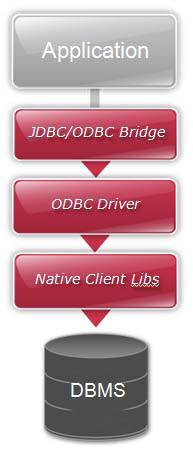
The JDBC-ODBC Bridge was the architecture that the first JDBC drivers adopted. This architecture requires an implementation of the JDBC API that then translates the incoming JDBC calls to the appropriate ODBC calls using the JNI (Java Native Interface). The requests are then sent to the underlying ODBC driver (which at the time was just a shell over the database native client libraries). The bridge implementation shipped with the JDK so you only needed the ODBC drivers and native DB client libraries to get started. Although this was a klunky and headache prone approach, it worked.
TYPE 2: Client Based
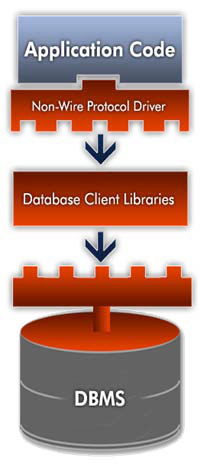
The next generation of JDBC Drivers was the ever popular Type 2 driver architecture. This architecture eliminated the need for the ODBC driver and instead directly called the native client libraries shipped by the database vendors. This was quickly adopted by the DB vendors as it was quick and inexpensive to implement since they could reuse the existing C/C++ based native libraries. This choice still left Java developers worrying about version and platform compatibility issues (i.e. client version 6 is not supported on HP-Itanium processors).

TYPE 3: Two Tier Architecture
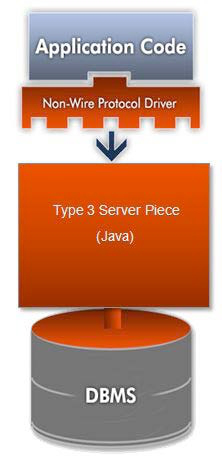
Type 3 drivers sought to be a 100% Java solution but never really gained much traction. Type 3 drivers had a Java client component and a Java server component, where the latter actually talked to the database. Although this was technically a full Java solution, the database vendors did not like this approach as it was costly – they would have to rewrite their native client libraries which were all C/C++. In addition, this didn’t increase the architectural efficiency as we are really still a 3 tier architecture so it is easy to see why this was never a popular choice.
TYPE 4: Wire Protocol Drivers
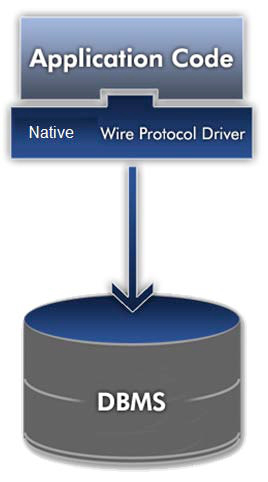
The most popular JDBC driver architecture to date is Type 4. This architecture encapsulates the entirety of the JDBC API implementation along with all the logic for communicating directly with the database in a single driver. This allows for easy deployment and streamlines the development process by having a single tier and a small driver all in a 100% java package.

TYPE 5: NEW!
While not yet officially sanctioned by the JDBC Expert Group, there is quite a bit of discussion surrounding the new Type 5 driver proposal in the JDBC community. Getting down to the real functional differences, we see this list as the requirements for Type 5 Drivers as follows:
| Codeless Configuration | The ability to modify options, check statistics and interact with the driver while it is running. Typically through a standard JMX MBean. |
| Performance Architecture | Drivers specifically designed for multi-core, 64 bit, and virtualized environments. |
| Clean Spec Implementation | Strict adherence to the JDBC standard, solving problems within the specification instead of using proprietary methods that promote vendor lock-in. |
| Advanced Functionality | Type 5 drivers unlock code that has been trapped in the vendor native client libraries and bring that into the Java community. Features include but are not limited to: Bulk Load, Client side High Availability, Kerberos, and others. |
PERFORMANCE CONSIDERATIONS
Pooling (Object Re-use)

Connection Pooling – Enabling Connection pooling allows the pool manager to keep connections in a ‘pool’ after they are closed. The next time a connection is needed, if the connection options requested match one in the pool then that connection is returned instead of incurring the overhead of establishing another actual socket connection to the server
Statement Pooling – Setting the MaxPooledStatements connection option enables statement pooling. Enabling statement pooling allows the driver to re-use PreparedStatement objects. When PreparedStatements are closed they are returned to the pool instead of being freed and the next PreparedStatement with the same SQL statement is retrieved from the pool rather than being instantiated and prepared against the server.

MetaData Performance
- Specify as many ar guments to DatabaseMetaData methods as possible. This avoids unnecessary scans on the database. For example, don’t call getTables like this:
ResultSet rs = dbmd.getTables(null,null,null,null);
Specifying at least the schema will avoid returning information on all tables for every schema when the request is sent to the server:
ResultSet rs = dbmd.getTables(null,”test”,null,null);
- Most JDBC drivers populate the ResultSetMetaData object at fetch time because the needed data is returned in the server responses to the fetch request. Some underutilized pieces of ResultSetMetaData include:
ResultSetMetaData.getColumnCount()
ResultSetMetaData.getColumnName()
ResultSetMetaData.getColumnType()
ResultSetMetaData.getColumnTypeName()
ResultSetMetaData.getColumnDisplaySize()
ResultSetMetaData.getPrecision()
ResultSetMetaData.getScale()

Commit Mode
When writing a JDBC application, make sure you consider how often you are committing transactions. Every commit causes the driver to send packet requests over the socket. Additionally, the database performs the actual commit which usually entails disk I/O on the server. Consider removing autocommit mode for your application and using manual commit instead to better control commit logic:
Connection.setAutoCommit(false);

Network Traffic Reduction
Reduce network traffic by following these guidelines.
| Technique | Benefit |
| Use addBatch() instead of using PreparedStatements to insert. | Sends multiple insert requests in a single network packet |
| Eliminate unused column data from your SQL statements | Removing long data and LOBs from your queries can save megabytes of wire transfer! |
| Ensure that your database is set to the maximum packet size and that the driver matches that packet size | For fetching larger result sets, this reduces the number of total packets sent/received between the driver and server |
JDBC DATA TYPES
Below is a list of common JDBC types and their default mapping to Java types. For a complete list of data types, conversion rules, and mapping tables, see the JDBC conversion tables in the JDBC Specification or the Java SE API documentation.
| JDBC Types | Java Type |
| CHAR, VARCHAR,LONGVARCHAR | java.lang.String |
| CLOB | java.sql.Clob |
| NUMERIC, DECIMAL | java.math.BigDecimal |
| BIT, BOOLEAN | Boolean |
| BINARY, VARBINARY,LONGVARBINARY | byte[] |
| BLOB | java.sql.Blob |
| DATE | java.sql.Date |
| TIME | java.sql.Time |
| TIMESTAMP | java.sql.Timestamp |
| TINYINT | byte |
| SMALLINT | short |
| INTEGER | int |
| BIGINT | long |
| REAL | float |
| FLOAT, DOUBLE | double |
WHAT’S IN A DRIVER?
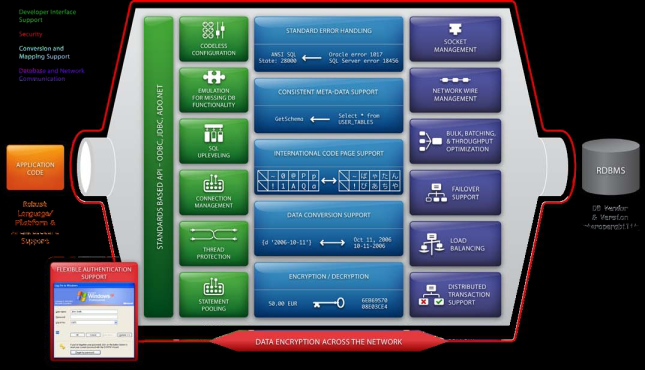
To illustrate what a JDBC driver does under the covers, take a look at this ‘anatomy of a JDBC driver’ diagram.
ADVANCED JDBC

Debugging and Logging
Well-written JDBC drivers offer ways to log the JDBC calls going through the driver for debugging purposes. As an example, to enable logging with some JDBC drivers, you simply set a connection option to turn on this spying capability:
Class.forName(“com.ddtek.jdbc.sqlserver.SQLServerDriver”);
Connection conn = DriverManager.getConnection
(“jdbc:datadirect:sqlserver://Server1:1433;User=TEST;Password=secret;
SpyAttributes=(log=(file)C:\\temp\\spy.log;linelimit=80;logTName=yes;t
imestamp=yes)”);
Codeless Configuration (Hibernate and JPA)
Codeless Configuration is the ability to change driver behavior without having to change application code. Using a driver under something like Hibernate or JPA means that the user cannot use proprietary extensions to the JDBC objects and should instead control and change driver behavior through connection options.
Additionally, codeless configuration is the ability to monitor and change JDBC driver behavior while the driver is in use. For example, using a tool like JConsole to connect to a driver exported MBean and check the PreparedStatement pool stats as well as importing/exporting new statements on the fly to fine tune application performance.
Encrypt Your Data using SSL
Ensure that your data is secure by encrypting the wire traffic between the server and client using SSL encryption:
- Set the EncryptionMethod connect option to SSL.
- Specify the location and password of the trustStore file used for SSL server authentication. Set connect options or system properties (javax.net.ssl.trustStore and javax.net.ssl.trustStorePassword).
- If your database server is configured for SSL client authentication, configure your keyStore information:
- Specify the location and password of the keyStore file. Either set connect options or Java system properties (javax.net.ssl.keyStore and javax.net.ssl.keyStorePassword).
- If any key entry in the keyStore file is passwordprotected,set the KeyPassword property to thekey password.
Single Sign-on with Kerberos
Kerberos is an authentication protocol, which enables secure proof of identity over a non-secure network. It is also used for enabling single sign-on across multiple sites by delegating credentials. To enable Kerberos:
- Set the authenticationMethod connect option to Kerberos.
- Modify the krb5.conf file to contain your Kerberos realm and the KDC name for that realm. Alternatively, you can set the java.security.krb5.realm and java.security.krb5.kdc system properties.
- If using Kerberos authentication with a Security Manager,grant security permissions to the application and driver.

Application Failover
Application failover is the ability for a driver to detect a connection failure and seamlessly reconnect you to an alternate server. Various types of failover exist for JDBC drivers so check your driver documentation for support - the most common are listed below:
| Connection Failover | In the case of the primary connection being unavailable, the connection will be established with the alternate server. |
| Extended Failover | While the application is running, if a connection failover occurs, the driver will reconnect to an alternate server and post a transaction failure to the application. |
| Select Failover | Same as extended, except instead of posting a transaction failure, this level will reposition any ResultSets, so the application will not know there was a failure at all. |
Bulk Loading
Loading large amounts of data into a database quickly requires something more powerful than standard addBatch(). Database vendors offer a way to bulk load data, bypassing the normal wire protocol and normal insert procedure. There are 2 ways to use Bulk Loading with a JDBC driver that supports it:
- Set enableBulkLoad connect option to true. This will make addBatch() calls use the bulk load protocol over the wire.
- Use a Bulk Load object:
// Get Database Connection
Connection con = DriverManager.getConnection(“jdbc:datadirect:orac
le://server3:1521;ServiceName=ORCL;User=test;Password=secret”);
// Get a DDBulkLoad object
DDBulkLoad bulkLoad = DDBulkLoadFactory.getInstance(con);
bulkLoad.setTableName(“GBMAXTABLE”);
bulkLoad.load(“tmp.csv”);
// Alternatively, you can load from any ResultSet object into the
target table:
bulkLoad.load(results);

SQL QUICK REFERENCE
Basic Syntax Examples
| SQL Construct | Example |
| SELECT statement | SELECT * from table1 SELECT (col1,col2,…) from table1 |
| WHERE clause | SELECT (col1, col2, col3) FROM table1 WHERE col1 = ‘foo’ |
| ORDER BY clause | SELECT (col1,col2,…) FROM table_name ORDER BY column_name [ASC|DESC] |
| GROUP BY clause | SELECT column_name, aggregate_ function(column_name) FROM table_name WHERE column_name operator value GROUP BY column_name |
| INSERT statement (all columns implicit) |
INSERT INTO table1 VALUES (val1, val2, value3,…) |
| (explicit columns) | INSERT INTO table2 (col1,col2,…) VALUES (val1, val2, value3,…) |
| UPDATE statement | UPDATE table1 SET col1=val1, col2=val2,… WHERE col3=some_val |
| DELETE statement | DELETE FROM table1 WHERE col2=some_val |
Escape Clauses
| Escape Type | Example |
| Call (a.k.a. stored procedure | {call statement} {call getBookValues (?,?)} |
| Function | {fn functionCall} SELECT {fn UCASE(Name)} FROM Employee |
| Outer Join | {oj outer-join} where outer-join is table-reference {LEFT | RIGHT | FULL} OUTER JOIN {table-reference | outer-join} ON search-condition SELECT Customers.CustID, Customers. Name, Orders.OrderID, Orders.Status FROM {oj Customers LEFT OUTER JOIN Orders ON Customers.CustID=Orders. CustID} WHERE Orders.Status=’OPEN’ |
| Date Escape | {d yyy-mm-dd} UPDATE Orders SET OpenDate={d ‘2005- 01-31’} WHERE OrderID=1025 |
| Time Escape | {t hh:mm:ss} UPDATE Orders SET OrderTime={t ‘12:30:45’} WHERE OrderID=1025 |
| TimeStamp Escape | {ts yyyy-mm-dd hh:mm:ss[.f...]} UPDATE Orders SET shipTS={ts ‘2005-02- 05 12:30:45’} WHERE OrderID=1025 |

| WildCard | Description and Example |
| % (percent) | Subsititute for zero or more characters. SELECT * from emp where name like ‘Da%’ |
| _ (underscore) | Substitute for exactly one character. SELECT * from books where title like ‘_at in the Hat’ |
| [charlist] | Any single character in the charlist. Select * from animals where name like ‘[cb]at’ |
| [!charlist] -or- [^charlist] |
Any single character not in the charlist. Select * from animals where name like ‘[!cb]at’ Select * from animals where name like ‘[^cb]at’ |
JDBC WITH HIBERNATE
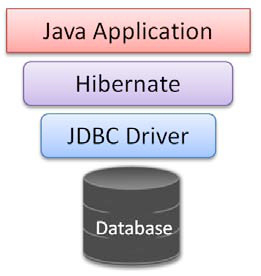
Hibernate is one of the most popular Object Relational Mapping (ORM) frameworks used with JDBC. It is important to note that even if you choose to use Hibernate instead of writing pure JDBC, Hibernate must use a JDBC driver to get to data! Therefore, Hibernate does not replace JDBC as the data connectivity layer, it merely sits on top of it to interface with the application:

When writing Hibernate applications it is important to understand the main files used to setup a Hibernate environment:
| Hibernate File | Purpose |
| Dialects (org.hibernate.dialect.*) | Describes the SQL behavior of the JDBC driver and database to which the application is connecting. |
| Configuration File (hibernate.properties or hibernate.cfg.xml) | Contains the hibernate configuration settings, such as: JDBC driver and connection information, dialect information, mapping information, etc. |
| Mapping File | The mapping file contains the mapping between the application defined objects and the relational data stored in the database. |