Google App Engine for Java
By Matthew McCullough
32,122 Downloads · Refcard 79 of 185 (see them all)
Download
FREE PDF
The Essential Google App Engine for Java Cheat Sheet
Google App Engine for Java
ABOUT THE PLATFORM
Google App Engine is a Cloud Computing SDK, API and Platform that makes Google's publically recognized scalable infrastructure available to any size development shop.

The App Engine platform is available for two languages at this time: Python and Java. This Refcard specifically focuses on the Google App Engine for Java, which will hereafter be referred to as GAE/J.
Proven Infrastructure
The Google App Engine platform inherits many characteristics and technological benefits of proprietary Google applications. These also include modest programming constraints and the absence of a traditional file system, but in return the developer achieves almost guaranteed horizontal scalability. Horizontal scalibility is the desirable application architectural achievement of being able to "just add more servers" to achieve ever greater throughput and user loads. Vertical scalability, in sharp contrast, is the adding of capabilities to a fixed number of servers, such as increasing their CPUs, adding more DIMMs of memory, or installing larger hard drives.
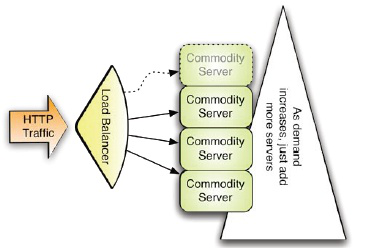
Figure 1: Horizontal Scalabe Infrastructure
Automatic Scalability
In return for the programming constraints of the GAE/J platform, it offers automatic load balancing, fault tolerance of failed servers, centralized logging, data replication (safety) and user-invisible incremental-version deployments across all servers hosting your application.
Java Hosting
GAE/J offers inquisitive developers a free base platform on which to host Java 5 and Java 6 Web Applications. GAE/J nodes run a custom version of the Jetty Servlet Container. This custom servlet container whitelists certain JDK classes, and blacklists others that would break the scalability of the Google cloud computing infrastructure. Blacklisted classes include java.lang.Thread, java.io.FileWriter, and the whole of JNI.

The list of whitelisted classes is published at: http://code.google.com/appengine/docs/java/jrewhitelist.html
Quotas
There are generous maximum throughput, disk, and CPU quotas for the free accounts. When the developer has exhausted these free levels, an economical set of pricepoints with configurable cost thresholds can be engaged to scale with your app's growing popularity. http://code.google.com/appengine/docs/quotas.html
SDK CONTENTS
Setting it up
The GAE/J SDK is a set of JARs (the core utilities are written in Java), shell scripts (SH and CMD) and example applications stored in a zip.

The GAE/J SDK can be downloaded from: http://code.google.com/appengine/downloads.html
Just as with any other command line toolset, it is recommend that you set a "home" environment variable that defines the root of the unzipped SDK. For GAE, it is recommended to set the environment variable APPENGINE_HOME to the top-level folder containing the GAE/J SDK.
A fair amount of forethought was put into versioning of the SDK and apps bound to a given version of the SDK, and one of those facets shines through in that multiple SDKs can be installed (though only one is pointed to by the environment variable) at any given time without conflict.
Documentation

All things about Google App Engine SDK can be found at: http://code.google.com/appengine/
Simulator
A version of the Jetty Servlet Container is included with the GAE/J SDK and is used for local development/test deployments. It replicates many facets of the true GAE hosting environment, but deviates slightly in others. For example, request timeouts and class blacklists are not enforced on the local development server. Developers need to keep this in mind and test their application on the real GAE servers as a final step prior to public annoucements.
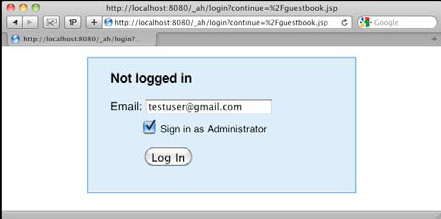
The simulator, which launches at http://localhost:8080 by default, even locally mimics Google account logins, if the integrated authentication options are used, and provides a BigTable datastore browser to review and edit test data.

Figure 2: Simulated Google Authentication integration
COMPILING AND DEPLOYING
Signing Up
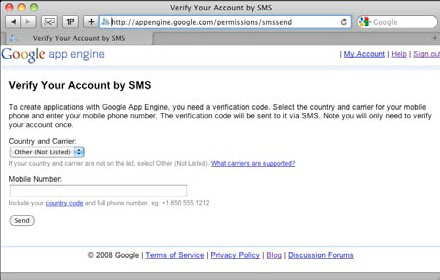
To get a free GAE account, you'll need just two things: an existing Google account, which can be a Gmail address, or username for any Google application such as Picasa Web Albums, and a mobile phone. Accounts are activated via entry of a code number sent to your cell phone by SMS. Only one free account is allowed per mobile phone number. Start the signup process at: http://appengine.google.com

Figure 3: SMS-based Google App Engine account activation
Reserving an App ID
Every application requires the reservation of a globally unique name called an "App ID" prior to its first deployment. App ID reservations are performed through the control panel at http://appengine.google.com. The administrative web app facilitates searching for unused application names and secures your choice once a desired and available name has been found.
Free accounts are limited to 10 App IDs. App IDs are immutable, and even if deleted, are not currently recycled for reuse in the global available name pool.
Your application ID determines your public URL in the form of:
http://<appid>.appspot.com/
Build Tools
Ant
Ant support for GAE/J is available straight out of the box. The samples in the SDK demonstrate how to use macros such as dev_appserver, appcfg and enhance. To include GAE/J Ant support in your build.xml file, define an Ant variable to point to the GAE/J SDK root and import the macro definition as follows:
<import file="${sdk.dir}/config/user/ant-macros.xml" />
Also put the the GAE/J jars onto the compilation classpath by a classpath ref that includes ${sdk.dir}/lib/*.jar
Complete documentation on integrating GAE/J with any Ant build can be found at:
http://code.google.com/appengine/docs/java/tools/ant.html
Maven
Maven support for GAE/J is a developing story led by the open source community. Efforts on a native Maven plugin for GAE are unfolding at http://code.google.com/p/maven-gaeplugin/.
The SDK shell scripts can also be reused via the execmaven- plugin. Example POMs using the SDK shell scripts can be found at http://github.com/matthewmccullough/googleappengine-nfjs/tree/master/gae-maven-parent-pom/.
When creating a new project, the Maven Archetype for GAE/J hosted at http://code.google.com/p/gae-mvn-archetype/ can used to set up the directory structure and core files by typing:
mvn archetype:generate -D archetypeCatalog=http://www.mvnsearch.org/
maven2
DATA STORAGE
Bigtable
Google has spent significant research funds and time to develop a non-relational data repository called Bigtable. This is the petabyte-capable technology behind the datasets for the Google web search engine and Google Earth. The research paper on Bigtable outlines the fundamental approaches and difference from traditional relational database (RDBMS) implementations.
http://labs.google.com/papers/bigtable.html
Datastore
GAE gave public developers their first broad access to Bigtable technology through a user-friendly abstraction named Datastore. Datastore has only slight similarities to a traditional relational database and in fact shares more characteristics with so-called "object databases." Even with the dissimilarities to RDBMSs, having a vocabulary map offers a means of gently approaching the new terminology and concepts of Datastore's non-relational storage facilities.
| Datastore Vocabulary Map | |
| Relational DataBase | Google DataStore Equivalent |
| Database | Datastore |
| Table | Kind |
| Row | Entitiy |
| Row ID | Key |
| Column | Property |
Java Datastore APIs
Though a low level DataStore API is available, GAE Java developers commonly use the official JDO and JPA persistence implementations wrapping DataStore. These APIs offer developers the familiarity of traditional JPA/JDO realational database persistence frameworks and pave a migration path for existing applications being converted to work on the GAE platform. http://code.google.com/appengine/docs/java/gettingstarted/usingdatastore.html
Google Query Language (GQL)
Datastore has its own Google Query Language (GQL), very similar to SQL, but with greater syntactical constraints. The traditional keywords SELECT, WHERE, AND, FROM, IN, ORDER BY, DATE, LIMIT and OFFSET are all supported in GQL queries.
The full GQL syntax reference can be found at http://code.google.com/appengine/docs/python/datastore/gqlreference.html
Indexes
Much like its relational database cousins, Datastore offers indexes to speed query results when sort order or limiting clauses are specified in a GQL statement. However, given the potential massive scale of Datastore Entities, Indexes are actually required for any and all WHERE and ORDER BY queries.
Datastore automatically builds two indexes for every entity's property each time a new entity/property combination is encountered in a persistable object. These automatic indexes include an ascending and descending index on each property, which satisfies the following common queries.
| Queries Satisfied by Automatic Indexes | |
| GQL | Description |
| ORDER BY <property> | Ascending sort |
| ORDER BY <property> DESC | Descending sort |
| WHERE <property> = <value> | Single property equality filter |
| WHERE <property> < <value> | Single property less than filter |
| WHERE <property> > <value> | Single property greater than filter |
| WHERE <property> <= <value> | Single property less than or equal filter |
| WHERE <property> >= <value> | Single property greater than or equal filter |
| WHERE <property1> = <value> ORDER BY <property1> | Filter and sort by the same single property |
Composite Queries and Custom Indexes
For any SELECT beyond these simple queries, custom indexes must be constructed. The GAE team formally calls these "composite queries." For this advanced level of development, GAE gives you significant tooling to make this as easy as possible. Manually written custom indexes are stored in the WEB-INF/datastore-indexes.xml file. This config file has a switch, autoGenerate="true", that enables GAE to automatically author indexes for composite queries run in the developer simulator server. These automatically generated queries are stored in WEB-INF/appengine- generated/ datastore-indexes-auto.xml. The resultant set of available indexes is the union of these two XML files.
Index Creation Work Queue
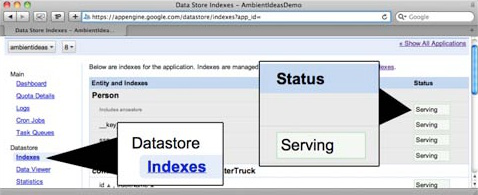
When an application is uploaded that contains these custom queries, GAE puts the index creation tasks onto a global work queue, shared by all applications. The index is then shown as in a "Building" state. This is often imperceptible and your index will be created within minutes. However, during heavy load times and as your datastore record count grows, index creation time can significantly increase. Once the index construction finishes, the index is shown in a "Serving" state on your Control Panel's Index page.

SPECIALIZED CAPABILITIES
Caching
Scalable web applications, even prior to GAE, have begun to make increasing use of in-memory caches to rapidly serve expensive-to-constuct results to clients.
GAE/J offers both a low level API as well as a JSR-107 JCache API to place objects in this simple key/value repository. It is your application's responsibility to determine what is most beneficial to serve from this cache as opposed to recalculating dynamically.
An example call to place an element in the cache looks like this:
cache.put(key, value);
Mail Server
Many modern web applications use email as a means to notify clients of order processing or sign up status. GAE/J provides a mail-sending JavaMail implementation.
Even more unique though is GAE/J's inbound mail facilities. Mail messages can be sent to the GAE program and are reconstructed as an HTTP POST to a servlet class. Inbound email addresses are of the form:
string@appid.appspotmail.com
Image Manipulation
Image manipulation is such a frequent requirement of modern Internet-based services that GAE/J provides the native ability to resize, rotate, flip, crop and enahance images on the fly.
Images are limited to 1MB in size and can be in a JPEG, PNG, GIF, BMP, TIFF or ICO format. Bear in mind that use of this helpful but Google specific image API results in tight coupling to the GAE/J platform.
byte[] origImageData;
ImagesService imgService = ImagesServiceFactory.
getImagesService();
Image origImage = ImagesServiceFactory.makeImage(origImageData);
Transform resize = ImagesServiceFactory.makeResize(200, 300);
Image newImage = imgService.applyTransform(resize, origImage);
Authorization
For applications that require the authentication of their users to perform certain secured functions, GAE provides an API to use Google's own authentication system. Users must have a valid Gmail address or username from any Google web application and can be assigned an administrative or user level role.
http://code.google.com/appengine/docs/java/users/overview.html
Task Queue
Activities that can be worked asynchronously are a fit for the Task Queue. This can be likened to an extremely constrained version of Java Message Service (JMS). Task Queue requests can take a maximum of 30 seconds to complete, but techniques for chaining multiple tasks together to approximate a long-running process are emerging.
CRON Jobs
Just like their UNIX cousins, GAE/J CRON Jobs execute on a scheduled recurrence. The requests to be called are declared in a custom file named cron.xml and are simply URLs to be invoked at the specified times.
http://code.google.com/appengine/docs/java/config/cron.html
XMPP
With instant messaging now a staple of communications, and XMPP the most open protocol, GAE/J impressively implements an API to allow web apps to participate in these IM conversations.
http://code.google.com/appengine/docs/java/xmpp/
CONSTRAINTS FOR SCALABILITY
The most common area of discussion around the GAE/J platform is the constraints placed on the application. Keep in mind that the GAE platform, moreso than other cloud computing frameworks, "forces" you to write scalable applications through these limitations. Nearly guaranteed scalability is an attractive benefit of the flexibility compromises.
Response Time
Each and every request, whether from a user-initiated HTTP request, a CRON request, or a Task Queue event has a maximum of 30 seconds to complete its execution. If it continues running longer than 30 seconds, a com.google.apphosting.DeadlineExceededException is thrown and the servlet is given a minimal extension to construct or redirect to a custom error page.
Datastore Row Responses
All queries to a datastore are limited to 1000 rows of response data. Queries can have result sets that are greater than 1000 rows from an execution plan standpoint, but the query client only receives the first 1000 rows.
Request and Response Size
All HTTP requests and responses (file uploads and downloads are the most common scenario) are limited to a maximum size of 10 MB. If a response is constructed that is too large, an error of "HTTP response was too large" is displayed.
| Feature | Limit |
| HTTP request size | 10MB |
| HTTP response Size | 10MB |
| Request or task duration | 30 seconds |
| Maximum files in app | 3000 |
| Maximum size of all app files | 150MB |
SUPPORTING FRAMEWORKS
An ever-increasing number of Java frameworks offer support for the GAE/J service, and some GAE-specific ones are beginning to emerge. A robust listing of frameworks and technologies compatible with GAE/J is community maintained on the GAE/J Google Groups site.
http://groups.google.com/group/google-appengine-java/web/will-it-play-in-app-engine
Grails
The effort to bring as much of the Grails efficiency to this platform began just days after the addition of Java support to Google App Engine. Today, both an app-engine plugin for Grails as well as GORM-JPA support are available. http://www.grails.org/plugin/app-engine
Gaelyk
A specialized servlet framework, leveraging the Groovy lanaguage, offers rapid small application development on the GAE/J platform. http://gaelyk.appspot.com/
JRuby
The cutting edge JRuby community has quickly embraced the GAE platform with both standalone Gems and near-complete Rails support. http://jruby-appengine.blogspot.com/ : http://olabini.com/blog/2009/04/jruby-on-rails-on-googleapp-engine/
Struts
Struts 2 offers a widely-used and familiar framework to quickly take advantage of GAE/J web app hosting. http://whyjava.wordpress.com/2009/08/30/creating-struts2-application-on-google-app-engine-gae/
Wicket
This popular web framework for the Java platform offers basic compatibility with GAE/J. http://stronglytypedblog.blogspot.com/2009/04/wicket-ongoogle-app-engine.html
IDEs
GAE officially supports the Eclipse IDE, but strong support for the NetBeans platform has also emerged in the form of an open source project plugin.
Eclipse Plugin
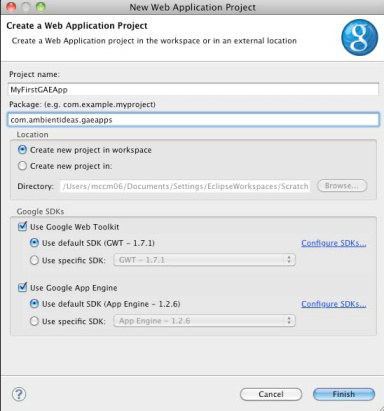
The installation for Eclipse contains both Google Web Toolkit (GWT) and GAE support. Google feels that these are complementary technologies, but allows a user to select support for them independently during the Eclipse new project wizard.

The Eclipse 3.5 (Galileo) GAE plugin update site is: http://dl.google.com/eclipse/plugin/3.5

Figure 4: Eclipse GAE plugin, New Web Application wizard
NetBeans Plugin
An equally rich GAE plugin exists for the NetBeans platform. It does not include GWT support, but does allow for the deployment of an application directly from the IDE to the production GAE servers. It also includes a visual form-based editor for the appengine-web.xml file.

The NetBeans GAE plugin homepage is: http://kenai.com/projects/nbappengine/pages/Home
CONTROL PANEL
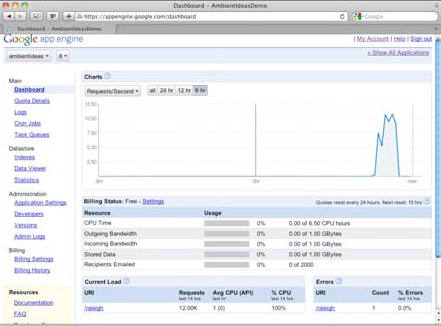
A GAE/J account is managed through a web control panel and provides utilties to visualize bandwidth, disk, and other resource usage. It also offers a GUI through which Datastore data records can be browsed, and arbitrary GQL statements can be executed.
For paid accounts, metered resource thresholds can be set in terms of how much you wish to spend per day in each category of disk, bandwidth, IDEs CPU and emails.

The Google App Engine account control panel can be accessed at: http://appengine.google.com

Figure 5: GAE control panel charts
Logs
The GAE control panel offers a unified view into the log entries coming from all servers participating in your application cloud. The log entries can be filtered by time, severity, and string regex.
Datastore Browser
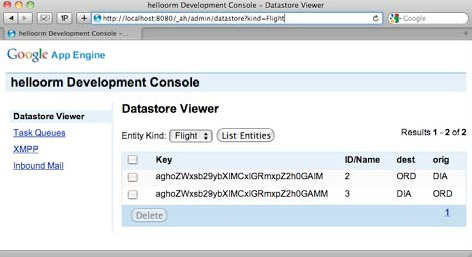
Since Datastore is a specialized data store, a web interface alternative to traditional SQL tools is provided. Arbitrary Google Query Language (GQL) scripts can be run, stored data can be browsed, and individual rows can be inspected in detail for column data types and values.
http://localhost:8080/_ah/admin

Figure 6: GAE local Datastore viewer
ADDITIONAL RESOURCES
IRC Channel
Many GAE developers and some of the Google engineers frequent the IRC channel. Special Google-sponsored chat events are also occasionally held in this virtual meeting space.
Host: irc.freenode.net Channel: #appengine or http://webchat.freenode.net/?channels=appengine
Bug Reports
Developers can review and search existing or log new GAE bug reports via the defect tracking web app.
http://code.google.com/p/googleappengine/issues/list
Twitter Account
Be the first to know about new SDK releases and other platform events via the official GAE twitter feed.
Social Bookmarks
The community is constantly collecting links to the newest GAE/J resources that can be followed via the most popular social bookmarking sites.


Comments
Ashish Paliwal replied on Wed, 2009/12/09 - 9:29am
Matthew McCullough replied on Wed, 2009/12/16 - 5:14pm
in response to:
Ashish Paliwal
Excellent feedback.
java.lang.Thread is only PARTIALLY whitelisted. You can access the static methods on Thread, such as getAllStackTraces(), but cannot call its constructor. We will alter the RefCard to clarify its partial blacklisting. Details are given here: http://stackoverflow.com/questions/1389043/why-is-java-lang-thread-in-the-google-app-engine-whitelist and here http://code.google.com/appengine/docs/java/runtime.html#The_Sandbox
As for java.io.FileWriter, if you go to http://code.google.com/appengine/docs/java/jrewhitelist.html and search the page, you will find that java.io.FileWriter is NOT whitelisted. You might be looking at the whitelisted FilterWriter mistakenly, an entirely different topic. Please verify and confirm. I want to make sure we've addressed your concerns.
Lan Gongkun replied on Tue, 2010/03/16 - 10:37pm