A cluster is a logical entity of several homogeneous server instances. Instances can be on a single machine and single subnet, or they can be scattered throughout several machines and subnets. Usually each machine is called a node and has at least one Node Agent. The Node Agent is a process responsible for the life cycle of the instances (create, stop, start, delete, watchdog) that is running on that machine. To be clear, a server instance is a running domain in a GlassFish installation.
GlassFish application server has clustering capabilities and is compatible with several web servers, or hardware appliances, as the load balancer.
A cluster is usually controlled by a domain that is usually served as the single point of cluster administration and not for serving applications. This domain is called DAS (Domain Administration Server). Administrators use DAS to configure and manage the clusters that are created under it.
GlassFish clusters can:
- Have in-memory replication
- Have persisted replication using HADB
When using HADB, the performance will degrade but the reliability will be the highest because all replicate information will get persisted in multiple instances of HADB.
A cluster needs to have a load balancer to distribute the load (Incoming Requests) between all instances in order to prevent a server from saturation.
Several load balancers such as Sun Java Web server, Tomcat with Mode_JK, Apache HTTPD with Mode_JK or Mode_proxy, F5 traffic managers, or others can be used. However, the only load balancer that can be configured from the DAS is Sun Java Web Server.
Figure 2 shows a complete anatomy of a clustered system.
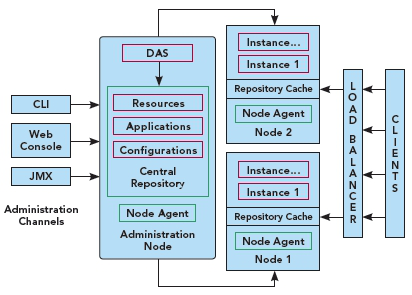
Figure 2.
To set up a cluster you will need GlassFish Application Server, Version 2: https://glassfish.dev.java.net/downloads/v2ur2-b04.html. Make sure that you choose the correct distribution for your operating system.
To set up the DAS, install GlassFish in the cluster or enterprise profile:
Now you need to have a (in-memory replicated) cluster in your DAS that will be the single point of management for all of its instances.
Related commands:
| Command |
Description |
| delete-cluster |
Delete the given cluster, the logical entity not the instance members |
| list-clusters |
List all clusters |
| start-cluster |
Start the given cluster (start all of the cluster instances) |
| stop-cluster |
Stop the given cluster (stop all of the cluster instances) |
Install GlassFish in Cluster's nodes:
In each one of the cluster's node, GlassFish should be installed in the Cluster or Enterprise profile in order to be able to create domains with clustering capabilities. To set up GlassFish in a node, use the following command:
Create a node agent on the node that will host some instances. Using the --port and --host is necessary in order to let the Node Agent understand where the DAS is, and that it should communicate and join.
Now start the node agent
Related commands:
| Command |
Description |
| delete-node-agent |
Delete the given node agent |
| list-node-agents |
List all node agents |
| stop-node-agent |
Stop the given node agent |
Creating instances is possible both from the DAS administration console or CLI, and from the node's CLI itself. To use DAS CLI to create some instances assigned to a specific cluster:
By starting the cluster, all in-memory information of every instance member will be the same in order to have a homogeneous farm of servers.
To set up the load balancer, visit https://glassfish.dev.java.net/javaee5/build/GlassFish_LB_Cluster.html.

An instance can only be a member of one cluster and not more.
IP multi cast should be allowed between subnets when we have instances on multiple subnets.
Instances which form the cluster virtually shape a ring topology network. Each instance gets a replication date from the previous one and sends its data, in addition to received data, to the next member in the ring. Instances are sorted in alphanumerical order. So the best bet for maximizing the availability, and having all data, is sorting cluster members in a way that none of the instances which resides in a single node come one after another. You can do this by selecting proper names for instances.