Getting Started with Apache Hadoop
By Eugene Ciurana
22,165 Downloads · Refcard 117 of 185 (see them all)
Download
FREE PDF
The Essential Apache Hadoop Cheat Sheet
Getting Started with Apache Hadoop
INTRODUCTION
This Refcard presents a basic blueprint for applying MapReduce to solving large-scale, unstructured data processing problems by showing how to deploy and use an Apache Hadoop computational cluster. It complements DZone Refcardz #43 and #103, which provide introductions to highperformance computational scalability and high-volume data handling techniques, including MapReduce.
What Is MapReduce?
MapReduce refers to a framework that runs on a computational cluster to mine large datasets. The name derives from the application of map() and reduce() functions repurposed from functional programming languages.
- “Map” applies to all the members of the dataset and returns a list of results
- “Reduce” collates and resolves the results from one or more mapping operations executed in parallel
- Very large datasets are split into large subsets called splits
- A parallelized operation performed on all splits yields the same results as if it were executed against the larger dataset before turning it into splits
- Implementations separate business logic from multiprocessing logic
- MapReduce framework developers focus on pr ocess dispatching, locking, and logic flow
- App developers focus on implementing the business logic without worrying about infrastructure or scalability issues
Implementation patterns
The Map(k1, v1) -> list(k2, v2) function is applied to every item in the split. It produces a list of (k2, v2) pairs for each call. The framework groups all the results with the same key together in a new split.
The Reduce(k2, list(v2)) -> list(v3) function is applied to each intermediate results split to produce a collection of values v3 in the same domain. This collection may have zero or more values. The desired result consists of all the v3 collections, often aggregated into one result file.

APACHE HADOOP
Apache Hadoop is an open source, Java framework for implementing reliable and scalable computational networks. Hadoop includes several subprojects:
- MapReduce
- Pig
- ZooKeeper
- HBase
- HDFS
- Hive
- Chukwa
This Refcard presents how to deploy and use the common tools, MapReduce, and HDFS for application development after a brief overview of all of Hadoop’s components.

Hadoop comprises tools and utilities for data serialization, file system access, and interprocess communication pertaining to MapReduce implementations. Single and clustered configurations are possible. This configuration almost always includes HDFS because it’s better optimized for high throughput MapReduce I/O than general-purpose file systems.
Components
Figure 2 shows how the various Hadoop components relate to one another:
Essentials
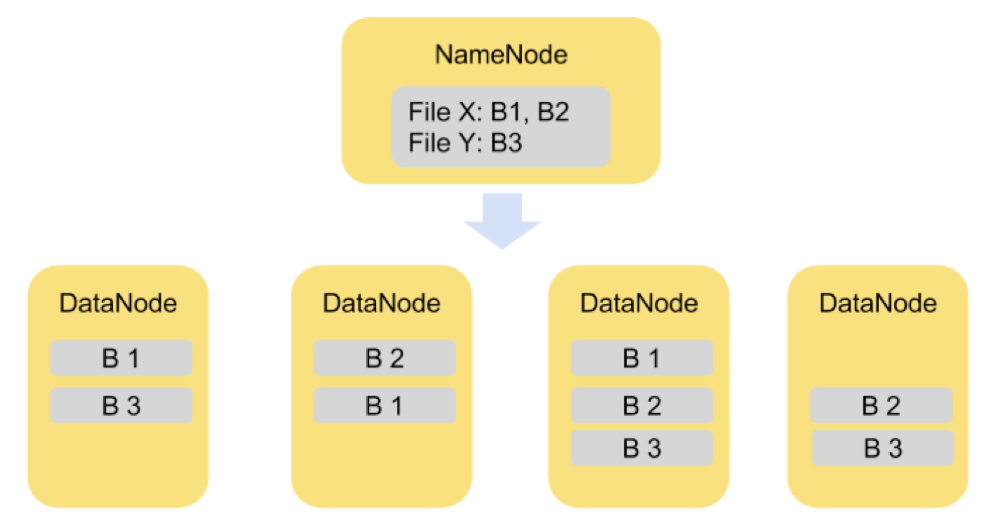
- HDFS - a scalable, high-performance distributed file system. It stores its data blocks on top of the native file system. HDFS is designed for consistency; commits aren’t considered “complete” until data is written to at least two different configurable volumes. HDFS presents a single view of multiple physical disks or file systems.
- MapReduce - A Java-based job tracking, node management, and application container for mappers and reducers written in Java or in any scripting language that supports STDIN and STDOUT for job interaction.

Frameworks
- Chukwa - a data collection system for monitoring, displaying, and analyzing logs from large distributed systems.
- Hive - structured data warehousing infrastructure that provides a mechanisms for storage, data extraction, transformation, and loading (ETL), and a SQL-like language for querying and analysis.
- HBase - a column-oriented (NoSQL) database designed for real-time storage, retrieval, and search of very large tables (billions of rows/millions of columns) running atop HDFS.
Utilities
- Pig - a set of tools for programmatic flat-file data analysis that provides a programming language, data transformation, and parallelized processing.
- Sqoop - a tool for importing and exporting data stored in relational databases into Hadoop or Hive, and vice versa using MapReduce tools and standard JDBC drivers.
- ZooKeeper - a distributed application management tool for configuration, event synchronization, naming, and group services used for managing the nodes in a Hadoop computational network.

Hadoop Cluster Building Blocks
Hadoop clusters may be deployed in three basic configurations:
| Mode | Description | Usage |
| Local (default) | Multi-threading components, single JVM | Development, test, debug |
| Pseudo-distributed | Multiple JVMs, single node | Development, test, debug |
| Distributed | All components run in separate nodes | Staging, production |
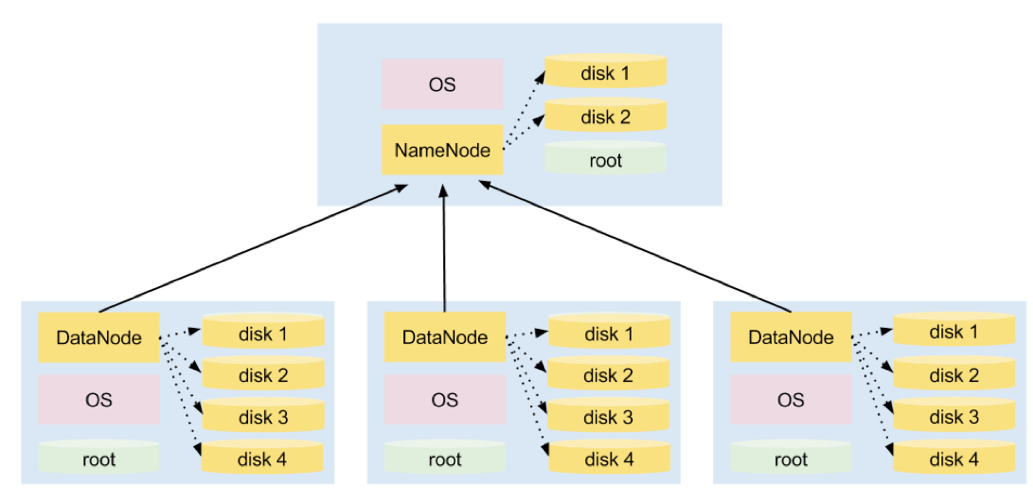
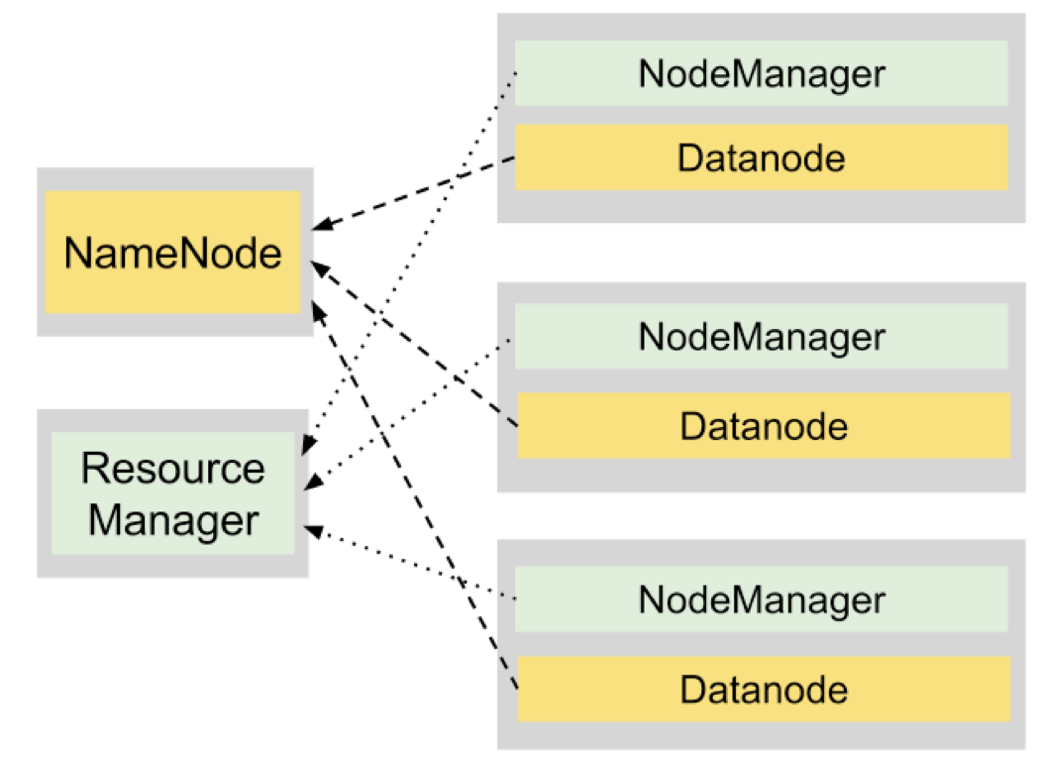
Figure 3 shows how the components are deployed for any of these configurations:
Each node in a Hadoop installation runs one or more daemons executing MapReduce code or HDFS commands. Each daemon’s responsibilities in the cluster are:
- NameNode: manages HDFS and communicates with every DataNode daemon in the cluster
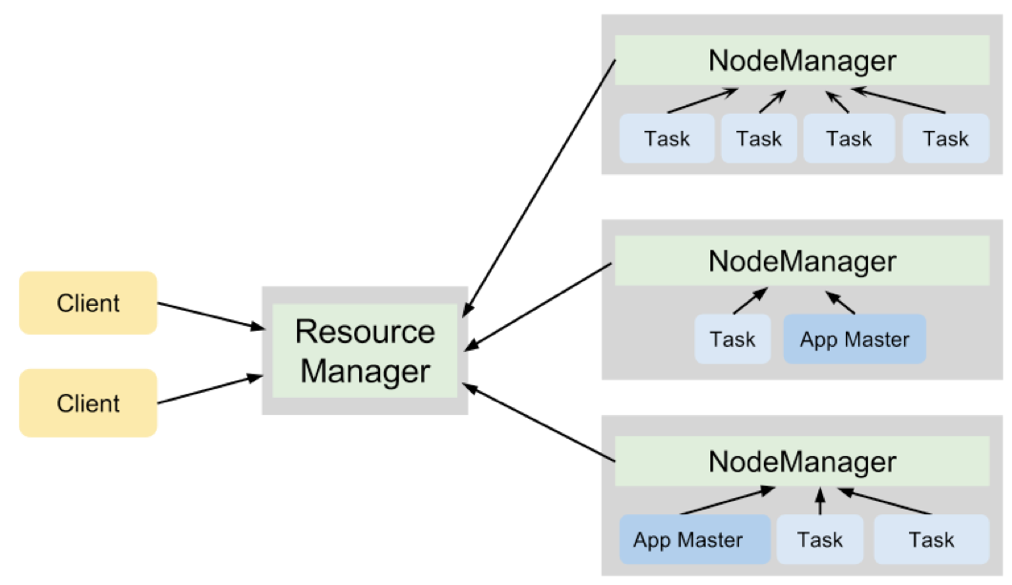
- JobTracker: dispatches jobs and assigns splits (splits) to mappers or reducers as each stage completes
- TaskTracker: executes tasks sent by the JobTracker and reports status
- DataNode: Manages HDFS content in the node and updates status to the NameNode
These daemons execute in the three distinct processing layers of a Hadoop cluster: master (Name Node), slaves (Data Nodes), and user applications.
Name Node (Master)
- Manages the file system name space
- Keeps track of job execution
- Manages the cluster
- Replicates data blocks and keeps them evenly distributed
- Manages lists of files, list of blocks in each file, list of blocks per node, and file attributes and other meta-data
- Tracks HDFS file creation and deletion operations in an activity log
Depending on system load, the NameNode and JobTracker daemons may run on separate computers.

Data Nodes (Slaves)
- Store blocks of data in their local file system
- Store meta-data for each block
- Serve data and meta-data to the job they execute
- Send periodic status r eports to the Name Node
- Send data blocks to other nodes r equired by the Name Node
Data nodes execute the DataNode and TaskTracker daemons described earlier in this section.
User Applications
- Dispatch mappers and reducers to the Name Node for execution in the Hadoop cluster
- Execute implementation contracts for Java and for scripting languages mappers and reducers
- Provide application-specific execution parameters
- Set Hadoop runtime configuration parameters with semantics that apply to the Name or the Data nodes
A user application may be a stand-alone executable, a script, a web application, or any combination of these. The application is required to implement either the Java or the str eaming APIs.
Hadoop Installation

Required detailed instructions for this section are available at: http://hadoop.apache.org/comon/docs/current
- Ensure that Java 6 and both ssh and sshd are running in all nodes
- Get the most recent, stable release from http://hadoop.apache.org/common/releases.html
- Decide on local, pseudo-distributed or distributed mode
- Install the Hadoop distribution on each server
- Set the HADOOP_HOME environment variable to the directory where the distribution is installed
- Add $HADOOP_HOME/bin to PATH
Follow the instructions for local, pseudo-cluster ed, or clustered configuration from the Hadoop site. All the configuration files are located in the directory $HADOOP_HOME/conf; the minimum configuration requirements for each file are:
- hadoop-env.sh — environmental configuration, JVM configuration, logging, master and slave configuration files
- core-site.xml — site wide configuration, such as users, groups, sockets
- hdfs-site.xml — HDFS block size, Name and Data node directories
- mapred-site.xml — total MapReduce tasks, JobTracker address
- masters, slaves files — NameNode, JobTracker, DataNodes, and TaskTrackers addresses, as appropriate
Test the Installation
Log on to each server without a passphrase: ssh servername or ssh localhost
Format a new distributed file system: hadoop namenode -format
Start the Hadoop daemons: start-all.sh
Check the logs for errors at $HADOOP_HOME/logs!
Browse the NameNode and JobTracker interfaces at (localhost is a valid name for local configurations):
- http://namenode.server.name:50070/
- http://jobtracker.server.name:50070/
HADOOP QUICK REFERENCE
The official commands guide is available from: http://hadoop.apache.org/common/docs/current/commands_ manual.html
Usage

Hadoop can parse generic options and run classes from the command line. confdir can override the default $HADOOP_HOME/ conf directory.
Generic Options
| -conf <config file> | App configuration file |
| -D <property=value> | Set a property |
| -fs <local|namenode:port> | Specify a namenode |
| -jg <local|jobtracker:port> | Specify a job tracker; applies only to a job |
| -files <file1, file2, .., fileN> | Files to copy to the cluster (job only) |
| -libjars <file1, file2, ..,fileN> | .jar files to include in the classpath (job only) |
| -archives |
Archives to unbundle on the computational nodes (job only) |
| User Commands | |
| archive -archiveName file.har /var/data1 /var/data2 | Create an archive |
| distcp hdfs://node1:8020/dir_a hdfs://node2:8020/dir_b |
Distributed copy from one or more node/dirs to a target |
| fsck -locations /var/data1 fsck -move /var/data1 fsck /var/data |
File system checks: list block/location, move corrupted files to /lost+found, and general check |
| job -list [all] job -submit job_file job -status 42 job -kill 42 |
Job list, dispatching, status check, and kill; submitting a job returns its ID |
| pipes -conf file pipes -map File.class pipes -map M.class -reduce R.class -files |
Use HDFS and MapReduce from a C++ program |
| queue -list | List job queues |
| Administrator Commands | |
| balancer -threshold 50 | Cluster balancing at percent of disk capacity |
| daemonlog -getlevel host name | Fetch http://host/logLevel?log=name |
| datanode | Run a new datanode |
| jobtracker | Run a new job tracker |
| namenode -format namenode -regular namenode -upgrade namenode -finalize |
Format, start a new instance, upgrade from a previous version of Hadoop, or remove previous version's files and complete upgrade |
HDFS shell commands apply to local or HDFS file systems and take the form:
hadoop dfs -command dfs_command_options
| HDFS Shell | |
| du /var/data1 hdfs://node/data2 | Display cumulative of files and directories |
| lsr | Recursive directory list |
| cat hdfs://node/file | Types a file to stdout |
| count hdfs://node/data | Count the directories, files, and bytes in a path |
| chmod, chgrp, chown | Permissions |
| expunge | Empty file system trash |
| get hdfs://node/data2 /var/data2 | Recursive copy files to the local system |
| put /var/data2 hdfs://node/data2 | Recursive copy files to the target file system |
| cp, mv, rm | Copy, move, or delete files in HDFS only |
| mkdir hdfs://node/path | Recursively create a new directory in the target |
| setrep -R -w 3 | Recursively set a file or directory replication factor (number of copies of the file) |

To leverage this quick reference, review and understand all the Hadoop configuration, deployment, and HDFS management concepts. The complete documentation is available from http://hadoop.apache.org.
HADOOP APPS QUICK HOW-TO
A Hadoop application is made up of one or more jobs. A job consists of a configuration file and one or more Java classes or a set of scripts. Data must alr eady exist in HDFS.
Figure 4 shows the basic building blocks of a Hadoop application written in Java:
An application has one or more mappers and reducers and a configuration container that describes the job, its stages, and intermediate results. Classes are submitted and monitored using the tools described in the previous section.
Input Formats and Types
- KeyValueTextInputFormat — Each line represents a key and value delimited by a separator; if the separator is missing the key and value are empty
- TextInputFormat — The key is the line number, the value is the text itself for each line
- NLineInputFormat — N sequential lines represent the value, the offset is the key
- MultiFileInputFormat — An abstraction that the user overrides to define the keys and values in terms of multiple files
- Sequence Input Format — Raw format serialized key/value pairs
- DBInputFormat — JDBC driver fed data input
Output Formats
The output formats have a 1:1 correspondence with the input formats and types. The complete list is available from: http://hadoop.apache.org/common/docs/current/api
Word Indexer Job Example
Applications are often required to index massive amounts of text. This sample application shows how to build a simple indexer for text files. The input is free-form text such as:
hamlet@11141\tKING CLAUDIUS\tWe doubt it nothing: heartily
farewell.
The map function output should be something like:
<KING, hamlet@11141>
<CLAUDIUS, hamlet@11141>
<We, hamlet@11141>
<doubt, hamlet@11141>
The number represents the line in which the text occurred. The mapper and reducer/combiner implementations in this section require the documentation from:http://hadoop.apache.org/mapreduce/docs/current/api
The Mapper
The basic Java code implementation for the mapper has the form:
public class LineIndexMapper
extends MapReduceBase
implements Mapper {
public void map(LongWritable k,
Text v, OutputCollector o,
Reporter r) throws IOException { /* implementation here
*/ }
.
.
}
The implementation itself uses standard Java text manipulation tools; you can use regular expressions, scanners, whatever is necessary.

The Reducer/Combiner
The combiner is an output handler for the mapper to reduce the total data transferred over the network. It can be thought of as a reducer on the local node.
public class LineIndexReducer
extends MapReduceBase
implements Reducer {
public void reduce(Text k,
Iterator v,
OutputCollector o,
Reporter r) throws IOException {
/* implementation */ }
.
.
}
The reducer iterates over keys and values generated in the previous step adding a line number to each word’s occurrence index. The reduction results have the form:
<KING, hamlet@11141; hamlet@42691; lear@31337>
A complete index shows the line where each word occurs, and the file/work where it occurred.
Job Driver
public class Driver {
public static void main(String… argV) {
Job job = new Job(new Configuration(), “test”);
job.setMapper(LineIndexMapper.class);
job.setCombiner(LineIndexReducer.class);
job.setReducer(LineIndexReducer.class);
job.waitForCompletion(true);
}
} // Driver
This driver is submitted to the Hadoop cluster for processing, along with the rest of the code in a .jar file. One or more files must be available in a reachable hdfs://node/path before submitting the job using the command:
hadoop jar shakespeare_indexer.jar
Using the Streaming API
The streaming API is intended for users with very limited Java knowledge and interacts with any code that supports STDIN and STDOUT streaming. Java is considered the best choice for “heavy duty” jobs. Development speed could be a r eason for using the streaming API instead. Some scripted languages may work as well or better than Java in specific problem domains. This section shows how to implement the same mapper and reducer using awk and compares its performance against Java’s.
The Mapper
#!/usr/bin/gawk -f
{
for (n = 2;n <= NF;n++) {
gsub(“[,:;)(|!\\[\\]\\.\\?]|--”,””);
if (length($n) > 0) printf(“%s\t%s\n”, $n, $1);
}
}
The output is mapped with the key, a tab separator, then the index occurrence.
The Reducer
#!/usr/bin/gawk -f
{ wordsList[$1] = ($1 in wordsList) ?
sprintf(“%s,%s”,wordsList[$1], $2) : $2; }
END {
for (key in wordsList)
printf(“%s\t%s\n”, key,wordsList[key]);
}
The output is a list of all entries for a given word, like in the previous section:
doubt\thamlet@111141,romeoandjuliet@23445,henryv@426917
Awk’s main advantage is conciseness and raw text processing power over other scripting languages and Java. Other languages, like Python and Perl, ar e supported if they are installed in the Data Nodes. It’s all about balancing speed of development and deployment vs. speed of execution.
Job Driver
hadoop jar hadoop-streaming.jar -mapper shakemapper.awk
-reducer shakereducer.awk -input hdfs://node/shakespeareworks
Performance Tradeoff

STAYING CURRENT
Do you want to know about specific projects and use cases where NoSQL and data scalability are the hot topics? Join the scalability newsletter:


Comments
Martin Gussy replied on Sun, 2010/11/07 - 7:32am
Great and interesting post thanks for sharing this wonderful and useful information....
Read News, Breaking News, Latest News, Current News, Social Media News, Add News, Add Press Releases at http://www.mynewssplash.com/