Expression-Based Authorization with Spring Security 3
By Willie Wheeler
17,642 Downloads · Refcard 106 of 185 (see them all)
Download
FREE PDF
The Essential Spring Security Cheat Sheet
Expression-Based Authorization with Spring Security 3
INTRODUCTION
Spring Security, nee Acegi, has a reputation for being a challenging framework. While that reputation isn't altogether undeserved, in fairness it owes largely to the difficulty of the subject matter itself. But those willing to invest the effort will discover a powerful tool.
This Refcard covers the key features of expression-based authorization with Spring Security 3, and aims to be a handy reference for novices and experienced users alike.
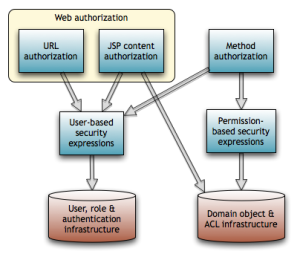
Here's a dependency diagram that doubles as our road map:

We'll begin with authentication and work our way up. Then we'll repeat the process starting from domain objects.
AUTHENTICATION
Authentication is the process by which a security principal-human, machine or otherwise-asserts and proves its identity. Username/password logins are a familiar example.
Spring Security has rich support for authentication. We can source authentication data from databases, LDAP, OpenID providers, CAS and more. We describe two common choices below.
WARNING: Our examples store passwords as plaintext, which is a poor security practice. Spring Security supports password hashing and salting, but space limitations preclude a demonstration.
Using the JDBC user service
Using Spring Security's JDBC user service with the default database schema is easy.
Step 1: Prepare the database
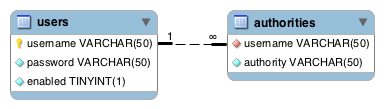
Create the users and authorities tables described in the Database Schemas section at the end of this Refcard, and populate it with data. (We can use a custom schema with the JDBC user service as well, but we won't describe that here.) For example:
insert into users values ('jude', 'p@ssword', 1);
insert into authorities values ('jude', 'user');
insert into authorities values ('jude', 'instructor');

Step 2: Configure Spring Security to use the JDBC user service The next step is to configure Spring Security to use the JDBC user service. Here's what that looks like:
<?xml version="1.0" encoding="UTF-8"?>
<beans:beans xmlns="http://www.springframework.org/schema/security"
xmlns:beans="http://www.springframework.org/schema/beans"
xmlns:xsi="http://www.w3.org/2001/XMLSchema-instance"
xsi:schemaLocation="http://www.springframework.org/schema/beans
http://www.springframework.org/schema/beans/spring-beans-3.0.xsd
http://www.springframework.org/schema/security
http://www.springframework.org/schema/security/spring-security-3.0.xsd">
... DataSource and <http> configuration ...
<authentication-manager>
<authentication-provider>
<jdbc-user-service data-source-ref="dataSource" />
</authentication-provider>
</authentication-manager>
</beans:beans>
Using a custom user service
Usually our existing user service and database schema are more interesting than the JDBC user service and default schema. Consider a Hibernate-backed AccountDao and an Account class supporting firstName, email and other such properties. Spring Security can use this authentication infrastructure. Here’s how.
Step 1: Implement the UserService interface
We modify our AccountDao to implement the Spring Security UserDetailsService interface, or else create an adapter if that isn't desirable/feasible. Either way, we implement a single method:
public UserDetails loadUserByUsername(String username)
throws UsernameNotFoundException, DataAccessException;
The fully-qualified name of the interface is:
org.springframework.security.core.userdetails.UserDetailsService
Step 2: Implement the UserDetails interface
Now we either modify our Account class to implement the UserDetails interface, or else create an adapter. This time there are several methods to implement, but they're straightforward. See the following for more information:
org.springframework.security.core.userdetails.UserDetails
Consider using the GrantedAuthorityImpl class when implementing the UserDetails.getAuthorities() method.
Step 3: Configure Spring Security to use the custom user service
Configuration is as easy as it was with the JDBC case:
<?xml version="1.0" encoding="UTF-8"?>
<beans:beans ... >
... AccountDao and <http> configuration ...
<authentication-manager>
<authentication-provider user-service-ref="accountDao" />
</authentication-manager>
</beans:beans>
AUTHENTICATION
Spring Security 3 builds upon the Spring Expression Language (SpEL) that Spring 3 introduces. The expressions in this section reference characteristics of the user himself, such as roles and authentication status. This stands in contrast to permission-based security expressions, which derive from considering a user, an action and a target domain object jointly. We'll treat this more advanced topic after we cover the basics here.
Spring Security evaluates user-based security expressions against a context-dependent "root object" as we explain below.
Common user-based expressions
The base root object is SecurityExpressionRoot, and it defines common security terms and predicates available for use in both web and method security contexts. Here are the security terms:
| Term | Refers to |
| authentication | The current user's Authentication object, taken from the SecurityContext |
| principal | The current user's principal object, taken from the Authentication object |
SecurityExpressionRoot supports several predicates as well. Their semantics center around authentication status and user roles:
| Predicate | True if and only if... |
| permitAll | Always true |
| denyAll | Always false |
| isAnonymous() | User is anonymous |
| isAuthenticated() | User is not anonymous |
| isRememberMe() | User authenticated via remember-me |
| isFullyAuthenticated() | User is neither anonymous nor remember-me |
| hasRole(role) | User has the specified role |
| hasAnyRole(role1, role2, ...,role n) | User has at least one of the specified roles |
User-based expressions in web contexts
In web contexts, the root object is a WebSecurityExpressionRoot,which extends SecurityExpressionRoot with the following:
| Expression | Description |
| request | Term exposing the underlying HttpServletRequest |
| hasIpAddress(ipAddr) | Predicate that’s true iff the client IP address matches the specified IP address. ipAddr can be either a single IP address or else a range of IP addresses using IP/netmask notation |
Examples
Most of the predicates are self-explanatory, so we'll concentrate on the ones that may not be, and also on how to use SpEL to combine them into complex predicates.
Restrict access to admins:
hasRole(‘admin’)
Restrict access to users who are either instructors or admins:
hasAnyRole(‘instructor’, ‘admin’)
Restrict access to fully-authenticated users who are either customers or admins (e.g., to require a full login before making a purchase):
isFullyAuthenticated() and hasAnyRole(‘customer’, ‘admin’)
Restrict access to the IPv4 loopback address:
hasIpAddress(‘127.0.0.1’)
Restrict access to admins on the LAN (uses netmask):
hasRole(‘admin’) and hasIpAddress(‘192.168.1.0/24’)
Now let's use expressions to create access rules to support the authorization of web URL requests and JSP content.
WEB AUTHORIZATION
Authorization deals with controlling access to secure resources. In Spring Security 3 authorization in general is heavily slanted toward the use of security expressions. This is one of the major differences between Spring Security 2 and 3.
For web authorization, expressions allow us to create access rules in terms of user characteristics such as authentication status, user roles and the user's IP address.
Spring Security supports two flavors of web authorization. The first uses the web security expressions just described to control access to application URLs, or optionally, URL/HTTP method pairs. The second involves showing or hiding JSP content using the Spring Security tag library. We’ll examine both.
Authorizing web URLs
Activate expression-based web URL authorization as follows:
<http auto-config="true" use-expressions="true">
Then implement access rules for URLs by adding <intercept-url> children directly under the <http> element. The <intercept-url> attributes are as follows:
| Attribute | Description | Required |
| pattern | URL pattern to match. Uses Ant syntax by default (e.g. * and ** wildcards) but regex is supported as well. | Yes |
| method | Optional HTTP method to narrow the match | No |
| access | When expressions are activated, this contains the security expression to apply to the URL and (if applicable) HTTP method. Legacy behavior is to store a comma-delimited list of user roles. | No |
| filters | Only possible value is “none”, which indicates that the request is to bypass the Spring Security filter chain. The request will have no SecurityContext. This is mostly for static resources like images, JavaScript, CSS and so forth. | No |
| requires-channel | Can be either “http” or “https”. | No |
Rules are processed in order, so the first pattern/method match determines which security expression will be used to make the access decision. Therefore, place more specific patterns before more general patterns.

Examples
Exclude images from being intercepted:
<intercept-url pattern=”/images/**” filters=”none” />
Allow all users to see the home page:
<intercept-url pattern=”/home” method=”GET” access=”permitAll” />
Only unauthenticated users can register a new account (RESTful URI/method):
<intercept-url pattern=”/users” method=”POST” access=”isAnonymous()” />
Only students or administrators can enter the student lounge:
<intercept-url pattern=”/lounges/student” method=”GET”
access=”hasAnyRole(‘student’, ‘admin’)” />
Authorizing JSP content based on user characteristics
Activate expression-based web URL authorization as follows:
<%@ taglib prefix=”security”
uri=”http://www.springframework.org/security/tags” %>
The tag library has three tags:
| Tag | Description |
| <security:authentication> | Exposes the current Authentication object to the JSP. |
| <security:authorize> | Shows or hides the tag body according to whether the current principal satisfies a specified condition. |
| <security:accesscontrollist> | Shows or hides the tag body according to whether the current principal has a specified permission on the specified domain object. |
We'll go over the first two tags now, and postpone the third until after we've covered domain objects and ACLs.
<security:authentication>
This tag exposes the current Authentication object to the JSP, either for creating variables or for display. Its attributes:
| Tag Attribute | Description | Required |
| property | Specifies a property on the Authentication object. Use dot notation to access nested properties; e.g., principal.username. | Yes |
| var | Variable name if you want to store the property value instead of displaying it. | No |
| scope | Optional variable scope if you want to store the property value instead of displaying it. Default is page scope. | No |
Examples
We're usually interested in the user principal. Here's how to greet a user by username if our principal implements the UserDetails interface. (By default, principals implement UserDetails.)
<p>Hi <security:authentication property=”principal.username” /></p>
Tell a user that his account has been locked, again assuming we're using a UserDetails principal:
<security:authentication var=”principal” property=”principal” />
<c:if test=”${!principal.accountNonLocked}”>
<p>Sorry, your account has been locked.</p>
</c:if>
See the Javadocs for Spring Security's UserDetails interface for more information on the properties it exposes.
We can use <<security:authentication> to access properties on a custom principal, whether a UserDetails implementation or not. For instance, here's a more user-friendly greeting:
<p>Hi <security:authentication property=”principal.firstName” /></p>
<security:authorize>
The <security:authorize> tag shows or hides its body according to whether the current principal satisfies a condition we select.
| Tag Attribute | Description | Required |
| access | Display tag body iff the access expression is true. Uses the web security expressions described earlier in the Refcard. | No |
| url | Specifies an app URL such that the tag displays the tag body only if the user has access to the URL | No |
| method | Optionally narrow url to a specific HTTP method (e.g., GET, POST, PUT, DELETE) when doing URL-based authorization. | No |
| ifNotGranted | Comma-delimited list of roles such that the tag body shows iff the user has none of the roles. Deprecated; use the access attribute instead. | No |
| ifAllGranted | Comma-delimited list of roles such that the tag body shows iff the user has all of the roles. Deprecated; use the access attribute instead. | No |
| ifAnyGranted | Comma-delimited list of roles such that the tag body shows iff the user has at least one of the roles. Deprecated; use the access attribute instead. | No |
Examples
Show a login link iff the user is unauthenticated (or, strictly, is "anonymously authenticated" in Spring Security):
<security:authorize access=”isAnonymous()”>
<a href=”${loginUrl}”>Log in</a>
</security:authorize>
Show a gradebook link if the user has the instructor role:
<security:authorize access=”hasRole(‘instructor’)”>
<a href=”${gradebookUrl}”>Gradebook</a>
</security:authorize>
Alternatively:
<security:authorize url=”/main/gradebook” method=”GET”>
<a href=”${gradebookUrl}”>Gradebook</a>
</security:authorize>
Show a logout link iff the user is authenticated:
<security:authorize access=”isAuthenticated()”>
<a href=”${logoutUrl}”>Log out</a>
</security:authorize>

With that, we're done with the left half of our road map. The next topic is domain objects and ACLs.

DOMAIN OBJECTS & ACLs
A user with the instructor role should be allowed to view his own gradebook, but not other instructors' gradebooks. Requirements like this demand something beyond uOne of the more compelling features of Spring Security 3 is its support for domain object security. The idea is to consider three factors when making an access decision: (1) the actor, (2) the domain object being acted upon and (3) the requested action. We ask the access question in terms of permissions: does the actor have permission to perform the action on the domain object?
For example, a user with the instructor role should be allowed to read her own gradebook, but not other instructors' gradebooks. Role-based authorization won't help us here.
Spring Security addresses this need by giving each secure domain object (such as a gradebook) an access control list (ACL). Each ACL is an ordered list of access rules, or access control entries (ACEs). An ACE specifies for a given <domain object, actor, action> triple whether to grant or block the action.
Managing ACEs
The Spring Security ACL module employs an ACE inheritance mechanism to keep the ACEs manageable even as the number of domain objects grows. The modeling approach is to organize domain objects into a hierarchy and then create ACEs against the most general domain object that makes sense.
Suppose that we have a forum with 10,000 messages. The forum moderator needs admin access to all 10,000 messages. Instead of creating 10,000 ACEs, we simply link the messages to the forum and create a single ACE giving the moderator admin access to the forum. The messages will inherit their ACEs from the forum as a result, and the moderator now has admin access to the messages.
Here's a set of entities corresponding to our scenario:
| Entity | Description |
| SID #1 | raylene |
| Domain object class #1 | myapp.model.Forum |
| Domain object class #2 | myapp.model.Message |
| Domain object #1 | Forum instance |
| Domain objects #2-10001 | 10,000 Message instances with parent set to the Forum instance |
| ACE #1 | Grant admin permission on the Forum instance to raylene |
Permissions and their codes
Creating ACEs involves adding records to the acl_entry table. We specify permissions by placing permission codes in the mask column. The five basic permissions and codes are the following:
| Permission | Bit Index | Code |
| read | 0 | 1 |
| write | 1 | 2 |
| create | 2 | 4 |
| delete | 3 | 16 |
| admin | 4 | 16 |
| custom permission | 5 <= n <= 31 | 2^n |
WARNING: Spring permissions cannot be combined and bitmasked like bitsets. A permission code of 3, for example, does not represent simultaneous read and write permissions; it is simply undefined. There are fairly deep reasons for this; suffice it to say that permissions are more like enums than bitsets. To grant a user two permissions on an object, we need two separate ACEs.
WEB AUTHORIZATION, REVISITED
Domain object security gives us the ability to authorize JSP content based on permissions, as we describe below.
Authorizing JSP content using permissions
Earlier we authorized JSP content based on user characteristics such as authentication status (anonymous, authenticated, remember-me authenticated, fully authenticated), user roles and others (e.g., IP address). Here we want to do the same thing, but this time based on user permissions on domain objects. Once again we rely upon the Spring Security tag library.
<security:accesscontrollist>
The <security:accesscontrollist> tag is like the <security:authorize> tag in that it either shows or hides its body depending upon a given condition. The difference is that the condition is based on a domain object’s ACL as described below:
| Tag Attribute | Description | Required |
| hasPermission | Comma-delimited list of numerical permissions to evaluate. Display tag body iff user has at least one of the permissions on the specified domain object. | 1 |
| domainObject | Domain object against which to evaluate the permissions | 2 |
Examples
Show an edit link for a message (referenced using the JSP EL expression ${message}) if the user has either write (2) or admin (16) permissions on the message:
<security:accesscontrollist
hasPermission=”2,16” domainObject=”${message}”>
<a href=”${editUrl}”>Edit message</a>
</security:accesscontrollist>
The <security:accesscontrolist> tag doesn’t use expressions,and the tag library currently offers no straightforward way to use expressions involving both user characteristics and permissions, as we might want to do if we wanted to allow the admin role to edit messages too. (Be careful to distinguish the admin user role from the admin permission on a domain object.)
A better approach, however, is to create an admin SID in the ACL database and give it the admin permission on the message. It is critical to use ACE inheritance to avoid a proliferation of ACEs. If the domain hierarchy is site < forum < thread < message, then we'd give the admin SID the admin permission on the site and then let inheritance do the rest.

METHOD AUTHORIZATION
Besides authorizing web URL requests and JSP content, Spring Security supports annotation-based method authorization. We protect methods by attaching annotations containing security expressions to the classes and methods in question.
The expressions are the ones we've already seen, plus an additional set of expressions allowing us to make assertions about a user's permissions on domain objects.
Permission-based security expressions
Here are the permission-based security expressions that Spring Security 3 makes available for defining access rules:
| Expression | Type | Description |
| #paramName | term | Expression variable referring to a method argument by parameter name |
| filterObject | term | Refers to an arbitrary element when filtering a Collection. See @PreFilter and @PostFilter below. |
| returnValue | term | Refers to a method’s return value. See @PostAuthorize below. |
| hasPermission( domainObject, permission) | predicate | True iff the current user has the specified permission on the specified domain object. Permission is read, write, create, delete or admin. |
Annotations for method authorization
Spring Security 3 introduces four expression-based @Pre/@Post annotations. While Spring Security continues to support the JSR- 250 standard annotations (e.g., @RolesAllowed) and the legacy @Secured annotation, the new @Pre/@Post annotations are much more powerful because they support permission-based security expressions. We'll therefore focus on those.
Use the following top-level namespace element to activate @Pre/@Post annotations:
<global-method-security pre-post-annotations="enabled" />
The @Pre/@Post annotations are as follows.
@PreAuthorize(expression)
Checks that expression is true before allowing access to the method. This is probably the most useful annotation of the set.
@PreFilter(value=expression [,filterTarget=collection])
Filters a Collection before passing it to the method. The filtering process applies expression to each element in turn, removing it from the collection if expression evaluates false. The reserved name filterObject in the expression refers to an arbitrary element. The Collection implementation must support the remove() method.
The filterTarget annotation element specifies the collection by name if the method has multiple Collection parameters. This requires compiling the target class with the debug flag on.
@PostAuthorize(expression)
Checks that expression is true before returning the annotated method’s return value. The reserved name returnObject in the expression refers to the return value. Useful in cases where the method has domain object parameters that are actually IDs instead of domain objects.
@PostFilter(expression)
Filters a Collection before returning it from the method. Similar to @PreFilter, but filters the return value.

Examples
Only users with the write or admin permission can edit a message:
@PreAuthorize(“hasPermission(#message, write) or
hasPermission(#message, admin)”)
public void editMessage(Message message) { ... }
Only users with the read permission can get a forum:
@PreAuthorize(“hasPermission(new myapp.model.Forum(#id), read)”)
public Forum getForum(long id) { ... }
In the example above, we use a SpEL trick to handle the fact that we can't directly reference an existing message. We can use @PostAuthorize here too, but that requires actually loading the forum before rejecting the request, which is suboptimal.
Only users with the admin role or permission can read blocked messages:
@PreAuthorize(“hasPermission(new myapp.model.Forum(#id), read)”)
public Forum getForum(long id) { ... }
We use @PostAuthorize here because there's no way to know whether the message is visible without loading it. The role name has to be in quotes. In contrast, the permission name must not be in quotes, even though the examples in the Spring Security reference documentation erroneously contain quotes.
Here's a similar example, but this time for a list of messages:
@PostFilter(“filterObject.visible or hasRole(‘admin’) or
hasPermission(filterObject, admin)”)
public List<Message> getMessagesByForumId(long forumId) { ... }
The last two examples combined hasRole('admin') with hasPermission(..., admin). That's OK, and we did it to illustrate expressions that combine hasRole() with hasPermission(). But again consider using ACE inheritance to give the admin role itself admin permissions on all messages, and then simply remove the hasRole('admin') expression from the access rules. By pushing access decisions into the data, we can change our mind about which roles can do what without having to recompile the app.

ACL infrastructure configuration
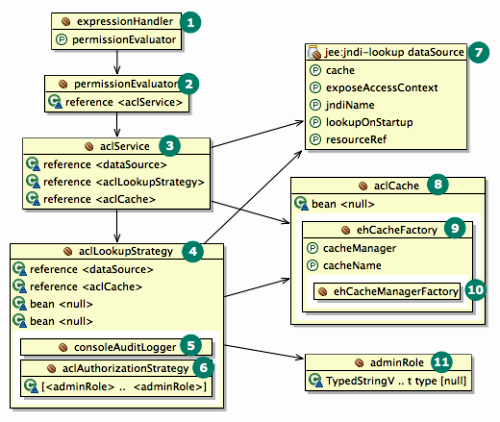
The following bean dependency diagram shows the major infrastructural components for method security and ACLs. As you can see, there's a lot of supporting machinery. Please consult the Spring Security reference documentation and Javadoc for details.

1 org.springframework.security.access.expression.method.
<DefaultMethodSecurityExpressionHandler
2 org.springframework.security.acls.AclPermissionEvaluator
3 org.springframework.security.acls.jdbc.JdbcMutableAclService
4 org.springframework.security.acls.jdbc.BasicLookupStrategy
5 org.springframework.security.acls.domain.ConsoleAuditLogger
6 org.springframework.security.acls.domain.
<AclAuthorizationStrategyImpl
7 javax.sql.DataSource
8 org.springframework.security.acls.domain.EhCacheBasedAclCache
9 org.springframework.cache.ehcache.EhCacheFactoryBean
10 org.springframework.cache.ehcache.EhCacheManagerFactoryBean
11 org.springframework.security.core.authority.GrantedAuthorityImpl
Here's the corresponding ACL configuration file (minus DataSource), with bean IDs suppressed where they're unnecessary.
<?xml version="1.0" encoding="UTF-8"?>
<beans xmlns="http://www.springframework.org/schema/beans"
xmlns:p="http://www.springframework.org/schema/p"
xmlns:security="http://www.springframework.org/schema/security"
xmlns:xsi="http://www.w3.org/2001/XMLSchema-instance"
xsi:schemaLocation=
"http://www.springframework.org/schema/security
http://www.springframework.org/schema/security/spring-security-3.0.xsd
http://www.springframework.org/schema/beans
http://www.springframework.org/schema/beans/spring-beans-3.0.xsd">
<bean id="aclCache"
class="org.springframework.security.acls.domain.EhCacheBasedAclCache">
<constructor-arg>
<bean class="org.springframework.cache.ehcache.EhCacheFactoryBean" p:cacheName="aclCache">
<property name="cacheManager">
<bean class="org.springframework.cache.ehcache.EhCacheManagerFactoryBean"/>
lt;/property>
</bean>
</constructor-arg>
</bean>
<bean id="adminRole"
class="org.springframework.security.core.authority.GrantedAuthorityImpl">
<constructor-arg value="admin" />
</bean>
<bean id="aclLookupStrategy"
class="org.springframework.security.acls.jdbc.BasicLookupStrategy">
<constructor-arg ref="dataSource" />
<constructor-arg ref="aclCache" />
<constructor-arg>
<bean class="org.springframework.security.acls.domain.AclAuthorizationStrategyImpl">
<constructor-arg>
<list>
<ref local="adminRole" />
</list>
</constructor-arg>
</bean>
</constructor-arg>
<constructor-arg>
<bean class="org.springframework.security.acls.domain.ConsoleAuditLogger" />
</constructor-arg>
</bean>
<bean id="aclService"
class="org.springframework.security.acls.jdbc.JdbcMutableAclService">
<constructor-arg ref="dataSource" />
<constructor-arg ref="aclLookupStrategy" />
<constructor-arg ref="aclCache" />
</bean>
<bean id="permissionEvaluator"
class="org.springframework.security.acls.AclPermissionEvaluator">
<constructor-arg ref="aclService" />
</bean>
<bean id="expressionHandler"
class="org.springframework.security.access.expression.method.DefaultMethodSecurityExpressionHandler"
p:permissionEvaluator-ref="permissionEvaluator" />
</beans>
DATABASE SCHEMAS
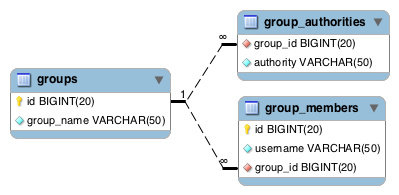
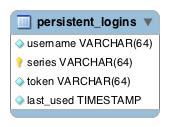
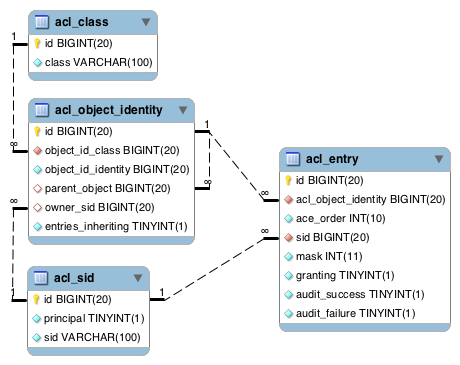
Spring Security 3 has database schemas for users, groups,"remember-me" logins and ACLs. Here are the tables:
| Table | Description |
| users | Individual users |
| authorities | User roles |
| groups | Groups |
| group_authorities | Group roles |
| group_members | Group membership |
| persistent_logins | Supports hardened "remember-me" authentication |
| acl_sid | Security ID: either a principal or a role |
| acl_class | Domain object classes whose instances require ACLs |
| acl_object_identity | Domain objects requiring ACLs |
| acl_entry | Domain object ACLs |
ERDs for the MySQL 5.1 versions of the schemas follow. Modify them as necessary for other DBMSes. You can get the DDL at http://springinpractice.com/2010/07/06/spring-security-databaseschemas- for-mysql/.
User Schema

Group Schema

Remember-me Schema

ACL Schema