Essential Mule 3.3: Simplifying SOA
Essential Mule 3.3
Simplifying SOA
By John D'Emic
8,593 Downloads · Refcard 140 of 185 (see them all)
Download
FREE PDF
The Essential Essential Mule 3.3 Cheat Sheet
Mule 3:Simplifying SOA
ABOUT MULE
Mule is the world’s most widely used open-source integration platform and Enterprise Services Bus (ESB). Mule is designed to support high-performance, multi-protocol transactions between heterogeneous systems and services. It provides the basis for service-oriented architecture. It is lightweight and can run standalone or embedded directly in your application.
This Refcard covers the use of Mule 3. If you are a new user, it will serve as a handy reference when building your integration flows in Mule. If you are an existing user, especially of Mule 2, it will help ease your transition into using Mule 3.
MULE XML
The programming model for Mule is XML using namespaces that provide a DSL authoring environment to orchestrate your integration applications. The diagram below demonstrates the structure of a typical Mule configuration.
<?xml version=”1.0” encoding=”UTF-8”?>
<mule xmlns=”http://www.mulesoft.org/schema/mule/core”
xmlns:xsi=”http://www.w3.org/2001/XMLSchema-instance”
xmlns:vm=”http://www.mulesoft.org/schema/mule/vm”
xmlns:jms=”http://www.mulesoft/org/schema/mule/jms”
xmlns:file=”http://www.mulesoft.org/schema/mule/file”
xsi:schemaLocation=”
http://www.mulesoft.org/schema/mule/core
http://www.mulesoft.org/schema/mule/core/3.1/mule.xsd
http://www.mulesoft.org/schema/mule/vm
http://www.mulesoft.org/schema/mule/vm/3.1/mule-vm.xsd
http://www.mulesoft.org/schema/mule/jms
http://www.mulesoft.org/schema/mule/jms/3.1/mule-jms.xsd
http://www.mulesoft.org/schema/mule/file
http://www.mulesoft.org/schema/mule/file/3.1/mule-file.xsd
“>
<description>Demonstrate Mule Configuration Elements</description>
<jms:connector name=”jmsConnector”
connectionFactory-ref=”connectionFactory”
username=”guest”
password=”guest”/>
<file:connector name=”fileConnector” streaming=”true”/>
<flow name=”Route messages dynamically using a message property”>
<vm:inbound-endpoint path=”input”/>
<vm:outbound-endpoint path=”#[header:INBOUND:destination-queue]”/>
</flow>
<simple-service name=”random-number-service”
address=”http://localhost:8080/rest”
component-class=”com.mulesoft.refcard.
RandomNumberResource”
type=”jax-rs”/>
</mule>
Mule XML consists of the following:
- An opening mule element containing the namespaces used in the configuration.
- A description of the purpose of the configuration.
- Connector definitions.
- Global configuration elements like endpoints, transformers and notification listeners.
- Flows, patterns and services.
Flows
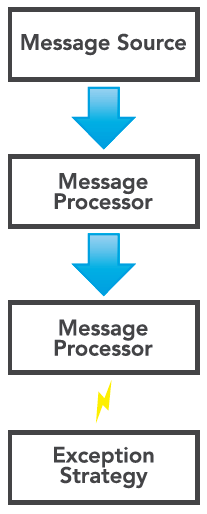
Flows, new to Mule 3, provide a free-form method of orchestrating message processing in Mule. A flow consists of a message source, typically an inbound-endpoint, followed by a sequence of message processors.
Message Processor
Message Processors are used in flows to route, transform, filter and perform business logic on messages. MessageProcessor is a single method interface implemented by almost everything in a Flow.
Exception Strategy
An exception strategy can be added to the end of the flow to route errors that occur during the flow’s execution.

Sending a JMS Message with a Flow
Sending a JMS message is easy with a flow. Here’s how you can use a flow to read files from a directory and send their payload to a JMS queue.
<flow name=”File to JMS Message”>
<file:inbound-endpoint path=”data/files”>
<byte-array-to-string-transformer/>
</file:inbound-endpoint>
<jms:outbound-endpoint queue=”output”/>
</flow>
The file:inbound-endpoint will read files from the given path, transforming their contents into Strings. The content is then passed as JMS TextMessages to the “output” queue.
Using Patterns
Mule Configuration Patterns, extending the Enterprise Integration Patterns, encapsulate common integration paradigms in a compact configuration format.
Creating a RESTful Web Service
A RESTful web service can be quickly created using the simpleservice pattern.
<simple-service name=”random-number-service”
address=”http://localhost:8080/rest”
componentclass=”org.refcard.RandomNumberResource”
type=”jax-rs”/>
In this case, we are using the simple-service pattern to expose a JAX-RS resource that returns a random number from an HTTP GET request.

MESSAGES
Messages encapsulate data entering and leaving Mule. The content of a message is called its payload. The payload is typically a Serializable Java class, an InputStream or an array of bytes.
Attachments
A message can have zero or more mime attachments in addition to the payload. These can be used to associate files, documents and images with the message.
Properties
Properties, also called headers, are metadata associated with a message. Mule, the various transports and you the developer can add properties to a message. Examples of message properties are JMS message headers, HTTP response headers or Mule-specific headers like MULE_MESSAGE_ID. The following table contains examples of message properties set by Mule.
| Property | Description |
| MULE_MESSAGE_ID | A GUID assigned to the message. |
| MULE_CORRELATION_ID | A GUID assigned to a group of messages. |
| MULE_CORRELATION_GROUP_SIZE | The amount of messages expected in the correlation group. |
| MULE_CORRELATION_SEQUENCE | The order of a correlation group. |
| MULE_SESSION | A property that holds encoded session data./td> |
Scopes
Properties are scoped differently depending on when they’re set or accessed during message processing. The following table contains the available scopes.
| Scope | Description |
| inbound | Set by message sources, typically an inbound-endpoint. |
| outbound | Any properties in this scope will get attached to an outbound or response message. Properties set by the messageproperties- transformer default to the outbound scope. |
| session | Properties in the session scope are available between flows and services without explicit propagation. |
| invocation | Used internally by Mule and lasts only for an invocation of a flow or service. |
CONNECTIVITY
Mule connects to over 100 applications, protocols and APIs. Mule endpoints enable connectivity to protocols such as JMS, HTTP and JDBC. Cloud Connectors enable connectivity to applications and social media like SalesForce and Twitter.
Endpoints
Messages can be received with an inbound endpoint and sent with an outbound endpoint. Inbound and outbound endpoints are configured using the XML namespace prefix of the transport.
Connectors
A connector is used to configure connection properties for an endpoint. Most endpoints don’t require a connector. However, some (like JDBC or JMS) do require connector configuration, as we’ll see below.
Configuring an SMTP connector
The following example illustrates how an SMTP connector is configured.
<smtp:connector name=”smtpConnector”
fromAddress=”user@foo.com”
bccAddresses=”admins@foo.com”
subject=”A Message from Mule” />
The SMTP connector allows you to specify properties that will be shared across SMTP endpoints. In this case, the connector sets the “from” and “bcc” addresses as well as the subject of the messages. A connector is referenced by its name, allowing you to define multiple connectors for the same transport.
Endpoints can be generically referenced using an endpoint URI as well as having specific XML configuration elements.
The following table describes some common endpoints supplied by Mule.
| Endpoint | Description |
| http://[host]:[port]:[path]?[query] | Send and receive data over HTTP. |
| ajax://[channel] | Pub / Sub to browser apps using CometD. |
| file://[path] | Read and write files. |
| ftp://[user]@[host]:[port]/[path] | Read and write files over FTP or SFTP. |
| jms://[type]:[destination]?[options] | Full support for JMS topics and queues. |
| smtp://[user]@[host]:[port] | Send email over SMTP. |
| imap://[user]@[host]:[port]/[folder] | Receive email via IMAP. |
| jdbc://[sql query] | Send and receive data from a SQL database. |
| vm://[path] | Uses memory-based queues to send between services and flows. |
The full list of transports is available in the Mule documentation.

Cloud Connectors
Cloud connectors enable easy access to SaaS, social media and infrastructure services such as Amazon WS and Facebook.
These connectors can be used anywhere in a flow to invoke a remote service. A cloud connector usually has a ‘config’ element where service credentials are set and then one or more elements that invoke service methods. The following demonstrates how the Twitter cloud connector can be used to post a tweet:
curl –-data “status=go mule!” http://localhost
<twitter:config name=”twitter” format=”JSON”
consumerKey=”${twitter.consumer.key}”
consumerSecret=”${twitter.consumer.secret}”
oauthToken=”${twitter.access.token}”
oauthTokenSecret=”${twitter.access.secret}” />
<flow name=”updateStatusFlow”>
<http:inbound-endpoint host=”localhost” port=”80”/>
<twitter:update-status
status=”#[header:INBOUND:status]”/>
</flow>
We can now post a tweet to the inbound-endpoint with curl:
curl –-data “status=go mule!” http://localhost
Polling
Mule has a poll tag that allows data from a remote service to be received periodically. To get updates from a Twitter timeline:
<flow name=”getStatusFlow”>
<poll>
<twitter:public-timeline />
</poll>
</flow>
MODULES
Modules extend Mule’s functionality by providing namespace support for a certain set of message processors. The following table contains some of the modules provided by Mule.
| Module | Description |
| JSON | JSON support, including marshalling, transformation and filtering. |
| CXF | SOAP support via Apache CXF |
| Jersey | JAX-RS support for publishing RESTful services. |
| Scripting | Support for JSR-223 compliant scripting language, like Groovy or Rhino. |
| XML | XML support, including XML marshalling, XPath and XSLT support. |
The full list of available modules is available in the official Mule documentation. Additional modules are available on MuleForge.

Bridging REST to SOAP
The following demonstrates how the CXF module can be used to bridge a RESTful service to a SOAP service.
The inbound-endpoint accepts HTTP POST requests to http://localhost:8080/service. The POST data is then sent to the SOAP service defined by the CXF jaxws-client.
Routers
Routers implement the Enterprise Integration patterns (EIP) and determine how messages are directed in a flow.
The following table contains commonly used routers
| Router | Description |
| all | Sends the message to each endpoint. |
| choice | Sends the message to the first endpoint that matches. |
| recipient-list | Sends the message to all endpoints in the expression evaluated with the given evaluator. |
| round-robin | Each message received by the router is sent to alternating endpoints. |
| wire-tap | Sends a copy of the message to the supplied endpoint then passes the original message to the next processor in the chain. |
| first-successful | Sends the message to the first endpoint that doesn’t throw an exception or evaluates the failureExpression to true. |
| splitter | Will split the current message into parts using an expression or just split elements of a List. |
| aggregator | Will collect related messages and create a message collection. |
Transformers
Transformers modify the message and pass it to the next message in the chain.
The following table contains commonly used transformers.
| Name | Description |
| message-propertiestransformer | Adds and removes properties from a message, optionally specifying their scope. |
| byte-array-to-stringtransformer | Many basic type transformers are included. |
| xml:jaxb-xml-to-objecttransformer | Transforms JAXB objects explicitly. |
| auto-transformer | Will automatically find the best transformer for a specified type. |
| xml:xslt_transformer | Transforms a message using the given stylesheet. |
| json:object-to-jsontransformer | Transforms message payloads to and from JSON. |
| gzip-compresstransformer | Compresses and uncompress message payloads using gzip. |
| encrypt-transformer | Encrypts and decrypts message payloads. |

Components
Components allow business logic to be executed in a flow. Any Java object or script can be used as a component. Components are configured by either identifying the class or providing a reference to a Spring bean for dependency injection.
The following snippet shows how a class called MyService can be configured as a component using a class and via dependencyinjection via Spring.
<bean class=”com.acmesoft.service.MyService”/>
<flow name=”test”>
<http:inbound-endpoint host=”foo.com”>
<component>
<spring-object bean=”myService”/>
</component>
</flow>
Mule will use the type of the payload of the message being processed to determine what method to invoke. It’s often necessary, however, to explicitly specify the method to invoke. Entry point resolvers are used for this purpose. The following table contains a list of available resolvers.
| Resolver | Description |
| method-entry-point-resolver | Resolves the method using the specified name. |
| property-entry-point-resolver | Resolves the method using the specified message property. |
| custom-entry-point-resolver | A Java class that implements org.mule.api.model.EntryPointResolver or extends org.mule.model.resolvers. AbstractEntryPointResolver. |
The use of entry point resolvers allows you to use POJO’s as components, decoupling your code from Mule. Sometimes, you will want access to the MuleMessage or MuleContext when processing a message. In cases like this, you can implement the org.mule.api.lifecycle.Callable interface. Callable includes a single method, onCall, to implement that provides direct access to the MuleMessage when the method is invoked.
In addition to custom components, Mule provides the following utility components.
| Component | Description |
| <log-component> | Logs messages. |
| <echo-component> | Returns and passes along. |
| <test:component> | Helps test message flows (in the test namespace). |

Filters
Filters selectively pass messages to the next processor in the chain.
The following table contains commonly used filters.
| Name | Description |
| expression-filter | Passes messages using any of the expressions languages supported by Mule. |
| regex-filter | Decides what messages to pass by applying the supplied regular expression to the message payload. |
| payload-type-filter | Passes messages only of the given type. |
| custom-filter | Specifies the class of a custom filter that implements the org.mule.api.routing.filter.Filter interface. |
| and-filter, or-filter, not-filter | Logic filters that work with other filters. |
Using Filters with XPath
The following example demonstrates how the xpath-filter can be used to only pass certain XML documents. In this case, only order XML documents containing a certain ZIP code are allowed to pass.
<flow name=”Filter messages using the XPath filter”>
<vm:inbound-endpoint path=”input”/>
<mulexml:xpath-filter pattern=”/order/zipCode”
expectedValue=”11209”/>
<vm:outbound-endpoint path=”output”/>
</flow>

EXPRESSIONS
Mule provides a rich expression language to evaluate data at runtime using the message currently being processed.
Evaluators
The following are commonly used expression evaluators.
| Name | Description |
| xpath | Query the message payload using XPath |
| payload | Use the message’s payload for evaluation. |
| map-payload | A Java class that implements org.mule.api.model. EntryPointResolver or extends org.mule.model.resolvers. AbstractEntryPointResolver. |
| regex | Perform a regular expression evaluation against a message payload. |
| bean | Evaluates the message payload as a JavaBean. |
| groovy | Use Groovy to evaluate an expression. Mule provides certain variables, like payload, properties and muleContext, to the script context to aid in evaluation. |
| header:[scope] | Return the given header for a specific scope, as demonstrated below |
Routing Messages Dynamically
The following illustrates how a message can be dynamically routed to a JMS queue passed on a message header.
<flow>
<vm:inbound-endpoint path=”input”/>
<jms:outbound-endpoint
queue=”#[header:INBOUND:destination-queue]”/>
</flow>
This example accepts a message off the given VM queue. The outbound-endpoint uses the header evaluator to dynamically route the message to the queue defined by an inbound message property called “destination-queue”.
ANNOTATIONS
Annotation support, introduced in Mule 3, further simplifies Mule configuration by reducing or eliminating the XML needed to configure components and transformers.
The following table contains a list of commonly used annotations.
| Name | Type | Description |
| @Transformer | Method | Indicates the method can be used as a transformer. |
| @ContainsTransformerMethods | Class | Indicates the annotated class contains transformation methods. |
| @Schedule | Method | Schedules a method for periodic execution. |
| @Lookup | Field,Parameter | Looks up the annotation field or parameter for dependency injection from the Mule registry. |
| @Payload | Parameter (component or transformer) | Injects the payload into a method. If the param type is different from the payload type, Mule will attempt to transform it. |
| @InboundHeaders | Parameter (component or transformer) | Injects any inbound headers at runtime. Can be filtered by name and used to inject individual headers. |
| @OutboundHeaders | Parameter (component or transformer) | Injects a Map of outbound headers that can be used to add headers to the outgoing message. |
| @Inbound Attachments | Parameter (component or transformer) | Injects any inbound attachments at runtime. Can be filtered by name. |
| @Outbound Attachments | Parameter (component or transformer) | Injects a Map of outbound attachments that can be used to add attachments to the message. |
You can use the Mule 3 annotation support to quickly implement transformers and components.
Implementing a Transformer with Annotations
Here’s an example of a transformer that lowercases a message’s payload.
@ContainsTransformerMethods
public class LowercaseTransformer {
@Transformer
public String toLowercase(String string) {
return string.toLowerCase();
}
}
This class can be used a message source in a flow to generate a timestamp every minute.
Implementing a Component with Annotations
Components can also be implemented with annotations. The following class demonstrates how the @Schedule annotation can be used to periodically generate data.
public class HeartbeatMessageSource {
@Schedule(interval = 60000)
public long pulse() {
return new Date().getTime();
}
}
This class can be used as a message source in a flow to generate a timestamp every minute.
HANDLING ERRORS
Exceptions thrown during message processing are handled by exception strategies. The default-exception-strategy, configured at the end of the flow, allows you to route the exception to another endpoint for handling.
Sending Messages to a DLQ
Messages that can’t be delivered, for instance if an exception is thown during their processing, it can be sent to a Dead Letter Queue (DLQ). The following example will send any errors that occur in the flow to the “dlq” VM queue.
<flow>
<vm:inbound-endpoint path=”input”/>
<vm:outbound-endpoint
path=”#[header:INBOUND:destination-queue]”/>
<default-exception-strategy>
<vm:outbound-endpoint path=”dlq”/>
</default-exception-strategy>
</flow>
Building upon the previous example, the default-exceptionstrategy will route messaging failures (for example, when the destination-queue inbound header is null) to the VM queue named “dlq”.

FUNCTIONAL TESTING
Functional testing is an important part of testing Mule applications. Mule provides a helper class, org.mule.tck. FunctionalTestCase, which you can extend to simplify setting up a TestCase.
Functionally Testing a Flow
public class XPathFilterFunctionalTestCase extends FunctionalTestCase
{
@Override
protected String getConfigResources() {
return “xpath-filter-config.xml”;
}
public void testMessageNotFiltered() throws Exception {
String xml = “<order><zipCode>11209</zipCode></order>”;
MuleClient client = new MuleClient(muleContext);
client.dispatch(“vm://input”, xml, null);
assertNotNull(client.request(“vm://output”, 15000).
getPayloadAsString());
}
public void testMessageIsFiltered() throws Exception {
String xml = “<order><zipCode>11210</zipCode></order>”;
MuleClient client = new MuleClient(muleContext);
client.dispatch(“vm://input”, xml, null);
assertNull(client.request(“vm://output”, 5000));
}
}

CONCLUSION
This Refcard is just a glimpse into what you can do with Mule 3. Consult the full documentation on the MuleSoft website. The full code and test cases for the examples used in this Refcard are available on GitHub:
https://github.com/johndemic/essential-mule-refcard