Liferay Essentials: A Definitive Guide for Enterprise Portal Development
Liferay Essentials
A Definitive Guide for Enterprise Portal Development
By James Falkner
16,061 Downloads · Refcard 126 of 185 (see them all)
Download
FREE PDF
The Essential Liferay Cheat Sheet
Liferay EssentialsA Definitive Guide for Enterprise Portal Development
INTRODUCTION
Liferay Portal is a free and open-source enterprise portal written in Java and distributed under the GNU LGPL. Now in its eleventh year of development, the award-winning product is one of the most widely deployed portal technologies on the market, with an estimated 250,000 deployments worldwide. More than a portal, Liferay is a platform for creating effective business applications and solutions. It offers a robust feature set, impressive scalability, time-saving development tools, support for over 30 languages, and a flexible, scalable architecture that is open-source developed and enterprise refined.
About this Refcard
This Refcard will help both novices and professionals quickly navigate some of Liferay’s most popular features and hidden gems. It will cover topics such as installation, configuration, administration, and development features.
Getting Set up
Liferay Portal Community Edition is freely downloadable from http://liferay.com. Click the Downloads link at the top of the page and you will be presented with multiple download options:
Bundles are archives that combine Liferay Portal with popular application servers such as Tomcat, GlassFish, and others.
Standalone (WAR) distributables contain Liferay Portal alone and are suitable for installation into an existing application server environment.
All bundles and WAR distributables are cross-platform and should run on any modern flavor of Windows, Linux, Mac OS X, or other Unix-based operating systems.
Bundle Directory Structure
liferay-portal-<version> This top-level folder is known as the Liferay Home directory.
Data: This folder is used to store the embedded HSQL database that the bundles use, as well as the configuration and data for the Jackrabbit JSR-170 content repository and the Lucene search index.
Deploy: Plugins that you wish to deploy to Liferay can be copied into this folder. It is also used by Liferay’s graphical plugin installer utility, which is available from the Control Panel.
License: This folder contains both Liferay’s license and a file that describes the licenses for many of the other open-source projects that are used internally by Liferay.
[Application Server]: There will also be an application server folder that is different depending on which bundle you have downloaded. This folder contains the application server in which Liferay has been installed.
Starting Liferay
In most cases, installing a bundle is as easy as uncompressing the archive and then starting the application server.
For example, Tomcat is started with:
$ ${LIFERAY_HOME}/tomcat-6.0.26/bin/startup.sh
$ tail –f ${LIFERAY_HOME}/tomcat-6.0.26/logs/catalina.out
Other bundles are started in a similar fashion.
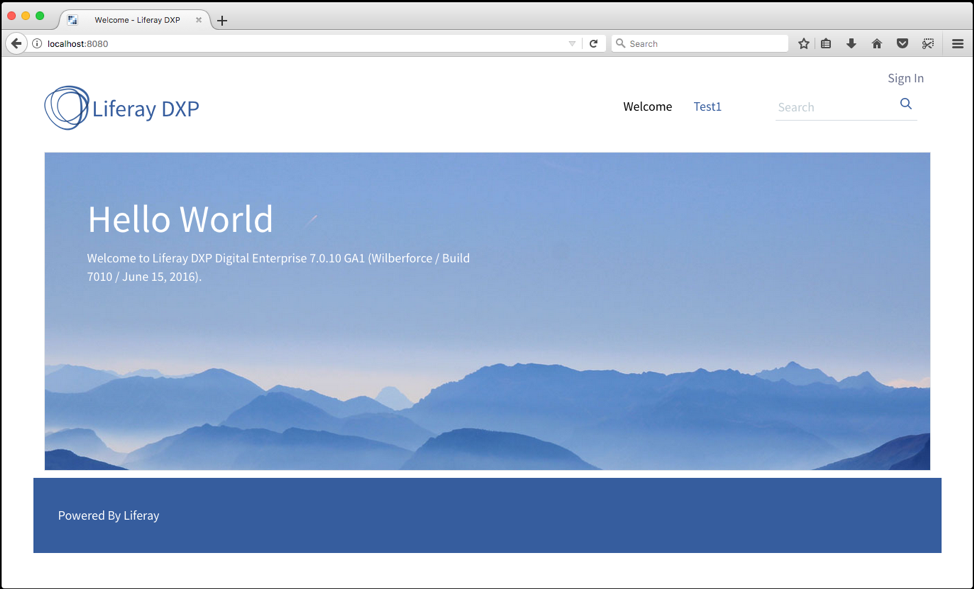
Once started, your Web browser should automatically be launched and directed to http://localhost:8080, which should display the default Liferay website, as shown here.
Liferay Basics
Liferay is a portal server. This means that it is designed to be a single environment where all of the required applications (represented by individual portlets) can run, and these applications are integrated together in a consistent and systematic way.
Portal Architecture
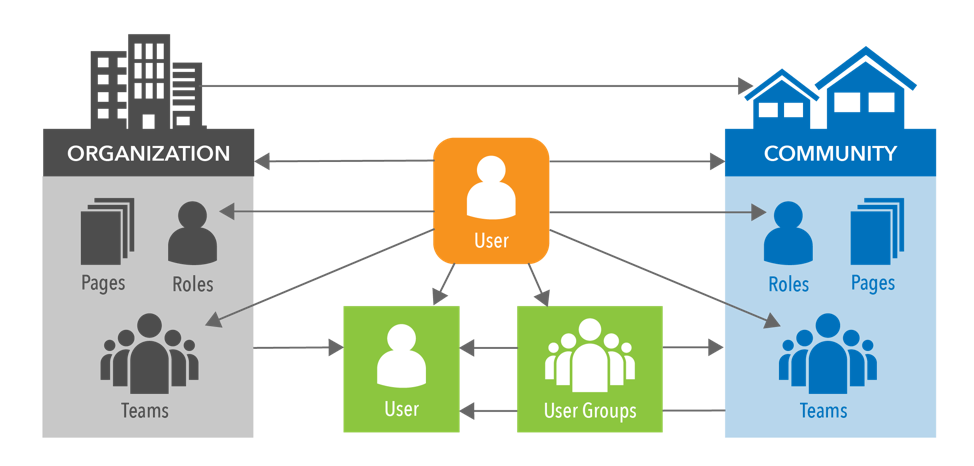
In the illustration below, each arrow may be read using the words “can be a member of.” It is important to note that the diagram illustrates only users and their collections. Permissions ` do not flow through all of these collections; permissions can be assigned to roles only.
The following concepts are used throughout Liferay:
- Portals are accessed by Users.
- Users can be collected into User Groups.
- Users can belong to Organizations and join/leave Communities.
- Roles are collections of permissions on portal objects that can be assigned to Users.
- Organizations can be grouped into hierarchies, such as Home Office Regional Office Satellite Office. Communities are not hierarchical.
- Users, Groups, and Organizations can belong to Communities that have a common interest.
- Within Organizations and Communities, users can belong to Teams, which are groupings of users for specific functions within a community or organization.
- Users, Organizations and Communities have two separate collections of Pages called Public and Private Pages. Each page can have as many applications (portlets) as desired. The page administrator can lay out these applications into zones defined by a default or customized layout template.
WEB CONTENT MANAGEMENT
Liferay’s Web Content Management (WCM) is a system which allows non-technical users to publish content to the Web without having advanced knowledge of Web technology or programming of any sort. Liferay Content Management System (CMS) empowers you to publish your content with a simple point-andclick interface, and it helps you to keep your site fresh.
You can use WCM to author both structured and unstructured content. Unstructured content is authored using an HTML-based WYSIWYG editor. Structured content is authored and displayed by combining Web Content Structures, Web Content Templates, and Web Contents. Structures and Templates are defined individually using a text editor or through the Liferay WCM UI.
Accessing Structure Elements
The following table shows how to access structure data from your Web Content Template code (when using Velocity templates; other template languages such as FreeMarker, XSL, or CSS have similar constructs). The variable name defined in the structure are denoted in bold and will be different depending on the name assigned in the structure.
| Element Type | Velocity Template Accessors |
| Text Field | $tf.name, $tf.data, $tf.type |
| Text Box | $textbox.data |
| Text Area (HTML) | $textarea.data |
| Checkbox | $checkbox.data |
| Selectbox | $selectbox.data |
| Multi-Selection List | #foreach($selection in $mylist.options) $selection #end |
| Image Gallery | <img src=”/image/image_gallery?img_id=$img.getData()”/> |
| Link to Page | $linkToPage.url |
| Repeatable | $el.siblings |
| Hierarchy | #foreach($child in $el.children) $child.data #end |
| Reserved Variables | $reserved-article-[id,version,title,create-date,modifieddate,display-date,author-id,author-name,author-emailaddress,author-comments,author-organization,authorlocation,author-job-title].data |
Template and Theme Variables
The following table lists the most common built-in variables accessible from Velocity Template code (when using Velocity templates; other template languages such as FreeMarker, CSS, or XSL have similar constructs). For example, $layout.getChildren(). Items marked with an asterisk (*) are only available from Liferay Theme files.
| Variable Name | Description |
| request | HTTPServletRequest object |
| company | The current company object. This represents the portal instance on which the user is currently navigating. |
| companyId | The current company ID. |
| groupId | ID of the group in which this web content is published. |
| locale | The current user's locale, as defined by Java. |
| randomNamespace | A randomized string. It is very useful for creating IDs that are guaranteed to be unique. |
| browserSniffer | Dynamic browser capabilities. e.g.$browserSniffer.isMobile() |
| portal | Current portal instance |
| portletURLFactory | Creates portlet URLs (action URLs, etc) |
| stringUtil | Useful string utilities |
| portletConfig* | Standard PortletConfig object describing information from the portal.xml file. |
| renderRequest* | Standard Portlet RenderRequest object |
| renderResponse* | Standard Portlet RenderResponse object |
| themeDisplay* | Contains many useful items, such as the logged in user, the layout,logo information, paths, and much more. |
| user* | The User object representing the current user. |
| layoutSet* | The set of pages to which the user has currently navigated. Generally, communities and organizations have two: a public set and a private set. |
| scopeGroupId* | groupId that is used to identify the scope where the data of the current portlet is stored and retrieved. The scope can represent a community, organization, user, the global scope, or a scope tied to a specific page. |
| timeZone* | The current user's time zone, as defined by Java. |
| viewMode | e.g. “print” when clicked print icon |
| fullTemplatesPath* | Path to all templates used. |
| pageTitle* | Title of the page |
| serviceLocator | Access to other Liferay services. Note by default this variable is disabled, must be enabled via portal-ext.properties |
| prefsPropsUtil | Access to portal settings that were set from the Control Panel or through the portal.properties configuration file. |
| permissionChecker | An object which can determine given a particular resource whether or not the current user has a particular permission for that resource. |
| [css|images|javascrip t|templates]_folder* |
Full path to various theme files |

WORKFLOW
A Liferay Workflow is a predetermined sequence of connected steps. In Liferay, workflow is designed to manage the creation, modification, and publication of all supported web content types (including Web Content, Blogs, Wikis, Message Boards, Documents, and other user-generated content). Liferay ships with a default workflow engine called Kaleo. It can generate and reference roles scoped for Organizations, Communities, and for the entire Portal. This engine is deeply integrated with Liferay, but can be replaced with an external engine, such as jBPM.
Kaleo Workflow Definitions
Liferay comes with a default Kaleo workflow definition called “Single Approver” that means that a single approval is needed before content is published. You can create custom workflow definitions by using the APIs and workflow definition format provided. An example skeleton of a simple workflow is shown below:
<workflow-definition>
<name>MyName</name>
<version>1</version>
<state>
</state>
<state>
</state>
<task>
</task>
<task>
</task>
</workflow-definition>
Assets, States, Transitions, and Tasks
The key parts of the workflow definition are the asset, states, transitions, and tasks. The asset is whatever piece of content is being reviewed and approved in the workflow. States represent stages of the workflow, such as “created”, “rejected”, or “approved”. Transitions occur between states, and indicate what the next state should be. Tasks are steps in the workflow that require user action.
Example State
<state>
<name>MyState</name>
<initial>true</initial>
<actions>
<action>
<name>SomeAction</name>
<execution-type>onEntry</execution-type>
<script>
<![CDATA[
// some javascript code here
]]>
</script>
<script-language>javascript</script-language>
<priority>7</priority>
</action>
</actions>
<transitions>
<transition>
<name>Task1</name>
<target>task1</target>
<default>true</default>
</transition>
</transitions>
</state>
| Notable Elements | Options |
| <actions> | Defines actions to be taken upon entering state |
| <transitions> | Defines possible transitions out of this state |
| <script-language> | groovy, javascript, python, ruby |
| <priority> | Integer, controls execution order of actions |
| <execution-type> | onEntry, onAssignment, onExit |
| <template-language> | text, velocity, freemarker |
| <notification-type> | email, im, private-message |
Example Task
<task>
<name>MyTask</name>
<due-date-duration>12</due-date-duration>
<due-date-scale>day</due-date-scale>
<actions>
<notification>
<name>A Notification</name>
<execution-type>onAssignment</execution-type>
<template>You have a new task</template>
<template-language>text</template-language>
<notification-type>email</notification-type>
</notification>
</actions>
<assignments>
<roles>
<role>
<role-type>community</role-type>
<name>Community Administrator</name>
</role>
</roles>
</assignments>
<transitions>
<transition>
<name>Transition1</name>
<target>state1</target>
<default>true</default>
</transition>
<transition>
<name>Transition2</name>
<target>state2</target>
<default>false</default>
</transition>
</transitions>
</task>
| Notable Elements | Options |
| <due-date-duration> | Defines when the task is due |
| <ue-date-scale> | second, minute, hour, day, week, month, year |
| <roles> | Users who have this role can be assigned this task |
| <role-type> | regular, community, organization |
LIFERAY ADMINISTRATION
Portal Properties
Liferay uses the concept of overriding the defaults in a separate file, rather than going in and customizing the default configuration file. The default configuration file is called portal. properties, and it resides inside of the portal-impl.jar file. This .jar file is located in Liferay Portal’s WEB-INF/lib folder. If you have a copy of the Liferay source code, this file can be found in portal-impl/src. The file which is used to override the configuration is portal-ext.properties. This file can be created in your Liferay Home folder or anywhere in the application server’s classpath.
Database Setup
Out of the box, Liferay bundles are configured to use HSQLDB, which should only be used for development or demo purposes. You cannot use this database in production.
For production use, Liferay supports the following databases: MySQL, Microsoft SQL Server, Oracle Database, IBM DB2, PostgresSQL, and Sybase. Liferay can also connect to Apache Derby, Firebird, Informix, Ingres, or SAP DB. To use these databases, the database and user with appropriate access must be created, and the appropriate JDBC driver must be available in your app server. Consult your database documentation for details on syntax and how to create databases and users.
To use a particular database, you must set the following four properties in your portal-ext.properties.
MySQL Example:
1. jdbc.default.driverClassName=com.mysql.jdbc.Driver
2. jdbc.default.url=jdbc:mysql://localhost/lportal?
useUnicode=true&characterEncoding=UTF-
8&useFastDateParsing=false
3. jdbc.default.username=
4. jdbc.default.password=
Oracle Example:
jdbc.default.driverClassName=oracle.jdbc.driver.OracleDriver
jdbc.default.url=jdbc:oracle:thin:@localhost:1521:xe
jdbc.default.username=lportal
jdbc.default.password=lportal
It’s also possible to delegate this configuration to the application server through a DataSource by using the following property:
jdbc.default.jndi.name=NameOfDataSource
App Server Configuration
Liferay is supported on the following app servers or servlet containers: Geronimo, GlassFish, JBoss, Jetty, JOnAS, Oracle, Resin, Tomcat, WebLogic, and WebSphere. Consult your app server documentation for details on configuration. The following table lists common files that are involved in configuring your app server.
| Tomcat 6.x | Location |
| Global Libraries | ${TOMCAT_DIR}/lib/ext |
| Portal Libraries | ${TOMCAT_DIR}/webapps/ROOT/WEB-INF/lib |
| Primary Configuration | ${TOMCAT_DIR}/conf/server.xml |
| Primary Log Files | ${TOMCAT_DIR}/logs/catalina.out |
| GlassFish 3.x | Location |
| Default Domain Directory | ${GLASSFISH_DIR}/domains/domain1 |
| Global Libraries | ${GLASSFISH_DOMAIN_DIR}/lib |
| Portal Libraries | ${GLASSFISH_DOMAIN_DIR}/applications/j2ee-modules/Liferay-portal/WEB-INF/lib |
| Primary Configuration | ${GLASSFISH_DOMAIN_DIR}/config/domain.xml |
| Primary Log Files | ${GLASSFISH_DOMAIN_DIR}/logs/server.log |
| JBoss 5.x | Location |
| Default Instance Directory | ${JBOSS_DIR}/server/default |
| Global Libraries | ${JBOSS_INSTANCE_DIR}/lib |
| Portal Libraries | ${JBOSS_INSTANCE_DIR}/deploy/ROOT.war/WEB-INF/lib |
| Primary Configuration | ${JBOSS_INSTANCE_DIR}/conf/jboss-service.xml |
| Primary Log Files | ${JBOSS_INSTANCE_DIR}/log/server.log ${JBOSS_INSTANCE_DIR}/log/boot.log |
Troubleshooting and Debugging
The following items should be checked when troubleshooting a problem.
| Item | Notes |
| Log Files | Log files for several app servers are listed above. These should be checked for warnings, errors, Java stack traces, etc. |
| Log Settings | Liferay uses the Apache Log4j library to perform all of its logging operations. See below on how to configure log settings. |
| JMX | Liferay provides out-of-the-box JMX MBeans, which allow introspection into the runtime, for example to identify and isolate problematic behavior such as poor cache performance or slow portlet rendering. |
| Debug | To attach a Java debugger to Liferay, you must start the JVM with special
properties. Some servers have done this for you. For example, to start Tomcat under a debugger, run “bin/catalina.sh jpda start” Other servers may need the JVM properties added manually. A typical set of properties is: -Xdebug -Xrunjdwp:transport=dt_socket,server=y,suspend=n,address=5005 |
Logging Configuration
Liferay uses Log4j for its logging operations. When debugging an issue, it is useful to be able to increase verbosity of certain areas of Liferay to diagnose an issue. There are two ways to do this:
Interactively
Interactively changing the log levels will only persist until the next system restart, when the log level settings will revert to their previous values. This is done through the Control Panel-> Server Administration -> Log Levels user interface.
Config File
To make a more permanent change, copy Liferay’s default METAINF/portal-log4j.xml file from the portal-impl.jar, rename to portal-log4j-ext.xml, make any edits, and place the file somewhere along the servers classpath. For example, if you were using Tomcat, one could create ${TOMCAT_DIR}/lib/META-INF/portal-log4j-ext.xml.
For example, to enable debug logging for Hibernate, add this to your portal-log4j-ext.xml file:
<category name=”org.hibernate”>
<priority value=”DEBUG” />
</category>

Portal Properties
Listed below are several properties and descriptions that can be used to configure Liferay. These settings belong in your portal-ext.properties file.
| Property Name | Description and Examples |
| liferay.home Default: Depends on App Server |
Specifies the root of Liferay’s working directory /configuration. Example: /var/lr-home |
| portal.ctx Default: / |
Specifies the path of the portal servlet context. If you change this, you must also change the setting in web.xml Example: /mysite |
| jdbc.default.jndi.name Default: Not Set |
Set the JNDI name to lookup the JDBC data source. If none is set, then Liferay will attempt to create the JDBC data source based on the properties prefixed with jdbc. default. Example: jdbc/LiferayPool |
| jdbc.default.driverClassName jdbc.default.url jdbc.default.username jdbc.default.password Defaults: settings for HSQL |
Database configuration options for creating the Liferay Database connection pool |
| company.default.web.id Default: liferay.com |
Default Web ID. Omni administrators must belong to this company. Example: mycompany.com |
DEVELOPING FOR LIFERAY
You can develop many things both for and in Liferay: portlets, hooks, themes, layout templates, services, and more.
Plugins SDK
The Plugins SDK is both a project generator and a location where your projects are stored. Download the Plugins SDK from liferay.com/downloads/liferay-portal/additional-files.
Do not forget to create a build.username.properties file (where username is your OS username). Set the app.server.dir property to point at an extracted Liferay/App Server bundle. For example, app.server.dir=${user.home}/lr-6.0.5.
Building projects in the Plugins SDK requires that you have Ant 1.7.0 or higher installed on your machine. Download the latest version of Ant from http://ant.apache.org/.
Creating and Deploying New “Hello World” Plugins
Use the “create” script for creating new portlet, theme, hook, layout, or Web plugins:
$ cd portlets; ./create.sh hello-world “Hello World Portlet”
$ ant deploy
Other ANT targets include: Clean: removes build artifacts. War: creates distributable .war file. Compile: compiles source code. build-service: invokes Liferay’s Service Builder to create and build service source code.
Anatomy of a Portlet Project
Several directories and files are created when you use the create.sh tool.
| Folder | Description |
| docroot | This folder is the “root” of your application. |
| WEB-INF | Standard WEB-INF folder for Web applications. Also contains Liferayspecific descriptors. |
| WEB-INF/src | Portlet source code. |
| build.xml | ANT build script controlling building and deploying your plugin. |
| liferay-display.xml | Describes what category the portlet should appear under in the Liferay UI. |
| liferay-pluginpackage. properties |
Describes properties used by Liferay’s hot-deploy mechanism. |
| liferay-portlet.xml | Describes Liferay-specific portlet enhancements (akin to portlet.xml for generic portlets). There are many settings here to customize your portlet. |
| portlet.xml | Standard JSR-168 or JSR-286 portlet descriptor |
| web.xml | Standard Web Application descriptor |
Liferay Hooks
Hooks are the best way to extend or modify Liferay’s behavior. They allow you to override parts of core Liferay with custom implementations. You specify what you wish to hook into in your liferay-hook.xml file. Within this file, you can customize:
Portal Properties
<hook>
<portal-properties>my.custom.portal.propertie</portal-properties>
</hook>
Within custom properties files, add startup action:
application.startup.events=org.mypkg.MyStartupEventClass
Add Model Listener for Blogs:
value.object.listener.com.liferay.portlet.blogs.model.BlogsEntry=org.mypkg.
BlogEntryAction
Language Properties
<hook>
<language-properties>content/Language_fr.properties</language-properties>
</hook>
JSP File Override
Allows overriding of any JSP from the core of Liferay by using the same paths as Liferay uses within the specified directory. Use with care:
<hook>
<custom-jsp-dir>/META-INF/custom_jsp</custom-jsp-dir>
</hook>
Then create custom JSPs:
/META-INF/custom_jsps/html/portlet/blogs/view.jsp
/META-INF/custom_jsps/html/portlet/calendar/week.jsp
Services
By wrapping services it’s possible to extend any core Liferay service method to perform additional operations or even to replace the default operations.
<hook>
<service>
<service-type>
com.liferay.portal.service.UserLocalService
</service-type>
<service-impl>
com.liferay.test.hook.service.impl.MyUserLocalServiceImpl
</service-impl>
</service>
</hook>
Liferay Themes
Themes are plugins, and are therefore hot-deployable just like portlet plugins. You can use the Plugins to build your themes automatically so that they can be deployed to any Liferay instance. The Plugins SDK packages a theme into a .war file just like a portlet, and this .war file can then be hot-deployed to Liferay.
Anatomy of a Theme
| Path within Theme | Description |
| /css/base.css, custom.css, … | Defines many aspects of Liferay’s UI. To override, create your own _diffs/css/custom.css within your theme source code |
| /images/ | Static image resources references from CSS, JS, VM, etc. |
| /javascript/main.js | Defines stub functions that fire at certain points of page loading when using theme. Override using custom main.js |
| /templates/ | Various Velocity Macro Templates that are executed during page rendering |
| init-custom.vm | Allows you to add your own custom Velocity variables |
| init.vm | Sets many Velocity variables that correspond to Liferay Java objects. See the section on Web Content for common variables available from your custom theme code. |
| navigation.vm | Implements the page navigation within the theme |
| portal_normal.vm | The overall template for all pages the theme implements. This file includes the other files. |
| portal_pop_up.vm | The overall template for any portlets which implement popup windows. |
| portlet.vm | The template for portlet windows within the theme. |
Service Builder
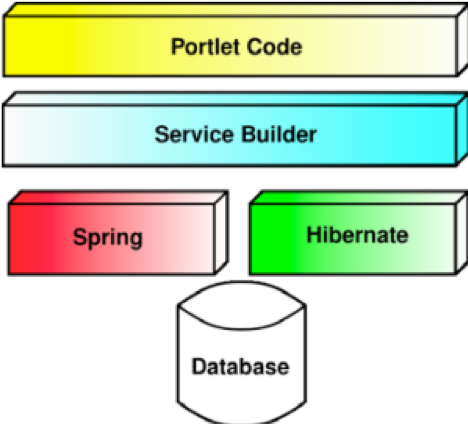
Service Builder is a source code generation tool built by Liferay to automate the creation of interfaces and classes for database persistence, local and remote services. This is useful when developing data-driven applications that make frequent calls to the underlying database.

Sample Service
Services are defined by creating a service.xml file. Once defined, source code can be generated for the persistence and data access/transfer layers of your Data-driven app. An example:
<service-builder package-path=”com.sample.portlet.library”>
<namespace>Library</namespace>
<entity name=”Book” local-service=”true” remote-service=”true”>
<!-- PK fields -->
<column name=”bookId” type=”long” primary=”true” />
<!-- Group instance -->
<column name=”groupId” type=”long” />
<!-- Audit fields -->
<column name=”companyId” type=”long” />
<column name=”userId” type=”long” />
<column name=”userName” type=”String” />
<column name=”createDate” type=”Date” />
<column name=”modifiedDate” type=”Date” />
<!-- Other fields -->
<column name=”title” type=”String” />
</entity>
</service-builder>
Generating the Code
$ ant build-service
JSP Variable Reference
To get access to Liferay contextual objects when writing a JSP:
<liferay-theme:defineObjects />
Then, the following variables are available to your JSP:
| Variable Name | Description |
| themeDisplay | A runtime object which contains many useful items, such as the loggedin user, the layout, logo information, paths, and much more. |
| company | The current company object. This represents the portal instance on which the user is currently navigating. |
| account | The user's account object. This object maps to the Account table in the Liferay database. |
| user | The User object representing the current user. |
| realUser | When an administrator is impersonating a user, this variable tracks the administrator's user object. |
| contact | The user's Contact object. This object maps to the Contacts table in the Liferay database. |
| layout | The set of pages to which the user has currently navigated. Generally, communities and organizations have two: a public set and a private set. |
| plid | A Portal Layout ID. This is a unique identifier for any page that exists in the portal, across all portal instances. |
| layoutTypePortlet | This object can be used to programmatically add or remove portlets from a page. |
| scopeGroupId | A unique scope identifier for custom scopes, such as the page scope that was introduced in Liferay Portal 5.2. |
| permissionChecker | An object that can determine, given a particular resource, whether or not the current user has a particular permission for that resource. |
| locale | The current user's locale, as defined by Java. |
| timeZone | The current user's time zone, as defined by Java. |
| theme | An object representing the current theme that is being rendered by the portal. |
| colorScheme | An object representing the current color scheme in the theme that is being rendered by the portal. |
| portletDisplay | An object that gives the programmer access to many attributes of the current portlet, including the portlet name, the portlet mode, the ID of the column on the layout in which it resides, and more |
Social Tools and Activity Streams
Liferay’s portal, content, and collaboration frameworks are tied together using a rich suite of social features. For developers, plugging social software into Liferay can be achieved in many ways. For example, using the native Social Relationship API for managing relationships between users (via the com.liferay.portlet. social package), interacting with the Activity Stream (via the SocialActivity model), calculating and visualizing Social Equity participation and contribution values, or dropping OpenSocial gadgets onto a page and managing via Liferay’s Control Panel.
More Information
For up-to-date and in-depth information, please refer to the official documentation for Liferay at http://www.liferay.com/ documentation.