Effective Process Modeling with BPM & BPMN
By Matjaz B. Juric and Ana Sasa
20,441 Downloads · Refcard 51 of 185 (see them all)
Download
FREE PDF
The Essential BPM & BPMN Cheat Sheet
Effective Process Modeling with BPM & BPMN
About Business Process Management
BPM (Business Process Management) is a set of related activities, such as process modeling and design, process execution, process monitoring, and process optimization. This Refcard provides an overview of the BPM lifecycle together with the roles and results of business process modeling. It gives an overview of the BPMN (Business Process Modeling Notation) and presents the most important BPM patterns.
BPM: Business Process Lifecycle
A business process lifecycle covers the following phases (Figure 1):
- Process modeling - definition of the process models using the selected methodology and notation (such as BPMN).
- Process implementation – implementation of end-to-end IT support for the process. SOA provides technologies and tools to make the implementation phase quick and efficient.
- Process execution and monitoring – execution of the process and monitoring of the process to gather the Key Performance Indicators (KPI).
- Process simulation – simulated execution of the process with the objective gathering KPIs and identifying optimization points.
- Process optimization – improving the process efficiency, effectiveness, agility, flexibility, and transparence.
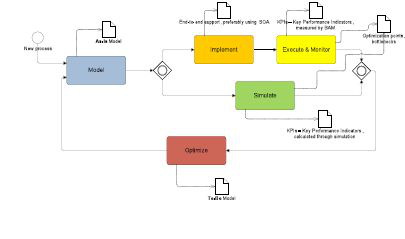
Figure 1: BPM process lifecycle


BPM: Modeling
Why do we Model Business Processes?
| Design new business processes | Focus on business goals, KPIs, customer needs, and business partner expectations. |
| Model existing business processes | Assure the right flow of activities.
Identify normal flows and possible exceptional flows. Identify inputs and outputs of activities. Identify key documents and sources. Identify business rules. |
| Restructure existing business processes | Focus on the activities and their added value. Focus on lines of business and their relations. Model responsibilities and roles. |
| Development of endto-end IT support for business processes | Detailed modeling of process flow. Detailed modeling of data, documents, business objects, and interfaces. Detailed exception handling. |
Who should take part in process modeling?
The team should include different profiles and encourage looking at the process from different angles. This is particularly important for optimizations. Four to six people is usually an optimal team size. The following table lists the various profiles that should comprise the team:
| Role | Responsibility |
| Line of Business Expert | Good, in-depth knowledge of the process. |
| Process Owner | Responsible for |
| Moderator | Responsible for the meeting, for asking questions for leading the discussion into the right direction. |
| Modeling Expert | Responsible for design the process model (during and after the meeting). |
| QA Owner | Responsible for the alignment of processes in aspect of total quality management. |
How do we model?
| Approach | Problems | |
| Top-down | We start with the process architecture. First we identify the major process activities and their flow. Then we model each activity into more detail. |
|
| Bottom-up | We start with the identification of activities. We model sub processes and business transactions and merge them into processes. |
|
| Inside-out | We start with core processes. We expand them with adding support processes around core processes. |
|

| As-Is model | We model the process as it is currently executed. Knowing the current as-is state is necessary for any future optimizations. We need to clarify whether we will model the process as it should be performed, or as it is performed in reality. Often there are significant differences between the two. When we model the as-is process we should not make on-the-fly modifications - not even those which seem obvious. We should however make notes of all possible modifications for the to-be process model. |
| To-Be model | We model the optimized model, where we should consider:
|
How to approach designing a process model:
We should model the process to understand the detailed structure of it. We should identify at least the following:
- Process activities, on various levels of details (depending on the selected approach)
- Roles responsible for carrying-out the process activities
- Events, which trigger the process execution and events that interrupt the process flow
- Input and output documents exchanged within the process
- Business rules that are part of the process
Below is the most conventional approach for designing a process model, in order of occurrence:
- Identify the roles
- Identify the activities
- Connect the activities with roles
- Define the order of activities
- Add events
- Add documents
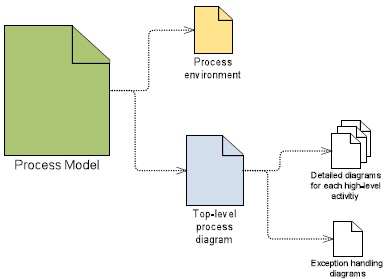
Figure 2: Process model for each individual process
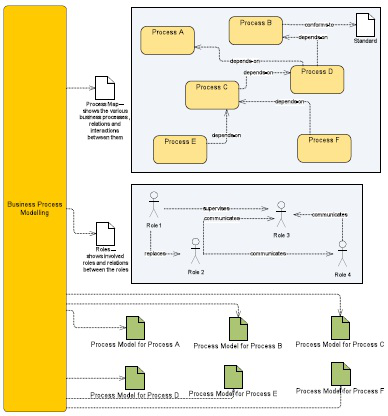
Figure 3: Results of Business Process Modeling
About BPMN
BPMN (Business Process Modeling Notation) is a graphical notation for business process modeling. The objective of BPMN is to support business process modeling for business and technical users. It provides a notation that is intuitive yet able to represent complex process semantics. BPMN is maintained by the Object Management Group.
Flow Objects
Flow objects are the main BPMN constructs that define the behavior of a business process. There are three categories of flow objects:
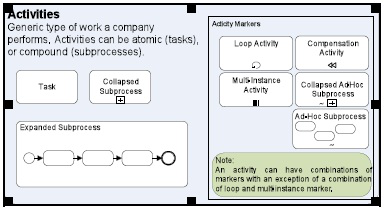
- Activities: they represent the work performed within a business process (see Figure 4).
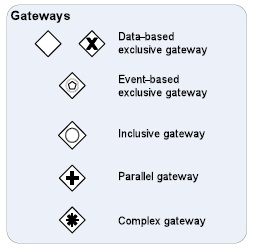
- Gateways: they represent how a sequence flow diverges or converges in a business process (see Figure 5).
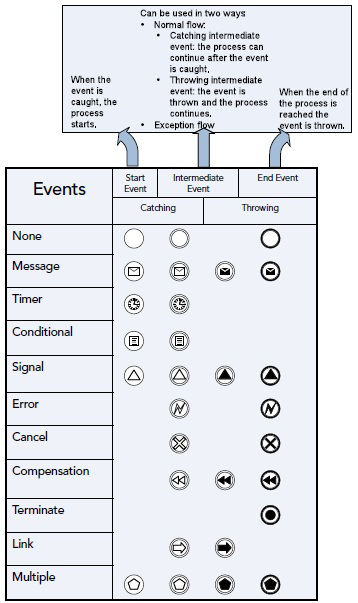
- Events: they depict that something happens in a business process (see Figure 6).
Figure 4: Activity types and markers
Figure 5: Types of gateways
Figure 6: Events, event triggers and results
Connecting Objects
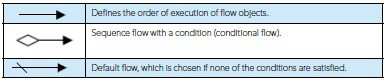
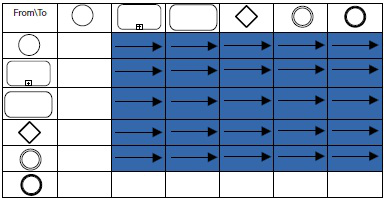
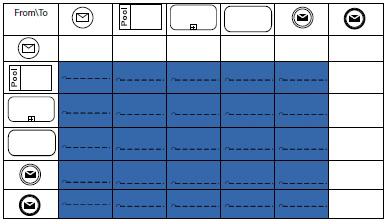
Connecting objects are used to connect flow objects to each other and to other information. There are three categories of connecting objects: Sequence flow ( see Figure 7), Message flow ( see Figure 9), Association ( see Figure 11).
| Defines the order of execution of flow objects. | |
| Sequence flow with a condition (conditional flow). | |
| Default flow, which is chosen if none of the conditions are satisfied. |
Figure 7: Sequence Flow
Figure 8: Construct that can be connected via sequence flow (blue shaded field represent a legal connection)
| Shows the flow of messages between two entities. |
Figure 9: Message Flow
Figure 10: Construct that can be connected via message flow (blue shaded field represent a legal connection)
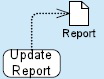
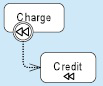
Figure 11: Association
Other constructs
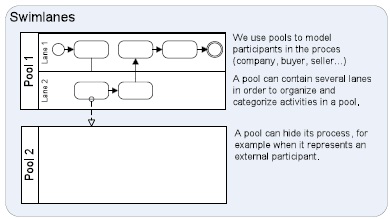
Figure 13: Swimlanes and pools
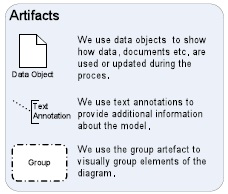
Figure 14: Artifacts
Exception Flow
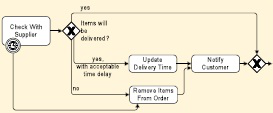
| In order to model an exception flow, we use intermediate events attached to the boundary of an activity. If such event is triggered during the activity execution, the flow is redirected through the intermediate event. |
|
| Example: The activity Check With Supplier of the example process has an intermediate timer event attached to its boundary. If the supplier does not provide a response within a certain timeframe, we remove the item from the order. |
![]() |
WorkFlow patterns with bpmn
| Sequence | |
| Workflow Pattern Description: An activity starts after completion of another activity. |
|
| BPMN: Activities are connected by a sequence flow directed towards the subsequent activity. |
|
| Example: After checking if the supplier can provide the necessary items in the Check With Supplier task, we notify the customer about their order in the Notify Customer task. |
|
| Parallel Split | ||
| Workflow Pattern Description: A path diverges into two or more parallel subsequent paths. The subsequent paths execute concurrently. | ||
BPMN: The pattern can be implemented in several ways:
|
||
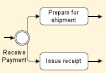
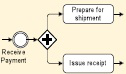
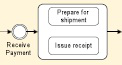
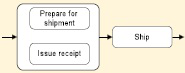
| Example 1: After receiving payment for the order we prepare the ordered items for shipment and issue the receipt concurrently. | ||
| Solution 1: Parallel split with outgoing sequence flows.
|
Solution 2: Parallel split using a parallel gateway
|
Solution 3: Parallel split using an expanded sub-process
|
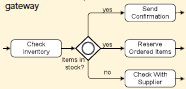
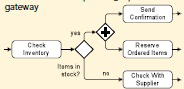
| Example 2: If the order items are in stock we send the confirmation of the order to the customer and reserve the ordered items in the inventory. These tasks are performed in parallel. Otherwise we check if the supplier can deliver the items |
||
Solution 1: Parallel split using an inclusive gateway
|
Solution 2: Parallel split using a parallel gateway
|
| Synchronization | |
| Workflow Pattern Description: Two or more paths converge into one subsequent path. The subsequent path is enabled when all the preceding paths complete (and-join). |
|
BPMN: The Pattern can be implemented in two ways:
|
|
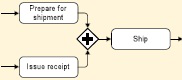
| Example 1: After preparing the ordered items for shipment and issuing the receipt, we ship the package to the customer. |
|
Solution 1: Synchronization using a parallel gateway.
|
Solution 2: Synchronization using an expanded sub-process.
|
| Exclusive Choice | |
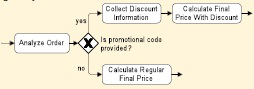
| Workflow Pattern Description: A path diverges into two or more subsequent paths. When the incoming path is enabled exactly one of the subsequent paths is selected and enabled. |
|
| BPMN: We use an exclusive gateway. | |
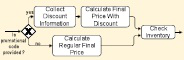
| After analyzing the order we check whether the customer has provided a promotional code. If a promotional code is provided we collect discount information and use it to calculate final price. Otherwise, we calculate final price for the order without discounts. |
Example 1: Exclusive choice with data-based exclusive gateway
|
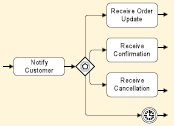
| After we notify the customer about the earliest possible delivery of the ordered items, the customer may change the ordered items, confirm the proposed date or cancel the order. If the customer does not respond in a certain timeframe an intermediate timer event is triggered. |
Example 2: Exclusive choice with event-based exclusive gateway
|
| Simple Merge | |
| Workflow Pattern Description: Two or more alternative paths converge into a single subsequent path. |
|
BPMN: The pattern can be implemented in two ways:
Note: The behavior is the same in both cases provided that the incoming sequence flows are alternative. |
|
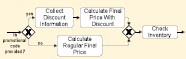
| Example: The two alternative paths used to calculate the final price of the ordered items are merged using the exclusive merge or by sequence flows leading to the “Check Inventory” task. | |
Solution 1: Simple merge with exclusive merge gateway
|
Solution 2: Simple merge with sequence flows to a flow object
|
Advanced Branching and synchronization pa tterns
| Multi-Choice | |
| Workflow Pattern Description: A path is diverged into two or more subsequent paths. One or more subsequent paths may be executed. |
|
BPMN: The pattern can be implemented in several ways:
|
|
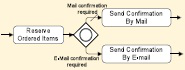
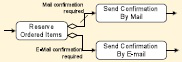
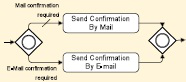
| Example 1: Based on requirements the customer specified in the order, we confirm the order via e-mail, by regular mail or both. Example solutions 1 nd 2 represent equivalent behavior. |
|
Solution 1: Multi-Choice with an inclusive gateway
|
Solution 2: Multi-Choice with conditional sequence flows
|
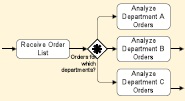
| Example 2: An order from the received order list may concern one or more departments. Depending on this, one, two or all three subsequent branches can be executed. |
![]() |
| Structured Synchronizing Merge (Synchronizing join) | |
| Workflow Pattern Description: Two or more paths converge into a single subsequent path. Several incoming paths may be enabled, in which case they are synchronized before the subsequent path is activated. In different process instances different number of incoming paths may be taken. | |
| BPMN: We use an inclusive gateway. | |
| Example: Based on requirements the customer specified in the order, we confirm the order via e-mail, by regular mail or both. If both activities are required to be executed, paths have to be synchronized before the process can continue. |
![]() |
| Multi-Merge (Multiple Merge) | |
| Workflow Pattern Description: Two or more paths converge into a single subsequent path. Each Incoming path activates the subsequent path. | |
| BPMN: We use sequential flow for every ending of a converging path directed towards the flow object of the beginning of the subsequent path. | |
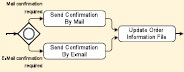
| Example: We confirm the order via e-mail, by regular mail or both. if either of the activities takes place, the order information file needs to be updated. |
![]() |
Iteration based patterns
| Arbitrary Cycles (Unstructured Loop) |
| Workflow Pattern Description: Loops that have more than one entry or exit points. |
| BPMN: Sequence flow connected to an upstream activity. |
![]() |
| Structured Loop | |
| Workflow Pattern Description: A task or a subprocess is repeated while or until some condition is true. | |
BPMN: We set the attributes of the activity as follows:
|
|
| Example: After receiving a list of orders the Process Order subprocess is performed for every order until the end of orders is reached in the list. |
![]() |
Multiple instance patterns
| Multiple Instances without Synchronization | |
| Workflow Pattern Description: Multiple instances of a task or a subprocess are created. They run concurrently and are not synchronized on completion. | |
| BPMN: We set the values of activity attributes as follows: |
|
| Example: For every order in the order list an instance of the Process Order subprocess is invoked. The subprocess instances are executed concurrently. Every instance generates a token that continues after the instance is completed. |
![]() |
| Multiple Instances with a Priori Design-Time Knowledge | |
| Workflow Pattern Description: Multiple instances of a task or a subprocess are created. The number of instances is known at design time. They run concurrently and are synchronized at completion before the process continues. | |
| BPMN: We set the attributes of the activity as follows:
|
|
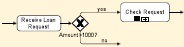
| Example: If a request for a loan exceeds 1000 USD the loan needs to be checked for approval by 3 eligible employees. |
![]() |
| Multiple Instances with a Priori Run-Time KnowledgeWorkflow Pattern Description: Multiple instances of a task or a subprocess are created. The number of instances depends on various run-time factors. Instances run concurrently and are synchronized at completion before the process continues. | |
| Workflow Pattern Description: Multiple instances of a task or a subprocess are created. The number of instances depends on various run-time factors. Instances run concurrently and are synchronized at completion before the process continues. | |
BPMN: We set the attributes of the activity as follows:
|
|
| Example: The process receives a list of all orders. The expression of the MI_Condition attribute depends on the number of orders in the list, which can be different for every process instance. For every order in the order list an instance of the Process Order subprocess is created. The subprocess instances are executed concurrently. After all the subprocess instances are completed, the process continues. |
![]() |
Termination Patterns
| Implicit Termination |
| Workflow Pattern Description: A process or a subprocess instance terminates when there is nothing else to be done and it is not deadlocked. The instance has completed successfully. |
BPMN: The pattern can be implemented in one of the following ways:
|
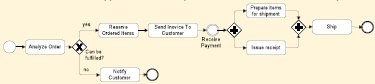
Example: In the example process there are two alternative paths that the process instance
can take. If the order cannot be fulfilled, the customer is notified. After this the end event is
reached and the process completes. If the order can be fulfilled several activities take place
and ordered items are shipped. After this the process reaches an end event and completes.
|
| Explicit Termination |
| Workflow Pattern Description: Aprocess or subprocess terminates and the remaining work is cancelled. |
| BPMN: We use a terminate end event. |
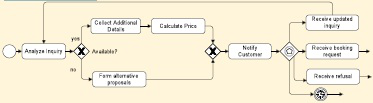
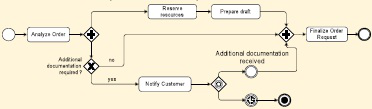
| Example: In the example, the process splits into two parallel paths after order analysis. If additional documentation is required, the customer is notified. Even though order preprocessing activities already take place, if the customer does not send the required documentation in time, the process terminates explicitly and all the remaining activities are cancelled.
|
Conclusion
BPM is essential for continuous improvement of business process efficiency and effectiveness with the overall goal to produce business results faster, cheaper, better. This Refcard has provided the overview of the BPM lifecycle, presented the BPMN notation and demonstrated the most important patterns.
Other References and Resources
M.B. Juric, R. Loganathan, P. Sarang, F. Jennings: SOA Approach to Integration, November 2007. OMG: Business Process Modeling Notation (BPMN), Version 1.2, January 2009.

M.B. Juric, P. Sarang, B. Mathew: Business Process Execution Language for Web Services 2nd Edition, January 2006. H. Gaur, M. Zirn, et al.: BPEL Cookbook: Best Practices for SOAbased integration and composite applications development, July 2006.
Wil van der Aalst, Arthur ter Hofstede, et al.: Workflow Patterns, http://www.workflowpatterns.com/.